
Training employees to use AI agents and tools
The most capable AI agent isn’t the one with the most tools. It’s the one trained to choose the right tool, use it safely and work towards a clear outcome. Tool access lets an agent do more than generate answers: it can draw on external systems and APIs to take action on complex tasks.
That changes what effective training needs to cover. Training agents on AI-powered tools means teaching people to define an agent’s purpose and boundaries, understand its role in a workflow and judge when its outputs need review. The technology matters, but so do the decisions around it.
This guide explains how tool use helps AI agents achieve complex goals and how to build and improve them iteratively. You’ll also learn how to assess employees’ current capabilities and choose frameworks and tools suited to the task, while keeping human oversight in view.
Key Takeaways
- Give an AI agent a clear goal, defined boundaries and suitable data so it can select tools and take useful actions.
- Build in stages: test the agent across realistic scenarios, compare results with expected outcomes and refine it using feedback.
- Assess employees through practical tasks as well as self-assessment to identify where training and human review will make the biggest difference.
- Choose frameworks and tools to fit the task, required integrations, oversight needs and the skills of the people who will use them.
- Explore how customer service agents can use conversational AI, agent assistance and omnichannel tools to support connected customer experiences.
How does tool use enable AI agents to achieve complex goals?
Tools let an AI agent move from producing an answer to taking steps towards a goal. For example, a customer service agent could interpret a delivery query, retrieve an order through an authorised API and draft a response. Training agents on AI-powered tools means preparing them to select appropriate actions, respect boundaries and recognise when a person should review the result.
Instructor-led training gives employees direct guidance and discussion with a trainer. Self-paced learning lets them work through material independently, while simulation-based training gives them practice in realistic scenarios, such as handling a delayed delivery. A programme can combine these approaches to build knowledge and practise applying it.
In the UK, the cost of AI tool training for customer service agents depends on the case and is provided after a quote request. Factors include the learning format, content, audience and practical exercises.
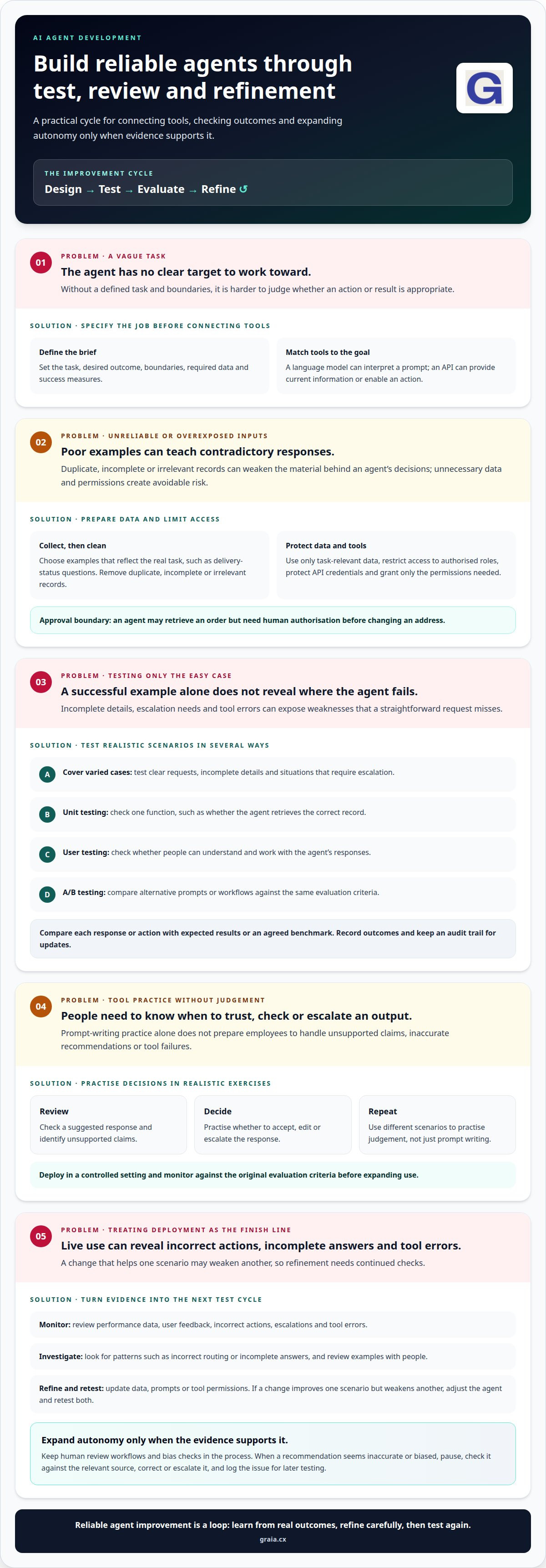
An agent’s capabilities depend on the data behind its decisions. Before deployment, teams should define the task, desired outcome, boundaries, required data and success measures. They can then gather relevant structured data, such as order fields, alongside unstructured material, such as support messages or historical records.
Prepare that material before using it:
- Collect: select examples that reflect the agent’s real task, such as questions about delivery status.
- Clean: remove duplicate, incomplete or irrelevant records so examples don’t teach contradictory responses.
Privacy and access controls matter at every step. Limit datasets to information needed for the task, restrict access to authorised roles and avoid exposing sensitive details in prompts or logs. Secure API use means granting an agent only the permissions it needs, protecting credentials and defining which actions require approval. For example, an agent may retrieve an order but need human authorisation before changing an address.
Next, connect the agent to tools that match its operational goal. A language model such as GPT-4, Claude or Llama can interpret a prompt, while an API supplies current information or enables an action. JBI Training describes frameworks such as LangChain, Semantic Kernel or MCP as orchestration tools for AI agents. The agent should return a clear answer when a tool fails, rather than treating missing data as success.
Deployment is the start of improvement, not the end. Test outputs against expected results, then monitor performance data and user feedback. Track patterns such as incorrect routing or incomplete answers, review examples with people, and update the data, prompts or tool permissions. This cycle turns practical evidence into stronger agent skills and more dependable decisions.
What are the key steps in the iterative process of building an AI agent?
Build an agent through repeated cycles of design, testing, evaluation and refinement. Each cycle should check whether its actions meet the intended outcome and respect defined boundaries.
Performance Testing and Refinement
Test the agent against realistic scenarios before expanding its role. For a customer service task, include clear requests, incomplete details and cases that require escalation. Compare each response or action with expected results or an agreed benchmark, then use failures to guide changes.
Use several testing methods because each reveals different weaknesses:
- Unit testing checks a specific function, such as whether the agent retrieves the correct record.
- User testing shows whether people can understand and work with its responses.
- A/B testing compares alternative prompts or workflows against the same evaluation criteria.
Record test outcomes and retain an audit trail for every update. Human review workflows and bias checks help identify harmful patterns before changes reach live use.
Effective AI Tool Training
Organisations train agents effectively by connecting tool practice to real tasks, clear outcomes and defined boundaries. Employees should learn what the agent can do, which sources to trust, when to review its answer and how to respond when a tool fails.
Design training around short, practical exercises. For example, ask employees to review a suggested response, identify unsupported claims and decide whether to accept, edit or escalate it. Repeat the exercise with different scenarios so people practise judgement, not just prompt writing.
Next, deploy in a controlled setting and monitor performance against the original evaluation criteria. Review user feedback, incorrect actions, escalations and tool errors. If a change improves one scenario but weakens another, adjust the agent and retest both before expanding its use. Increase autonomous operation only when the evidence supports it.
Governance must cover permissions as well as output quality. Restrict each tool to the actions needed for its task, protect API credentials and keep records of important changes. For example, an agent might draft a customer reply but require a person to approve a sensitive account change.
When a human agent spots an inaccurate or biased recommendation, they should pause, check it against the relevant source, then correct or escalate it. Log the issue so the team can include it in later testing and refinement.
For further ideas on applying evaluation to customer interactions, explore AI and customer experience insights.
Assessing employees’ current AI capabilities
Start with evidence of what employees can do, not confidence alone. A reported 35% of employees have received some AI training, while 68% of people overestimate their AI skills during self-assessment. These figures make practical evaluation essential: employees need opportunities to demonstrate how they use AI in real workflows.
Generative AI and automation call for a mix of judgement, communication and tool-handling skills. Agents should write clear prompts, assess whether an answer is relevant, protect sensitive information and know when human review is needed. They also need to use automated systems effectively, follow workflow steps and explain decisions to customers or colleagues.
Use a role-based assessment rather than one technical test for every employee. A service agent, for example, could practise summarising a customer request, reviewing an AI-generated reply and identifying an unsupported claim. A team leader might instead assess whether they can interpret performance insights and coach colleagues through a changed process.
- Prompting: Ask employees to improve a vague request into a specific prompt, then assess whether the result meets the task.
- Verification: Provide an AI answer containing an error and ask the employee to find it using an approved source.
- Workflow judgement: Present a routine enquiry and a sensitive complaint, then ask which requires human handling.
- Responsible use: Ask employees to identify information that should not be entered into a tool.
Score each exercise against observable criteria, such as accuracy, appropriate escalation and the ability to explain a decision. Keep criteria consistent for employees doing similar work, while adapting examples to their duties. This separates technical familiarity from sound judgement and highlights specific learning needs.
Use the results to shape a training programme by skill level. An employee who writes effective prompts but misses factual errors needs practice verifying information, not another introduction to prompting. Someone unsure how AI fits into daily workflows may need guided exercises using familiar tasks and clear review points.
Reassess after training with comparable examples, then review employee feedback and work outcomes. If a team handles customer summaries well but struggles with escalation decisions, focus the next learning session on those scenarios. This gives a practical view of capability: what employees can handle independently, where they need support and which skills need further development.
To keep this view current, account for how quickly skills and tools change: AI capabilities advance every 3-6 months, so reassessment should follow meaningful shifts in work. The page reports that trained employees show 2.7x higher proficiency than self-taught workers, and companies with AI training programmes see a 14% increase in revenue per employee. These outcomes support linking measured gaps to targeted practice rather than treating assessment as a one-off exercise.
For voice evaluations, pair results with human review for high-stakes assessments because accuracy varies by accent and environment.
Choosing agent frameworks and tools
Choose software to fit the task, not because a particular framework seems appealing. An agent that answers routine questions has different needs from one that coordinates actions across several systems. First define its goal, users, data, boundaries and deployment environment, then assess which components meet those requirements.
Many agents combine a large language model with memory, tool access and an orchestration framework. Models such as GPT-4, Claude and Llama can interpret instructions, while tools let an agent retrieve information or act through an API. JBI Training describes LangChain, Semantic Kernel and MCP as orchestration frameworks used in AI-agent setups.
These components serve different purposes. The model interprets the request, the framework manages the sequence of actions, and connected software supplies information or performs tasks. For example, a service agent might classify a query, retrieve an account detail and prepare a response. Map each step before choosing technology so the selected stack supports the whole workflow, not just one capability.
Assess each option against practical criteria:
- Task fit: Can it handle the required prompts, tools and decision steps?
- Integration: Can it connect with the systems and APIs the workflow relies on?
- Control: Can teams set tool permissions, review points and failure handling?
- Maintainability: Can the people responsible understand, test and update its configuration?
- Deployment: Does it suit the organisation’s technical environment and operational needs?
A small proof of concept can reveal integration gaps before wider deployment. Test one defined workflow, such as answering a common enquiry using an approved knowledge source. Check whether the agent selects the right tool, handles missing information and returns a useful answer. Compare results with the task’s success criteria, then refine the model, framework or process as needed.
Low-code and no-code platforms can help teams develop simple agents in a few days, especially when tasks use existing connectors and standard workflows. More complex requirements, such as custom integrations or multiple coordinated actions, need careful design and testing. Building quickly should not replace evaluation of security, access controls and human oversight.
Research should focus on the work the agent must perform, not just feature lists. For each framework, test integration, error handling and ease of change with a representative scenario. A tool that supports a quick demonstration may still create friction in everyday use or during later updates.
Finally, consider employee skills alongside technical fit. A framework teams can understand and maintain may support stronger productivity than a more complex option they cannot confidently operate. Choose the smallest workable combination, document how its parts interact and expand only when testing shows a clear need.
Which AI-powered tools are commonly used by customer service agents?
Customer service teams use AI at several points in an interaction. A conversational agent can respond to routine enquiries, while agent-assist software supports a human during live conversations. Other tools organise messages across channels, analyse conversation content or help agents work across languages. The right combination depends on the service task and the systems employees already use.
Conversational agents handle defined customer requests through chat or voice. For example, a customer might ask about an order, and the agent can interpret the request and provide relevant information. Teams should set clear boundaries: a straightforward status query may be suitable for automation, while a complaint involving several issues may need a person.
Agent-assist tools support employees without replacing their judgement. During a conversation, they can surface relevant knowledge, suggest a response or help an agent follow the right process. The employee remains responsible for considering the context, correcting unsuitable suggestions and deciding what to communicate.
Omnichannel tools bring customer conversations from channels such as voice, chat, email and social messaging into a connected service workflow. This helps teams manage requests across channels without treating each interaction as an isolated task. For example, an employee handling a follow-up can use the available conversation context to understand the customer’s next question.
Other tool categories support specific parts of the service journey:
- Intent and emotion analysis helps identify what a customer is asking and the tone of their message.
- Conversation transcription and summarisation turns spoken exchanges into text or concise notes for follow-up.
- Knowledge search helps agents locate relevant guidance while preparing an answer.
- Translation tools can support communication when customers and employees use different languages.
These tools work best when their role is clear. A transcript can help an agent review a call, but it should not replace listening when tone or context matters. A generated summary can speed up handovers, but the employee should correct missing details before relying on it. Training should use realistic customer examples, including ambiguous requests and situations that require escalation.
Choose tools by mapping the customer journey first. Identify where customers contact the team, which tasks repeat and where employees need support. Then assess how each tool fits existing workflows, what information it uses and how people review its outputs. A small, well-defined use case makes it easier to judge whether a tool improves the interaction.
Explore practical customer service AI insights to see how these tool categories can support connected customer experiences.
GraiaCX
GraiaCX helps customer service teams put AI into practice through tools designed for customer interactions and employee support. Its Conversational Agent can handle routine enquiries, while Agent Assist provides real-time suggestions to support human agents. The Agentic Omni-Channel Platform brings voice, chat, email and social messaging together with AI-driven automation. Live Call Translation supports multilingual conversations in over 100 languages.
These capabilities are relevant when your training plans need to connect with real contact-centre workflows, from supporting staff during conversations to automating routine requests. Contact GraiaCX to discuss how its offerings could fit your customer service needs.
Turn AI learning into a stronger customer experience
The next step is to connect training agents on AI-powered tools with the customer experience your organisation wants to deliver. Define what useful support should feel like for customers and employees, then consider how AI can help within your service workflows. Technology matters most when it helps people respond with greater clarity, consistency and care.
GraiaCX offers a Conversational Agent, Agent Assist and Live Call Translation to support customer interactions and the people handling them. These capabilities help teams explore how AI fits into their service environment while keeping human judgement central to the experience.
Contact GraiaCX to discuss your customer service goals and consider a practical next step for your organisation. A thoughtful approach can turn AI capability into a more connected experience for customers and teams alike.
Frequently Asked Questions
So how do you choose the appropriate model?
Choose a model by testing it against the work it must perform, not by comparing reputations alone. Create representative tasks, including ambiguous requests and cases that require escalation, then assess answer quality, consistency and reliability in tool use. Consider how well it fits existing software, data controls and operational needs. A model that performs well on everyday requests but fails on critical exceptions may not suit that workflow.
What does training agents on AI-powered tools involve?
Combine practical instruction with clear operating procedures. For example, an agent handling booking enquiries can practise reviewing a suggested reply, confirming that it reflects the customer’s request and following the approved process before making a change. Training should also explain how to report an error and where to find help. The aim is confident, responsible use, not simply familiarity with buttons or prompts.
How can businesses measure the impact of AI tool training on agent performance?
Compare performance before and after training using the same types of customer interactions. Track quality-review results, resolution outcomes, escalations and customer feedback alongside handling time. For example, if employees respond faster but quality reviews find more incorrect answers, the programme needs adjustment. Segment results by task or team to see where training changes behaviour, then use those findings to guide coaching and further practice.
What risks and data protection rules apply when UK agents use AI-powered tools?
Key risks include exposing customer details, relying on inaccurate output and allowing tools to act beyond their intended purpose. UK organisations should align AI use with applicable data protection obligations and internal policies. In practice, agents should use approved systems, avoid entering unnecessary identifying details and check whether an output is suitable before sharing it. Clear access limits and escalation routes help manage sensitive or uncertain cases.
How can organisations roll out AI tool training and support agents after launch?
Introduce the tools through role-specific practice before making them part of everyday workflows. Give agents concise guidance for common tasks, a way to report problems and access to support from trained team leads. After launch, review recurring questions and errors, then update examples and coaching materials. For instance, if agents struggle with a new summarisation feature, a focused practice session can address the issue directly.