
How to Use Conversational AI for Appointment Scheduling
A booking should move the conversation forward, not leave a customer waiting for a reply. With conversational AI appointment scheduling, an AI agent understands what the person needs, checks available times in a connected scheduling system, offers suitable options and confirms the chosen appointment. It can also answer routine questions using business-specific information and follow defined availability rules.
Customers should be able to book simply and personally, even when the team is handling other demands. This guide explains how conversational booking works, how availability checks and calendar connections fit together, and how it differs from online forms, text chatbots and human agents. You’ll also learn what information and booking rules to prepare, and when a conversation needs human attention.
Key Takeaways
- Map the booking journey from the customer’s first request to a confirmed appointment, including the details the system needs to collect.
- Connect scheduling tools so the AI can check availability, offer suitable times and keep appointment changes in sync.
- Present a small set of relevant appointment options, guided by the customer’s preferences and your booking rules.
- Decide which routine conversations AI can handle and when a human agent should step in for more personal support.
- Compare voice-based AI, text chatbots and human agents to choose the right approach for each part of the booking experience.
What is Appointment Booking in Conversation AI?
Conversational booking lets customers describe what they need and guides them towards a suitable appointment. Build the workflow around clear booking rules, accurate business information and a reliable hand-off for requests that need human help.
-
Assess traditional booking limitations
Map where phone and in-person booking creates friction. Callers may wait while staff finish another conversation, call outside opening hours or repeat details when transferred. At reception, appointment requests compete with customers who need immediate help. Record these missed or delayed booking moments, then identify which routine requests follow a repeatable workflow.
Compare those steps with a traditional online booking form. A form can show open slots, but customers must understand the options and enter their details themselves. Conversational AI can interpret a request such as “I need an afternoon appointment” and guide the person through the next step. Automate routine bookings, not complex requests that need judgement or personal attention.
-
Support booking outside business hours
Decide which appointment types the system can book without staff involvement. Voice AI can be configured to answer calls 24/7 and offer appointments outside business hours, using predefined availability. For example, a caller with a roof-repair enquiry at 10:30 p.m. can describe the issue and request a visit instead of waiting to call the next day.
Set clear rules for confirmation, follow-up and transfer to staff. Keep opening hours, service details and booking rules accurate so the AI doesn’t offer a time the business can’t honour. Use a human hand-off when a request falls outside those rules or needs individual attention.
-
Check channel and calendar support
Choose channels customers already use, such as voice, chat, SMS and social media. Which booking channels and calendar systems does a conversational AI scheduler support? Connections vary by platform, so list the required touchpoints and connect the scheduling system that holds current appointment availability.
For UK GDPR and PECR, design the booking workflow to explain how customer data is used, collect only the details needed for the booking, and distinguish service updates from marketing messages. Reduce privacy and security risks by limiting access to booking data, protecting it in connected systems and setting clear retention practices. These controls matter when conversations include contact details or appointment information.
Before launch, test a booking on each selected channel, from the first message through calendar confirmation. Check that changes appear in the right place, customers receive clear confirmation and staff can see the appointment. This end-to-end test can reveal gaps between the conversation and scheduling workflow.
Calendar and scheduling system integration
Connect the scheduling platform to the calendars and customer records that govern each booking. Then test how an appointment moves from a customer message to a confirmed calendar entry.
-
Connect calendars and CRM systems
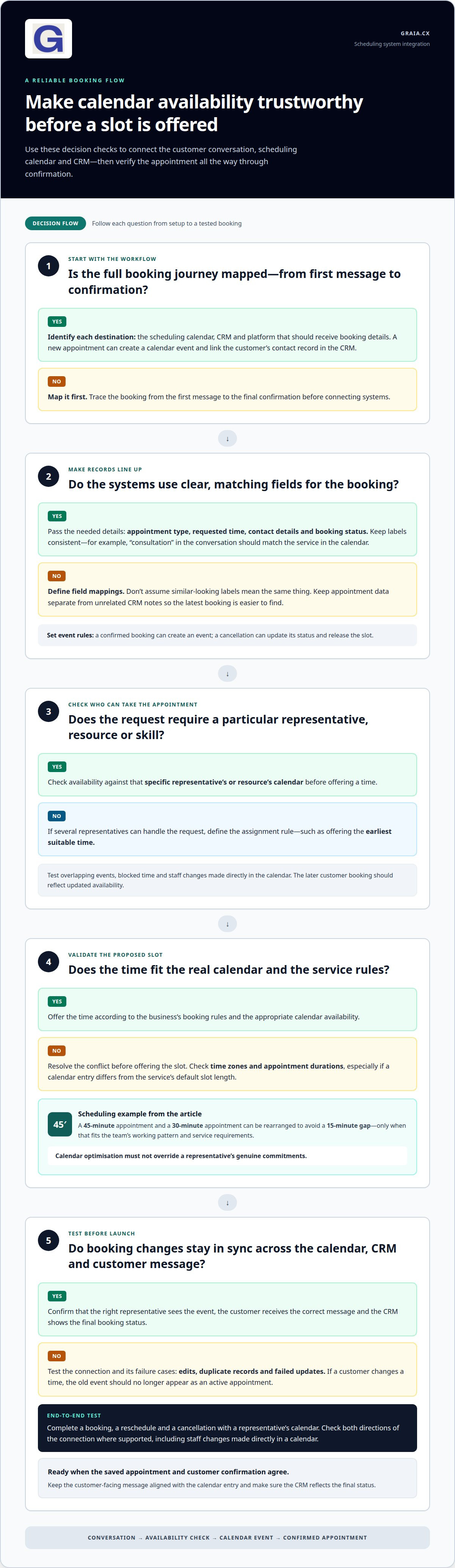
Start by mapping the booking workflow from the first message to the final confirmation. Identify the scheduling calendar, customer relationship management (CRM) system and platform that should receive each detail. For example, a new appointment might create a calendar event and link the customer’s contact record in the CRM.
Define which fields need to pass between systems, such as appointment type, requested time, contact details and booking status. Use consistent labels so “consultation” in the conversation matches the right service in the calendar. Set triggers for key events: a confirmed booking can create an event, while a cancellation can update its status and release the slot.
Check how the integration handles edits, duplicate records and failed updates. If a customer changes a time, the old event should no longer appear as an active appointment. Test both directions of the connection, where supported, because staff may update a calendar directly. Keep the customer-facing confirmation aligned with the saved appointment.
Keep appointment data separate from unrelated CRM notes. This makes the workflow easier to review and helps agents find the latest booking. Use clear field mappings rather than assuming similar-looking labels mean the same thing.
-
Check representative calendars
Choose how the system checks each representative’s calendar before offering a slot. If an appointment requires a particular person, resource or skill, connect availability to that specific calendar. If several representatives can handle the request, define whether the system offers the earliest suitable time or assigns the booking using another rule.
Test overlapping events, blocked time and changes made by staff. For example, if a representative adds a meeting directly to their calendar, a later customer booking should reflect that updated availability. Check time zones and appointment durations too, especially when a calendar entry differs from the service’s default slot length.
Review how the platform handles gaps between appointments. One scheduling example rearranges a 45-minute appointment and a 30-minute appointment to avoid a 15-minute gap. Apply this kind of rule only when it fits the team’s working pattern and service requirements. Don’t let automated optimisation override a representative’s genuine calendar commitments.
Before launch, test a complete booking, reschedule and cancellation with a representative’s calendar. Confirm that the right agent sees the event, the customer receives the correct message, and the CRM record reflects the final status. Use contact-centre automation insights to consider how scheduling connects with other customer workflows.
Which Industries Can Benefit From Conversational AI Scheduling?
Prioritise services where missed appointments, changing plans or repeat bookings disrupt daily operations. Healthcare, home services and professional appointments can each use defined actions to manage changes consistently.
- Set rescheduling rules for each service. List the details needed before changing an appointment: the customer’s identity, original slot, service type and preferred replacement time. A dental practice, for example, may need to keep the same clinician or appointment length. A property maintenance team may need to record the issue alongside the new visit time. Make permitted options clear and route exceptions to staff.
When a customer asks to move a booking, the system should find the original event, release its slot and offer replacement availability. Confirm the new time before treating the change as complete. This prevents “I need to move Thursday” from being mistaken for a confirmed reschedule.
- Make cancellation handling an explicit workflow. Decide what happens after a customer cancels: update the calendar, change the booking status and make the released time available where appropriate. For a consultation, the system can ask whether the customer wants another appointment. If so, continue with rescheduling; if not, close the booking clearly.
Give customers a direct way to respond to a confirmation or reminder. For instance, “I can’t make it” can trigger a rescheduling conversation instead of leaving the appointment unchanged. Staff should be able to see whether the customer cancelled, requested a new time or hasn’t completed the change.
- Build no-show follow-up around the service. Set a reminder sequence that gives customers a clear chance to respond before their appointment. If someone misses a visit, send a follow-up with a direct route to rebook. For an unfinished booking, schedule separate nudges after 24 hours and 72 hours. These distinct triggers help prevent a no-show from being treated like an incomplete booking.
Tailor the next action to the service. A healthcare appointment may need staff review if the customer mentions a new concern, while a missed home-maintenance visit may require reconfirming access arrangements. Record each response and resulting action so staff can distinguish a confirmed reschedule from a message awaiting follow-up.
- Match automation to the industry’s operational needs. Healthcare teams can apply appointment-specific reminders and rescheduling steps. Home service businesses can capture a changed visit time alongside the work required. Professional services can manage consultation changes without losing the original enquiry context. In each case, test the full sequence: customer request, calendar change, confirmation and staff visibility.
Availability checks and curated appointment options
Use connected scheduling data to match each request with open, suitable appointment times. Then make the choice clear, confirm the booking and provide a route to human support.
-
Check real-time calendar availability
Connect the conversation workflow to the scheduling system that holds current availability. When a customer asks for a time, check the relevant calendar before suggesting a slot. This helps avoid offering an appointment already taken by another customer or blocked for staff commitments.
Match the availability check to the service and the customer’s needs. A request for a particular appointment type should return times that fit its duration and any staff or resource requirements. If the customer says “not too early”, account for that preference before presenting options rather than automatically returning the first open slot.
Refresh availability after the customer chooses a time, and confirm the booking only after the calendar accepts it. If someone else takes that slot during the conversation, explain the change and offer alternatives. This final check keeps the confirmation aligned with the saved appointment.
Test the integration with a newly booked slot and a time changed directly in the calendar. Confirm that the conversation reflects both updates. Also test what happens when the scheduling system can’t return availability, so the customer gets a clear next step instead of an invented time.
-
Curate appointment options
Offer no more than two or three available appointment slots at once. A focused choice is easier to compare than a long list. Select times that respect the customer’s preferences, service requirements and actual calendar availability. For example, a request for an afternoon appointment should prioritise suitable afternoon openings.
Use known preferences to order the options, not to make assumptions about the customer. A patient who regularly requests dental appointments after 4 p.m. on Mondays or Tuesdays could see matching openings first. Let them choose another time if those slots don’t work.
When the customer selects an option, repeat the date, time and appointment type. Ask them to confirm before completing the booking, then send a clear confirmation. Keep reminders consistent with the final calendar entry, particularly if the customer later changes the appointment.
Define a live-transfer trigger for requests that need personal attention, such as help beyond the available options. Where staff are available, transfer the conversation with its booking context so the customer doesn’t need to repeat their preferred times. If no agent can take over, explain the next step and preserve the request for follow-up.
Comparison with human agents and text-based chatbots
Choose the channel and level of support that fit each booking interaction. Compare what voice AI, text chatbots and human agents can handle, then design clear hand-offs.
- Assign routine appointment booking to automation. A text chatbot can guide customers through typed questions about service type, preferred day and contact details. It suits people who want to book without calling. Voice AI supports a spoken interaction, letting callers describe their needs naturally and answer follow-up questions aloud.
For example, a patient might type “move my eye test to next week” or make the same request on a call. Both channels need to identify the existing appointment and guide the person to an available alternative. Keep prompts direct, and don’t ask customers to repeat details they’ve already provided.
- Use voice AI for inbound and outbound calls. Inbound voice AI can respond to callers seeking a new appointment, cancellation or change. It can collect the information the booking workflow requires and guide routine requests towards completion. If a request falls outside those rules, transfer the conversation to a human agent with the context collected so far.
Outbound calls can support appointment follow-up, such as reminding a customer about an upcoming visit or inviting them to complete an unfinished booking. Keep the message relevant to the original interaction and give the customer a clear way to respond. Don’t imply that a booking has changed unless the calendar reflects the change.
- Keep human agents focused on complex conversations. A person can interpret nuance, respond to sensitive concerns and make decisions that depend on context. AI suits repeatable steps, such as gathering a requested date and recording a booking. The strongest workflow combines both: automation handles the standard path, while agents take over exceptions and personal requests.
For instance, a caller may need an appointment and also raise a concern that requires discussion. Don’t force the patient through repeated automated prompts. Set a transfer trigger, pass along their stated need and let the agent continue without restarting the booking conversation.
- Coordinate specialist agents around one customer journey. A multi-agent workflow can separate tasks such as understanding intent, checking booking details and preparing a hand-off. Define which agent owns each action, what information it passes forward and how completion is recorded. Without clear boundaries, customers might receive conflicting answers or repeat the same request.
Test a complete example: a customer asks to reschedule, the system identifies the appointment, then routes an unusual request to a human. Compare that flow with a text chatbot and a voice interaction. Explore contact-centre AI approaches to shape a booking experience that uses automation and human judgement together.
GraiaCX: Conversational Agent
GraiaCX’s Conversational Agent helps contact centres automate routine appointment conversations across voice and digital channels. Use it when customers need a clear way to discuss bookings and agents need more capacity for conversations requiring personal judgement. The Agentic Omni-Channel Platform brings voice, chat, email and social messaging together to help teams create a consistent experience across customer touchpoints.
For appointment workflows, define the booking rules, availability information and hand-off points the AI should follow. When a conversation needs human attention, Agent Assist can provide agents with real-time next-best-action suggestions. Live Call Translation supports multilingual calls in over 100 languages, helping teams serve customers across language needs without relying on bilingual staff.
To discuss how these capabilities could support your contact centre, contact GraiaCX.
Make the Next Booking Journey Easier
Choose one appointment journey and design it around the customer’s needs. A well-designed conversational AI appointment scheduling workflow makes the next action clear, preserves context when someone needs support and gives your team visibility into what happened. Start with a repeatable booking task, then refine the experience using customer questions and agent feedback.
This practical approach helps contact centres introduce automation without losing the human connection that builds trust. GraiaCX’s Conversational Agent, Agent Assist and Live Call Translation support different parts of that experience, from customer conversations to agent support.
Explore how to discuss scheduling with GraiaCX and take the next step towards a booking experience that works better for customers and your team.
Frequently Asked Questions
Building conversational AI?
Building conversational AI starts with defining what customers should be able to accomplish, not simply drafting replies. List common intents, such as booking, changing an appointment or asking about preparation. Connect trusted information and the systems needed to complete those actions. Add clear fallback routes, then test varied phrasings, incomplete details and misunderstood requests before expanding access. Review real conversations regularly to find where the experience needs refinement.
What Is AI scheduling?
AI scheduling uses software to organise appointments around availability and business rules. It can match a requested service with a suitable time, resource or staff member, then record the result in a scheduling system. A customer-facing scheduler may use a form, chat or voice conversation. Behind the scenes, automated scheduling can also help staff coordinate diaries and manage appointment changes.
What is conversational AI appointment scheduling and how does it work?
Conversational AI appointment scheduling lets people describe a booking need in everyday language and receive guided support. The system interprets the request, asks for missing details, checks relevant scheduling information and moves the booking forward. For example, a customer might request a follow-up with the same specialist. The workflow can capture that preference and apply the business’s rules before offering an appropriate next step.
How can businesses set up conversational AI appointment scheduling step by step?
Start by documenting the services, appointment durations, eligibility rules and information required for each booking type. Choose the system that owns availability, then map how customer details and booking outcomes should pass between tools. Build and test one focused journey before adding others. Include examples of ambiguous requests, duplicate enquiries and unavailable services. Review test outcomes with staff who regularly handle those appointments.
How do AI appointment schedulers handle cancellations, rescheduling, reminders and no-shows?
Use a configured workflow for each event. A cancellation can update the appointment record; a rescheduling request can start a search for another suitable time. Reminders can prompt customers to prepare or respond. Record a missed appointment using the business’s defined process, keeping follow-up steps distinct from cancellation handling. Clear status labels help staff see whether a booking remains active, has changed or is unresolved.
How accurate are conversational AI schedulers, and when should bookings be handed to a person?
Accuracy depends on clear service information, reliable calendar data and the system’s ability to interpret a customer’s request. Test different ways people describe the same need, including corrections and incomplete answers. Have the system repeat key booking details before finalising them. Hand the interaction to a person if the request falls outside defined rules, details conflict or the customer asks for human help.
Which UK industries benefit most from conversational AI appointment scheduling?
UK organisations with repeatable, appointment-led services can benefit, including veterinary practices, dental services, trades and professional consultations. A veterinary practice might distinguish routine appointments from requests that need staff attention. A trades business could capture the job type alongside a visit request. The best fit is a service with clear booking criteria and a reliable source of availability, where customers value an easy way to arrange or change a visit.
How do conversational AI scheduling tools compare on features, integrations and ease of use?
Compare supported channels, calendar and CRM connections, availability checks, and how well bookings, changes and cancellations stay in sync. Check whether the tool supports human hand-offs, and test a complete booking workflow before launch.