
How to drive agent adoption of new CX tools with a defined business problem
A powerful CX tool won’t earn agent adoption on its own. Driving agent adoption of new CX tools starts with a clear business problem: identify work that is slow, inconsistent or difficult, then choose a focused use case and involve agents in shaping the solution. Set a defined outcome and give the team a practical way to review results and handle exceptions.
It’s reasonable to expect new technology to make service faster and easier. But if a tool adds steps, surfaces irrelevant information or feels disconnected from customer needs, agents have little reason to embrace it. Adoption depends on making the benefit tangible in day-to-day work, not simply introducing another system.
This guide explains how to connect AI adoption to business needs, address digital adoption challenges and help agents use new CX tools with confidence. You’ll learn how to choose a manageable first workflow, involve the people closest to customer interactions, measure meaningful outcomes and build in human oversight. The aim is practical: make the technology useful to agents and valuable to the customer experience.
Key Takeaways
- Choose a focused CX workflow with a clear business outcome, checkable results and a safe way to handle mistakes.
- Make new tools easier to adopt by aligning them with agents’ daily tasks and giving them relevant, usable information.
- Assess where agents lose time or face inconsistent processes before deciding which technology to introduce.
- Measure adoption through the quality of the customer outcome as well as the time and effort needed to complete the work.
- Explore how an agentic omni-channel platform can bring AI assistance and customer interactions together across channels.
Best practices for implementing AI in CX initiatives
Start with one customer-facing workflow and a defined outcome. Involve agents in testing, measurement and refinement before expanding the change.
-
Train Agents to Use New CX Tools
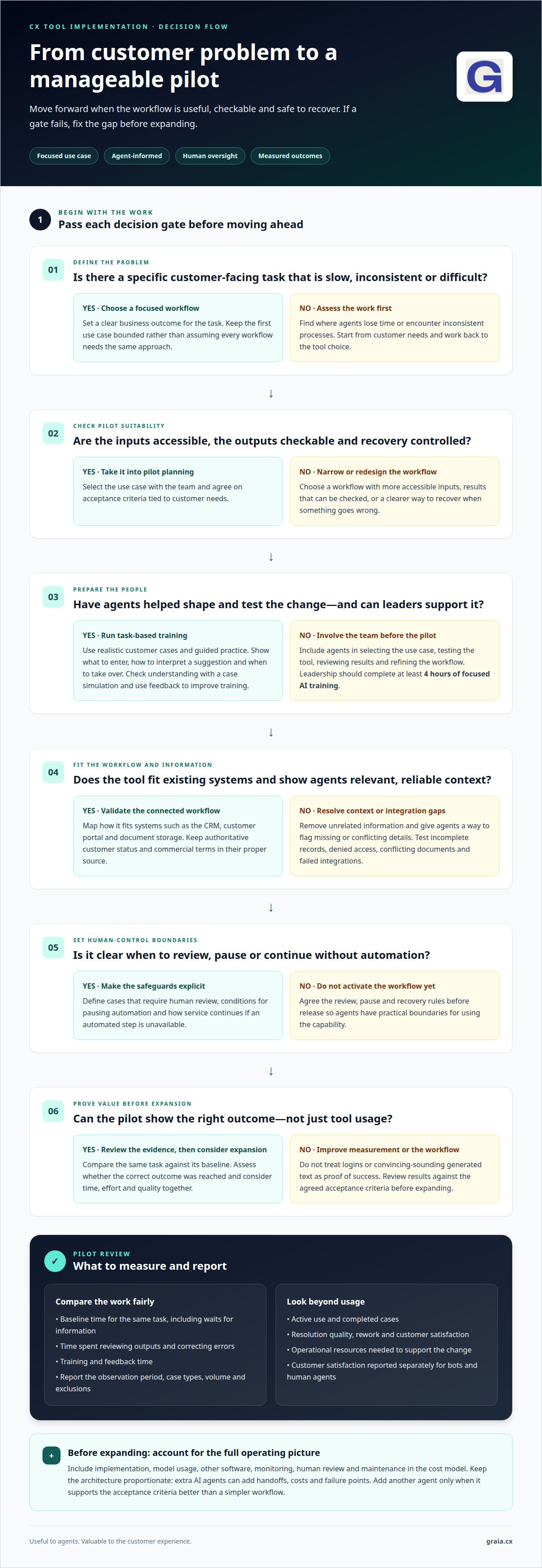
Train agents on the specific task the AI changes, using realistic customer cases and guided practice. Show what information to enter, how to interpret a suggestion and when to take over. Leadership should also complete at least four hours of focused AI training, so managers can model confident use. Check understanding through a case simulation, not attendance alone, and capture agent feedback to improve the training.
-
Track Adoption Metrics for CX Tools
Measure tool use alongside the outcome it is meant to improve. For a pilot handling customer queries, record the baseline time for the same task, including waits for information, output review and error correction. Track training and feedback time too. Assess whether the workflow reached the correct outcome, rather than judging only whether an AI-generated response sounds convincing. Report the observation period, case types, volume and exclusions.
-
Integrate Tools With Contact Centre Workflows
Map how the new tool fits existing contact centre systems, such as the CRM, customer portal and document storage. Keep authoritative customer status and commercial terms in their proper source; an AI component shouldn’t become a second source of truth. Show agents information relevant to each case, not unrelated data. Before release, test incomplete records, denied access, conflicting documents and failed integrations.
-
Roll Out Tools Through Pilots and Phases
Begin with a workflow that has accessible inputs, checkable outputs and a controlled recovery route. Involve the team in selecting the use case, then pilot it against customer needs and agreed acceptance criteria. Before launch, define when human review is required, when to pause automation and how work continues if the automated step is unavailable. Expand only after reviewing the pilot results.
- Build a complete operating picture for the pilot before expanding. Include implementation, model usage, other software, monitoring, human review and maintenance in the cost model. Keep the architecture proportionate: multiple AI agents can add handoffs, costs and failure points. Add another agent only when it supports the acceptance criteria better than a simpler workflow. These checks help turn a promising test into a manageable CX process.
CX teams can start with small, incremental AI implementations, asking the whole team to help identify an initial use case. Set the direction from customer needs and work backwards into the organisation, so choices about tools and internal processes stay anchored to the experience customers need. Treat the first use case as a bounded start, not a reason to assume every workflow should follow the same approach.
Keep the information shown to service agents relevant and useful to their cases; adding unrelated material can overwhelm rather than help. Evaluate the workflow by whether it produces the correct result, not merely by whether its generated text seems convincing. Leadership should receive at least 4 hours of focused AI training. Before activation, make explicit which cases require human review, what conditions call for pausing the workflow and how service will continue if its automated step is unavailable. These decisions give the team practical boundaries for using the new capability while keeping customer needs central.
Digital adoption challenges
Adoption stalls when a tool adds effort without improving an agent’s work. Measure practical use and outcomes together, then respond to what the evidence shows.
-
Measure ROI and Agent Adoption
Set a baseline for the task before introducing the tool, then compare like with like. Track active use, completed cases, resolution quality, rework and customer satisfaction, alongside the operational resources needed to support the change. ROI is more meaningful when improved outcomes and reduced effort are considered together, rather than treating login activity alone as success.
-
Use Feedback and Incentives to Support Adoption
Build regular agent feedback into the rollout through team discussions and examples from real customer cases. Agents can identify confusing prompts, missing information or suggested actions that don’t fit the conversation. Recognise useful feedback and thoughtful use, not simply the number of interactions handled. Incentives tied only to speed can encourage rushed decisions and undermine service quality.
- Separate usage from value in the report. A tool can be opened frequently yet fail to make work easier; a smaller group may use it effectively on complex cases. Compare results across relevant case types, and report customer satisfaction separately for bots and human agents. This helps leaders see whether automation supports customers or merely shifts effort between channels.
- Investigate the data behind adoption problems. When customer activity, such as order history, sits apart from feedback and insights, agents may struggle to connect what customers did with how they feel. That gap can make an AI suggestion seem irrelevant, even when the underlying model works as intended. Bring useful context into the workflow and give agents a clear way to flag missing or conflicting information.
- Interpret adoption figures in context. The average core feature adoption rate across SaaS products is 24.5% in 2025, so feature availability alone doesn’t show whether a tool fits contact centre work. Identify which features support a specific task, then review usage alongside agent comments and case outcomes. A useful CX adoption resource can help teams frame that review around practical changes.
- Turn findings into a visible response. If agents say a tool disrupts call handling, examine the workflow and remove unnecessary steps before expecting greater use. Share what changed in response to feedback, then monitor whether the same friction appears in later cases. Closing this loop shows agents that their experience shapes the rollout and gives managers evidence to refine training, processes or tool configuration.
Starting AI adoption with a defined business problem
Start with a work problem, not a technology feature. Identify who it affects and which customer or operational outcome should improve.
-
Define the Business Problem
Describe a task that is slow, inconsistent or difficult, then name the people affected. For example, agents may spend time piecing together customer history from separate systems. Define the outcome in observable terms, such as fewer avoidable support tickets or a clearer view of each customer. Avoid starting with “we need AI”: that names a solution, not the problem.
-
Assess Contact Centre Agents’ Needs
Ask agents where customer conversations stall, what information they need and what creates repeat work. Compare their insights with case examples and workflow observations, including moments when agents switch between systems. A comprehensive customer view and siloed data are common challenges for organisations. Check whether those gaps affect particular teams or case types before choosing a tool.
- Set a specific outcome that connects the problem to customer value. For example, a digital adoption goal could be reducing customer support tickets by 20% through self-service. Another could be increasing customer satisfaction by 10 points through a more intuitive interface. Treat these as example targets, then define the customer group, task and measure that make the goal meaningful for your organisation.
- Trace the workflow from the customer’s first action to resolution. Note each handoff, information source and decision an agent makes. If a customer asks about an order, for instance, map how the agent finds its status and communicates the next step. This shows whether the main barrier is missing information, duplicated entry or an unclear process, rather than assuming AI must solve every friction point.
- Match the technology to the work. An AI agent can use a model to select steps and tools while carrying out a task; a predefined workflow can use AI at specific points without being an agent. Choose the simplest approach that addresses the problem. For routine enquiries, consider whether self-service can resolve the request; for complex cases, focus on helping agents find relevant information.
- Define success before selecting the initial use case. Connect the measure to the original problem, such as fewer repeated contacts or a shorter path to completing a task. A digital adoption example could aim to reduce new-user time to value from 14 days to 3 days. Set boundaries too: decide which cases need human judgement, and what a useful handover looks like.
- Use the problem statement to align teams before implementation. Share the affected users, workflow, intended result and key constraints with operations, technology and customer-facing teams. If the goal is a seamless customer journey, assess whether disconnected records prevent agents from seeing relevant insights. This shared definition keeps decisions focused, makes trade-offs visible and gives the initial AI use case a clear purpose.
AI adoption in the workplace
Workplace adoption depends on clear communication, practical support and trust. For UK contact centres, define why customer and staff data is used, limit access to relevant roles, and explain what monitoring records and how managers use it.
-
Plan Change Management for New Software
Build a change plan around the agent’s customer journey, not just the software launch. Explain which task changes, what stays the same and where agents can raise concerns. Use real examples, such as how a new AI suggestion appears during a billing query. Don’t present the tool as a performance shortcut; clarify how it supports judgement and customer service.
-
Encourage Tool Use in Daily Workflows
Make the tool part of a defined daily task, then coach managers to demonstrate it during team discussions. For example, review a case where an agent used an AI suggestion, explain why it helped, and discuss when a different response would be better. Invite feedback on friction points and recognise thoughtful use, not raw usage counts or speed alone.
- Set transparent boundaries before introducing monitoring features. Tell agents what activity is recorded, who can access the information and whether it informs coaching or performance decisions. Restrict access to people who need the data for their roles. For example, if interaction summaries support quality reviews, explain how managers assess them and how agents can add relevant context.
- Equip managers to answer questions consistently. Give them a short guide covering the purpose of the change, the tasks affected and how to report issues. Ask each team leader to gather examples from live work, such as a suggestion that misses a customer’s intent. Share recurring themes with the implementation team, then explain what was adjusted.
- Make support visible during the rollout. Set clear routes for agents to report errors, request help or flag a workflow that disrupts customer experience. Managers can review reports in regular team meetings and distinguish training needs from system problems. If an AI response needs correction, capture the case details and explain the safe handover to a human agent.
- Model the behaviour expected from the team. Managers who use the tool in relevant work can show how it fits existing routines while acknowledging where human judgement remains essential. Pair a new agent with an experienced colleague to practise common contact types. Review agent feedback and customer outcomes together, so adoption reflects better service, not simply more clicks.
AI adoption in the workplace was over 40% in 2023, while less than 1% of enterprise software applications included agentic AI in 2024. Gartner forecast that one-third of enterprise software applications would include agentic AI by 2028. These figures suggest adoption can move at different speeds across workplaces and software, so teams benefit from clear expectations and support as tools change.
In the McKinsey & Company State of AI 2025 report, 62% of organisations were experimenting with AI agents, while 23% had begun to scale them. The post reports that 6% of businesses are high performers generating more than 5% of EBIT from AI. For workplace teams, these findings reinforce the value of pairing experimentation with practical coaching, clear boundaries and attention to how AI supports sound judgement.
How can organisations assess contact centre agents’ needs before introducing new CX tools?
Assess actual work before selecting technology. Agent observations, customer cases and system handoffs reveal where support could make a difference.
- Observe representative customer interactions. Follow calls, chats and email cases from opening to resolution. Note when agents search for information, repeat questions or transfer customers. A customer may have only a few seconds to wait while an agent locates an answer, so capture delays without assuming every pause has the same cause.
- Ask agents what makes cases difficult. Use short interviews and team discussions to uncover friction that call records cannot explain. Ask for a recent example, what information was missing and what would have helped. An agent handling a billing query might need clear account history, while another case may depend on understanding previous customer feedback.
- Compare needs across roles and case types. Review how new starters, experienced agents and specialist teams handle different enquiries. Don’t treat one agent’s workflow as universal. If a recurring issue appears only in complex complaints, a tool designed for routine requests may not address it. Group findings by task and customer need before prioritising a solution.
- Map where customer information lives. Trace the steps needed to find order history, previous interactions and relevant feedback. Organisations may store customer activity separately from feedback and insights, making it harder to connect actions with sentiment. Record which systems agents consult and where missing context changes the response or creates repeat work.
- Identify the most consequential information gaps. Organisations commonly face the challenge of lacking a comprehensive customer view. Establish what agents need to understand the customer’s current issue, rather than collecting every available data point. An order query, for example, may require status and prior contact notes, while unrelated marketing activity adds little value.
- Check whether the workflow is ready for assistance. Confirm that the task has clear inputs, a result agents can assess and a practical route for correcting errors. Identify sensitive decisions or unusual cases that need human judgement. A process with conflicting records may need clearer data ownership before AI assistance can help agents act confidently.
- Validate priorities with the agents affected. Share the observed problem and proposed change with representatives from each relevant team. Ask whether the new workflow addresses their real barrier, and invite examples that challenge the assumption. Use that feedback to refine the use case before implementation, then explore practical CX adoption guidance for the next planning step.
GraiaCX: Agentic Omni-Channel Platform
GraiaCX’s Agentic Omni-Channel Platform brings voice, chat, email and social messaging together with AI-driven automation. For teams addressing repetitive enquiries, its Conversational Agent can understand intent and emotion, then resolve routine requests autonomously. Agent Assist provides real-time support, including next-best-action suggestions, while agents manage customer interactions.
For contact centres supporting multilingual conversations, Live Call Translation covers over 100 languages, helping teams serve customers without relying on bilingual staff. These capabilities can support a defined adoption goal, whether that means streamlining routine work, assisting agents during complex interactions or coordinating customer conversations across channels.
Turn a clear use case into lasting progress
The next stage of driving agent adoption of new CX tools is making improvement part of everyday practice. Treat each rollout as a learning cycle: listen to agents, observe customer outcomes and refine the experience as real work reveals what needs attention. This keeps adoption connected to the people and service it is meant to support.
Choose a practical next step with your team. Agree which customer need matters most, who will shape the workflow and how you’ll recognise progress. Keep the conversation open as agents build confidence and identify opportunities to improve. Technology creates value when people can use it with purpose.
Contact GraiaCX to discuss agent adoption and explore a considered next step for your contact centre. Your team can move forward with clarity, keeping better customer experiences at the heart of change.
Frequently Asked Questions
What are the best practices for driving agent adoption of new customer experience tools?
Make the tool’s role clear at the point of use. For example, distinguish an AI-generated suggestion from a required script, and show agents how to correct or dismiss a suggestion that doesn’t fit. Assign ownership for keeping the knowledge behind recommendations current. These details make driving agent adoption of new CX tools part of everyday service design, rather than a launch announcement that fades after training.
What common barriers prevent contact centre agents from adopting new tools, and how can they be addressed?
Agents may avoid tools that slow conversations, give irrelevant suggestions or make performance monitoring feel opaque. Address each barrier directly: simplify steps that interrupt calls, explain how recommendations are generated and give agents a clear way to report errors. If guidance conflicts with a current procedure, for example, route the issue to the person responsible for the knowledge content, not solely to the agent.