
How to choose a contact centre AI vendor for your needs
The most capable contact centre AI platform isn’t automatically the right one for your operation. To choose a contact centre AI vendor, compare how well each option fits your workflows, integrates with existing systems and handles conversations when automation reaches its limits. Test accuracy against real use cases, and assess whether implementation requirements suit your team.
That’s a more useful starting point than judging a platform by a polished demo or a long feature list. You need AI that can take meaningful action, retain context across channels and hand conversations to people smoothly when needed.
This guide shows you how to compare vendors across pricing, ecosystem fit, implementation, accuracy and automation opportunities. You’ll also learn how to define success measures, test performance with relevant scenarios and identify the capabilities that matter most for your contact centre.
Key Takeaways
- Start with the customer and agent outcomes you need, then define how you’ll measure progress.
- Map the systems and workflows an AI platform must work with before comparing its capabilities.
- Assess implementation demands, ongoing support and pricing structure together to understand the operational fit.
- Use realistic customer scenarios to evaluate accuracy, context handling and escalation to human agents.
- Prioritise automation opportunities that improve service while keeping human support available for complex needs.
1. How Do You Choose the Right AI Vendor for Your Contact Center?
In the UK, compare leading contact centre AI platforms by how they integrate with your technology stack, preserve context across channels and complete useful actions. There’s no universal winner; the strongest fit is the platform that supports your workflows and connects customer conversations to the systems your teams use.
A practical way to choose a contact centre AI vendor is to map a common customer journey. For example, a customer asks about an order, then follows up by phone. The AI should recognise the earlier conversation, retrieve the order record and provide a relevant next step. If it can’t resolve the issue, it should pass the conversation to an agent with useful context intact.
Test integration across the systems involved in resolving each issue. Start with your customer relationship management (CRM) platform, ticketing system and knowledge base. Ask how the AI retrieves customer details, checks case status and finds approved answers. Then test a workflow: a delivery query should locate the correct order, create or update a support ticket when needed, and use current delivery guidance. Classification alone isn’t enough; the platform should support structured actions grounded in your business processes.
Next, map the wider technology stack, including your contact centre platform, identity tools, analytics and third-party applications agents use during conversations. Distinguish native integrations from application programming interfaces (APIs) or custom connectors, and document who maintains each connection. This reveals where implementation relies on your IT team and where system changes could affect other tools. Establish whether data from separate systems can be combined into a reliable customer view, and how insights reach teams able to act on them.
Channel continuity deserves a live test. Microsoft reports that 49% of consumers use between three and five communication channels to contact customer service. Give vendors one scenario that moves from web chat to email or voice, and check whether the AI retains conversation history, intent and actions already taken. A repeated request for information signals a context gap.
Use the same integration tests with every shortlisted platform. Score each against 10 areas, including CRM and ticketing access, knowledge retrieval, workflow actions, channel continuity, third-party connections and human handoff. Record whether each task works, needs manual intervention or depends on development. That evidence makes comparisons more useful than feature lists and exposes integration risks before implementation begins.
Compare platforms against the same customer journey. Note which tasks each completes directly and where manual work or custom connections are needed.
2. Vendor ecosystem fit and implementation considerations
A good ecosystem fit depends on how the platform works with your people, processes and technology partners. Map the teams involved, including contact centre operations, IT, customer experience and compliance. Involve these stakeholders early so technical constraints and frontline needs shape the decision together.
Implementation starts with clear technical documentation. Review setup guides, integration specifications, data requirements, configuration instructions and troubleshooting resources. Ask your implementation team to follow a representative task, such as connecting a customer record to an agent workflow. Gaps in the documentation can slow delivery and make future changes harder to manage.
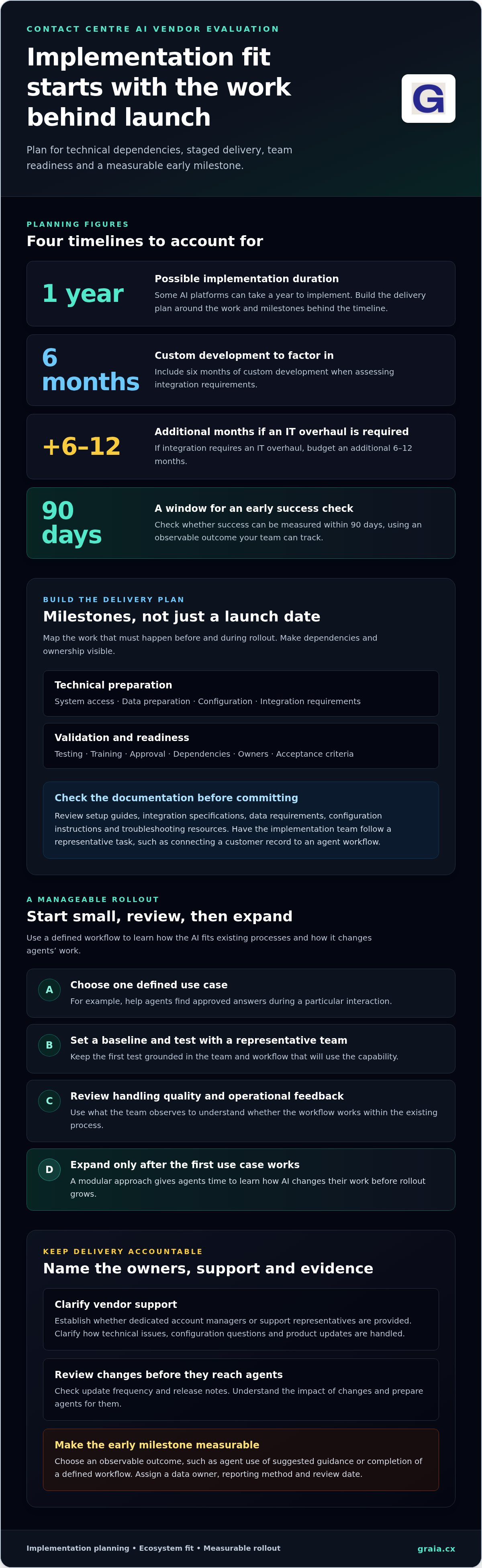
Build a delivery plan around milestones, not a single launch date. Some AI platforms can take a year to implement, so identify the work behind the timeline: system access, data preparation, configuration, testing, training and approval. When assessing integration requirements, factor in six months of custom development. If integration requires an IT overhaul, budget an additional 6-12 months.
A modular rollout can make implementation more manageable. Start with one defined use case, such as helping agents find approved answers during a particular interaction. Set a baseline, test the workflow with a representative team, then review handling quality and operational feedback. Expand only after the first use case works within the existing process. This also gives agents time to learn how AI changes their work.
Support arrangements matter at every stage. Establish whether the vendor provides dedicated account managers or support representatives, and clarify how technical issues, configuration questions and product updates are handled. Review update frequency and release notes for evidence that changes address enterprise needs. A regular update cadence is only useful when your team can understand its impact and prepare agents for changes.
Set a measurable early milestone before implementation begins. A vendor-evaluation decision tree recommends checking whether success can be measured within 90 days. Choose an outcome your team can observe, such as agent use of suggested guidance or completion of a defined workflow. Name the data owner, reporting method and review date. That turns time to value into a practical checkpoint, rather than a broad promise.
Before agreeing a rollout plan, document dependencies, owners, training needs and acceptance criteria for each module. For a concise planning framework, use this contact centre implementation guidance to organise the questions your teams need to resolve.
3. Pricing predictability and resource efficiency
Compare the commercial model with the way your contact centre will use AI, rather than focusing on a headline rate. Ask for a clear breakdown of platform charges, implementation, integrations, usage and support. Identify which charges are fixed and which vary with use, and ask how selected capabilities, expected activity and service requirements affect the proposal.
Model the total cost of ownership over a representative operating period. Include configuration, data preparation, staff training, maintenance and the time required from IT, operations and procurement. A low platform fee may not represent good value if each workflow needs custom development or agents must switch between disconnected tools. Compare the cost of handling a defined set of interactions using the same workload assumptions for every proposal.
Usage-based pricing may vary with interaction volume, while per-agent or seat-based pricing may track staffing levels. Platform or feature fees create a different cost pattern. Ask vendors to define the billing unit plainly: is activity counted by conversation, AI task, duration, agent seat or another measure? Then test how seasonal peaks, longer conversations and an added channel affect the forecast. Clear definitions help leaders plan without confusing flexibility with predictability.
Assess resource efficiency alongside the commercial model. Estimate which tasks AI could handle autonomously, which need Agent Assist and which still require a person. A routine status request may follow a short automated path, while a complex complaint may involve several agent interactions. Compare the workload for each path, including handoffs and repeat contacts, to distinguish useful automation from work that has simply shifted elsewhere.
Ask for a written forecast based on your operating assumptions, including contact volumes, channel mix, service hours, growth plans and the workflows in scope. Request low, expected and high-usage scenarios, and identify what triggers a change in each charge. Treat these as planning tools, not promised outcomes. They show whether the pricing model remains clear as demand changes.
Finally, assess the vendor relationship as part of pricing. Ask who explains invoices, how usage is reported and how scope changes affect charges. Require prompt answers and transparent inclusions before committing. Record assumptions, exclusions, renewal terms and the process for adding or removing capabilities. A comparison table with one row per cost category gives finance, operations and technology leaders a shared basis for evaluating value and resource efficiency.
4. Testing accuracy with real data and use cases
Run a proof of concept using representative customer scenarios, with the same tasks and scoring rules for every shortlisted platform. Compare correct resolutions, errors, escalation quality and performance by issue type, rather than relying on broad claims about deflection. This gives your team evidence beyond a polished demonstration.
Include both routine requests and difficult interactions. Test an address change, a disputed charge and a customer who changes their request midway. Check whether the AI uses the conversation history, responds accurately and passes unresolved cases to an agent with useful context. Measure resolution separately by issue type, and record where the system fails or needs human handling.
Incomplete data can undermine results. If customer records lack relevant history, knowledge articles conflict or analytics can’t link interactions to outcomes, the AI may give incomplete answers or miss useful patterns. Test the data your contact centre will actually use, then document gaps in source records, ownership and update processes. A consistent, AI-ready data foundation helps preserve customer context and route insights to teams able to act.
Accuracy also depends on safeguards. In the past year, 73% of consumers had fewer than two out of five customer experience issues resolved without human involvement. Treat that as a reason to test meaningful resolution and fallback handling, not simply automation volume. Gartner found that at least 50% of generative AI projects were abandoned after proof of concept by the end of 2025, reinforcing the value of realistic evaluation before rollout.
For UK organisations, include GDPR compliance and data sovereignty in the assessment. Map what customer data the platform receives, why it needs each field, where it is processed and how long it is retained. If the AI processes high-risk personal data, the Information Commissioner’s Office (ICO) says organisations should have a data protection impact assessment (DPIA) and appropriate safeguards, including protection against AI-targeting attacks. Review access controls, audit records and how the system explains decisions.
To run a proof of concept and choose a contact centre AI vendor, define the use cases, test representative data, score issue-level outcomes and review failures before deciding. Include CX, IT and compliance colleagues in the evaluation, and document which updates or configuration changes affected results.
Key risks include inaccurate answers, weak handoffs, incomplete data and exposure of personal information. Address them with controlled access, clear escalation paths, data-quality checks and a DPIA when high-risk personal data is processed.
5. Assessing contact centre needs and automation opportunities
Start with the service outcomes your contact centre needs to improve. Choose a recurring issue, such as appointment changes, and map the customer journey from first contact to resolution. Identify where agents spend time searching, repeating questions or switching systems. This shows which tasks suit automation and which depend on judgement, empathy or handling exceptions. It also gives your team a practical basis for prioritising AI capabilities.
Set success measures before reviewing features. First-contact resolution and containment can show whether automation resolves an issue or transfers it. Pair these with service-quality measures, such as answer accuracy and whether customers avoid repeating information. Define each measure clearly: count an interaction as contained only if the issue is resolved, not simply because the customer leaves the channel.
Compare core contact centre capabilities against real workflows. Common features include call queuing, recording, monitoring and barging, transcription, intelligent and skills-based routing, IVR, chatbots, predictive dialling and real-time reporting. Automated quality assurance can help teams assess interactions against defined criteria, such as required disclosures or accurate information. Test how the platform flags a missed step and presents evidence, rather than relying on a single overall score.
Prioritise opportunities by asking three questions: does the task recur, can the answer be grounded in reliable information, and can an agent take over smoothly? A routine balance enquiry may suit automation when the data is current and the customer’s identity is established. A complaint involving several issues may need agent assistance instead. This protects the customer experience while directing automation towards predictable work.
Define non-negotiable requirements before scoring vendors. These might include multilingual support, low-latency voice capabilities or robust fallback strategies. For voice, assess turn-taking, interruptions and handoff when the AI can’t confidently proceed. For written interactions, test whether it follows approved guidance and retains relevant history. Rank each requirement by its impact on customers, agents and operational risk.
Gartner predicts agentic AI will resolve 80% of common customer service issues without intervention by 2029. Treat this as a forecast, not a target for every contact centre. Use your own issue mix and pilot results to set realistic automation goals, then review resolution and service quality by issue type. That keeps investment tied to the needs your team actually sees.
Build a practical requirements scorecard from these workflows and measures before shortlisting platforms. Explore contact centre AI insights to support your planning and identify automation opportunities.
GraiaCX: Conversational Agent
GraiaCX brings together AI automation and human support for contact centres seeking to improve routine handling and channel continuity. Its Conversational Agent can understand customer intent and emotion, resolve routine enquiries autonomously and support conversations across voice, chat, email and social messaging. For teams focused on agent productivity, Agent Assist provides real-time next-best-action suggestions, while Live Call Translation supports multilingual conversations in over 100 languages without requiring bilingual staff.
Consider these capabilities when your evaluation points to routine enquiries suited to automation, a need for agent guidance or multilingual voice interactions. The Agentic Omni-Channel Platform brings voice and digital channels together with AI-driven automation, helping teams build a connected service experience around their workflows.
Visit graia.cx to explore how GraiaCX’s contact centre AI capabilities fit your needs.
Turn your evaluation into a confident next step
The right choice should support the service experience you want to build, not simply add another layer of technology. Define a focused next step: identify one customer journey, agree what success means and bring the relevant operational and technical teams together. This gives your organisation a practical starting point for improving customer service with purpose.
If you’re considering how to choose a contact centre AI vendor, connect your requirements to the work customers and agents need to complete. GraiaCX offers a Conversational Agent, Live Call Translation and Agent Assist, with options for automated customer interactions, multilingual voice conversations and real-time agent guidance.
Discuss your contact centre AI needs with GraiaCX and take the next step towards a service experience built around your customers and team.
Frequently Asked Questions
How Do You Choose the Right AI Vendor for Your Contact Center?
Choose a vendor whose platform fits your operating model and can demonstrate its capabilities against real priorities. A retailer handling delivery changes, for example, may need AI to retrieve order details and pass unusual cases to staff. Involve operations, IT and procurement, then record which needs are essential, which are desirable and how each will be assessed.
How should you go about choosing an AI contact centre platform?
Use a consistent selection process: define the business problem, set evaluation criteria, shortlist platforms and compare them through structured demonstrations or a proof of concept. Give every vendor the same scenario, such as a customer changing an account detail after an earlier enquiry. Ask evaluators to score usability, workflow fit, reporting and governance separately, so a strong presentation doesn’t hide a poor operational match.
What is the Best Way to Determine Your Call Center’s AI Needs?
Use contact reasons and agent feedback to find the work that creates the most friction. Review customer journeys, note repeated steps and identify where staff need judgement or specialist knowledge. Agents may, for example, spend time locating a policy before answering a straightforward eligibility question. Turn that observation into a clear requirement, then agree how improved handling will be recognised.
What features should a contact centre AI vendor provide?
Prioritise capabilities that support your chosen workflows, including useful reporting, clear human escalation and controls for access and conversation records. Automated quality assurance can review interactions against your service standards, while agent guidance can surface approved information during a conversation. Consider whether supervisors can understand why the system produced an answer and identify interactions for review.
How to assess contact centre AI vendors for business needs and use cases?
Score each vendor against representative scenarios, not feature names alone. Include a routine request, a policy exception and an interaction with incomplete information. For each, assess whether the platform takes the intended action, recognises when it lacks context and supports a suitable next step. Record results by scenario so teams can see which business needs remain unmet.
What questions should you ask contact centre AI vendors during evaluation?
Ask how the platform handles an unclear request, a failed system connection and a customer who changes their mind. Request details on configuration, release management, reporting and how incorrect responses are reviewed. Clarify how responsibilities are divided between your organisation and the vendor during deployment. Specific answers show how the partnership would work beyond the demonstration.
How much does contact centre AI software cost in the UK?
Contact centre AI software has no single UK price because the commercial model depends on the project. The price depends on the case and is given after a quote request; cost factors include the platform scope, selected capabilities, implementation needs, integrations, support and expected usage. Compare proposals using the same assumptions, and distinguish recurring charges from one-off setup work to understand the full commitment.
How to calculate ROI and total cost of ownership for contact centre AI?
Compare the value created with the full cost of owning and operating the platform. Estimate measurable benefits, such as staff time redirected from repetitive tasks, then account for platform charges, implementation, integrations, training and ongoing internal effort. Use a consistent period and assumptions, separating observed results from forecasts. Track service quality alongside efficiency so reduced handling effort doesn’t conceal a poorer customer experience.