
De-escalating angry customers with AI prompts for live chat
A heated chat doesn’t need a longer reply. De-escalating angry customers with AI prompts works best when the response validates the customer’s experience without endorsing an unverified allegation, then uses the 5 A’s: Acknowledge, Apologise, Amplify, Ask and Act. Keep the live-chat reply concise, avoid copying the customer’s tone, and make the next step clear.
When a customer is upset, the right words can be hard to find, especially when every message feels high-stakes. AI can help shape a calm, relevant response using the customer’s concern and case details, while a person retains judgement over what to say and which action to take.
This article explains how conversation frameworks and customer context can support de-escalation in live chat and public channels. You’ll learn what effective prompts need to include, how to keep replies human rather than scripted, and when an issue needs a clear next step or escalation.
Key Takeaways
- Acknowledge the customer’s emotion and specific concern before explaining facts or proposing a solution.
- Keep public replies short, factual and non-defensive, then move the detailed conversation to a private channel.
- Use Regulate, Redirect and Resolve to guide the conversation from heightened emotion towards a practical next step.
- Ground AI prompts in relevant customer, case and policy details so suggested responses stay accurate and within authorised limits.
- In live chat, validate the customer’s experience without endorsing unverified claims, and keep a human in control of decisions.
How can an AI-powered contact centre de-escalate an angry customer over chat?
An AI-powered contact centre can help an agent respond with empathy before explaining what happened. It can surface the customer’s specific complaint, suggest an acknowledgement and identify a practical next step. The agent remains responsible for checking the facts and deciding what to say. Early in the exchange, using the customer’s name and inclusive words such as “we” can help establish a calmer, shared tone.
Different tools support different decisions. Sentiment detection can identify language that may signal frustration, helping an agent notice rising tension. Conversation summaries bring together the customer’s stated concern and relevant case history. Response-drafting tools suggest concise wording that acknowledges the experience before discussing facts. Escalation rules can flag cases for human review, but the team remains responsible for deciding when escalation is appropriate.
Start with the complaint, not a generic apology. If a customer says, “I’ve explained the same billing error twice,” an agent could reply: “You’ve had to explain the billing error more than once, and I can see why that’s frustrating.” This names the issue and recognises its impact. The agent can then apologise and take responsibility for the next action: “I’m sorry you’ve had to repeat this. I’ll review the earlier notes and explain what happens next.” This acknowledges frustration without making unsupported claims.
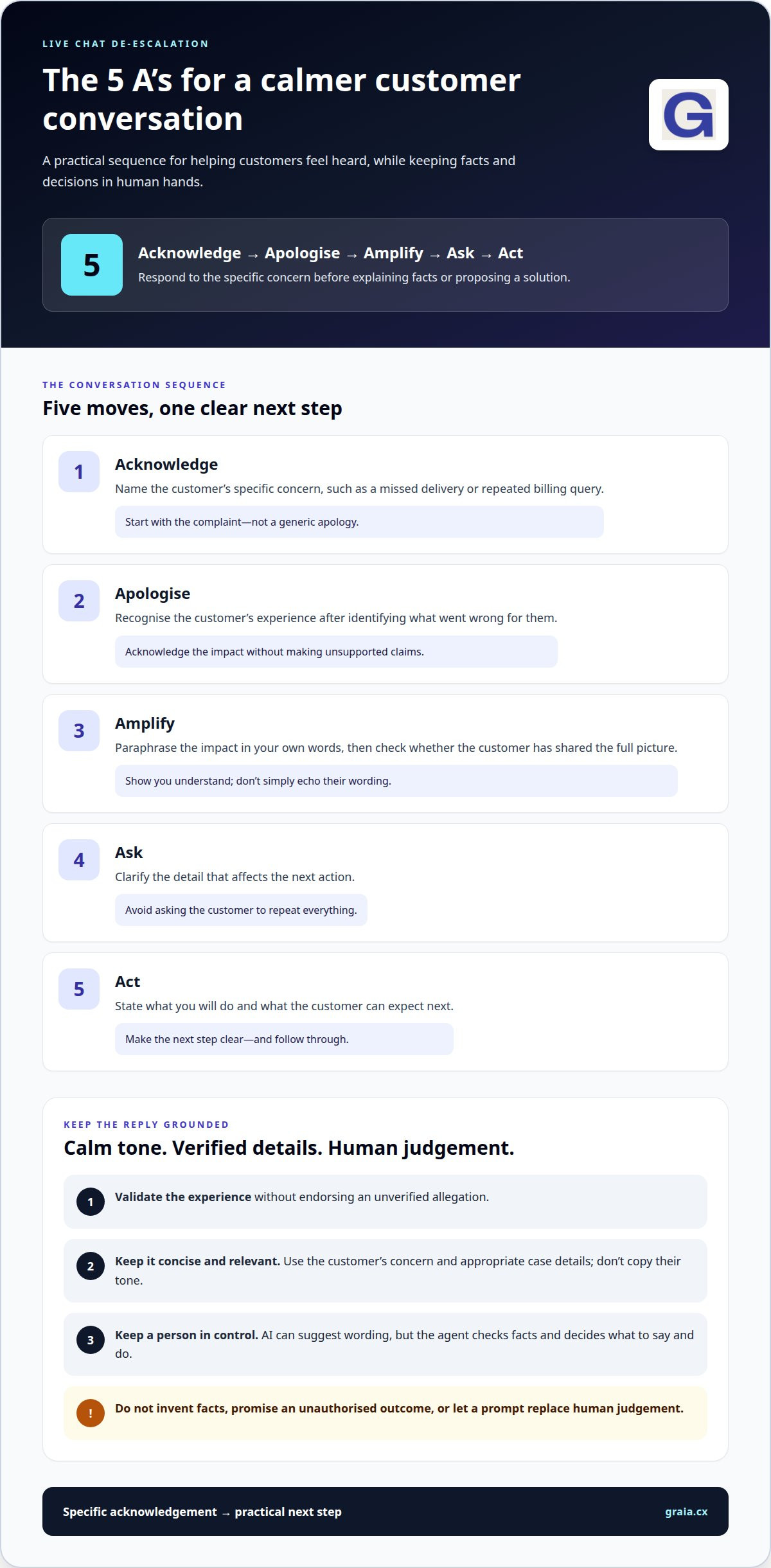
A useful conversation structure is the 5 A’s: Acknowledge, Apologise, Amplify, Ask and Act. AI can help an agent move through each step without turning the exchange into a rigid script:
- Acknowledge: Name the customer’s concern, such as a missed delivery or repeated billing query.
- Apologise: Recognise the experience after identifying the specific complaint.
- Amplify: Paraphrase the impact, then check whether the customer has shared the full picture.
- Ask: Clarify the detail that affects the next action, rather than asking the customer to repeat everything.
- Act: State the step the agent will take and what the customer can expect next.
This sequence lets the customer feel heard before the agent explains policy or investigates a disputed detail. For example, after a failed account update, an agent can acknowledge the disruption, check the record and explain the next step. AI should suggest language, not decide what the business owes or authorise a remedy. If a case exceeds the agent’s authority, a prompt can help summarise it for the appropriate reviewer.
In the UK, firms and staff must comply with applicable data protection requirements when handling customers’ personal information, according to the Financial Conduct Authority. AI-generated replies should use relevant case details carefully, while complaint records and decisions follow the organisation’s established processes. A prompt can guide an acknowledgement and clarify what happens next. It should not invent facts, promise an unauthorised outcome or replace human judgement.
How contact-centre teams respond to angry customers in public channels
A public complaint needs a visible acknowledgement, not a public argument. A social response should stay short, factual and non-defensive, then invite the customer to continue privately. Teams should aim to respond within about 24 hours. For example: “We’re sorry your delivery hasn’t arrived. Please send us a private message with your order details so we can review the situation.” This recognises the concern without exposing account information.
AI can acknowledge frustration without sounding scripted by using the customer’s specific words and verified case details. A prompt should request a natural response that names the issue, avoids copying the customer’s tone and leaves room for the agent’s judgement. “You’ve contacted us twice about the delayed order” feels more attentive than a generic “We understand your frustration.”
A social-response drafting tool can produce a working draft of 120-200 words, which an agent can then shorten for public use. Sentiment analysis can highlight urgency or rising frustration, while conversation summarisation can bring related tickets into view. These tools support the response; they don’t establish whether an allegation is true or authorise a remedy.
- Acknowledge: Name the issue specifically, such as a delayed delivery or unanswered service request.
- Protect privacy: Ask the customer to move account details into a private channel.
- Stay factual: State what the team will review, without blaming staff or disputing the customer publicly.
- Set the next step: Explain how the team will continue the conversation, and follow through.
For angry customer emails, an AI drafting prompt can help create a calm, firm reply. Ask it to address the complaint directly, acknowledge its impact, and keep each sentence under twenty words. For example, if a customer reports a missed appointment, the reply should recognise that specific disruption before explaining the available next step. The agent should edit any wording that sounds defensive or promises more than the business can deliver.
For complaints about refunds, delays or poor service, prompts should separate the customer’s request from the facts and applicable policy. They can suggest empathetic wording and remind the agent to state only an authorised outcome. They mustn’t invent a refund, delivery date or compensation.
AI risks include inaccurate summaries, tone-deaf wording and unsupported promises. A defensive reply can intensify the situation, while sharing personal details unnecessarily can create further harm. Human review helps catch these problems before a response goes live.
Teams handling social posts, email and chat together can use an omni-channel approach to customer conversations to maintain context across interactions. That context helps agents respond to the current complaint without asking customers to repeat details already captured in earlier tickets.
How contact-centre teams use the 3R Conversation Control Method: Regulate, Redirect, Resolve
The 3R Conversation Control Method gives agents a practical sequence for tense exchanges: Regulate the emotion, Redirect towards the issue, then Resolve with an owned action. A prompt can help keep each stage visible, while the agent listens, judges the facts and decides what they’re authorised to do.
- Regulate: Let the customer explain without interruption. Use a steady pace and recognise the emotion before investigating. An AI sentiment tool can flag language suggesting frustration, but it cannot know the customer’s full intent from a message alone.
- Redirect: Summarise the specific concern and ask a focused question. For example, “The account access stopped after the update. Is that the main issue you need resolved?” A conversation-summary tool can help agents retain relevant case details.
- Resolve: Choose an action within the agent’s authority, then explain what happens next. A response-drafting tool can help state the action and next update clearly, without deciding what the business owes.
Authority makes the method actionable. Frontline agents need clear resolution workflows that show which issues they can handle and which require review. A service issue can be resolved at Tier 1 when it’s isolated, understood and within frontline authority. Manager escalation should be an exception, not the default. If a case falls outside an agent’s authority, AI can help prepare a concise handover rather than encouraging an unauthorised promise.
Specific commitments help protect trust. A holding reply should state when the customer will receive the next update, even if the investigation is ongoing. Agents should explain what they’ll do and when they’ll be in touch, then follow up as promised. Missing a promised callback can damage trust. Repeating the agreed resolution, timeframe and next steps helps both sides leave the conversation with the same understanding.
After resolving an issue, a case-management tool can record the decision, actions taken and any promised follow-up. Teams can review whether agents provided updates, whether the issue returned and where policy or workflow created friction. These signals support useful coaching; one difficult conversation shouldn’t define an agent’s ability.
A short debrief can then examine the conversation’s turning point. Did the agent regulate the emotion before redirecting? Was the proposed resolution within their authority? Did the customer receive the promised update? Training can use these questions to rehearse the method aloud, so agents treat prompts as anchors, not scripts. The aim is a controlled conversation and a clear, accountable resolution.
How contact-centre AI uses customer, case, offer and policy details as prompt inputs
A useful prompt gives AI enough context to draft a relevant reply without letting it decide the remedy. Contact-centre teams can provide four inputs: the customer’s stated concern, case history, approved offers and applicable policy. The agent checks the draft against the record before sending it. This structure helps customer service stay direct, accurate and consistent during a difficult exchange.
Case details make a response specific. For example, a customer reports three failed data exports over two weeks. A prompt can ask AI to acknowledge the repeated disruption, summarise those events and suggest a focused question about the latest failure. A case-summary tool can bring relevant ticket history together, and a drafting tool can turn that context into a clear response. Neither should fill gaps with invented causes.
Offer and policy details define the boundaries. A prompt should distinguish what the customer requests from what the business has authorised. If a customer asks for a refund covering six months of service, AI can help phrase a respectful reply based on the applicable policy. It must not decide the refund amount or promise an exception without approval. The agent should explain the decision plainly and offer an authorised alternative where one exists.
Declining a demand needn’t end the conversation. The response can recognise the customer’s goal, state the limit directly, then present practical choices. For an API rate-limit request, an example alternative is a three-month account credit while the customer re-architects, if that credit is within the business’s approved offer. A prompt can help the agent explain the choice without implying that the requested exception was granted.
Goodwill also needs context. A free offer shouldn’t appear automatically in every complaint. Where policy and the case justify it, a prompt can help an agent present an approved gesture, such as the free months described in a sample response. The agent must confirm that the offer fits the customer’s circumstances and the business’s stated limits.
Solution choices work best when each option includes its effect and next step. A prompt can ask for two authorised paths, such as continuing an investigation or applying an approved account credit. The agent should repeat the selected resolution, timeframe and what happens next. This confirmation reduces ambiguity and gives the customer a clear basis for replying.
Tools such as ChatGPT can draft wording from supplied context, while a policy-retrieval tool can surface relevant approved terms. Teams should focus the prompt on the current case, remove unrelated personal details and prevent AI from deciding customer entitlements. This division lets AI support empathetic communication while people retain control over commitments.
How contact-centre AI helps de-escalate angry customers in live chat
Live chat makes each message immediate and visible. A delayed or defensive reply can intensify frustration, while a thoughtful response creates space to understand the concern. AI can help agents notice emotional cues, find relevant context and shape concise language. The boundary is important: validate the customer’s experience, not an allegation the team hasn’t established. De-escalating angry customers with ai prompts starts with that distinction.
A live-chat prompt should give the agent a response to adapt, not a script to paste blindly. It can ask AI to describe the customer’s concern, recognise the inconvenience and suggest one useful next step. Keep the draft brief, with fewer than four sentences. That leaves room for empathy without burying the action in a long explanation.
For example, a customer writes, “I’ve been locked out all morning, and nobody has fixed it.” A suitable draft might say: “Being locked out has disrupted your day, and I understand why that’s frustrating. I’ll review the access notes now and explain the next step.” The agent should confirm that the account record supports this action before sending. The message acknowledges the impact without claiming a cause or promising an outcome.
Different AI tools contribute at different moments:
- Sentiment detection can flag messages whose language signals rising frustration, prompting a closer review.
- Conversation summarisation can surface the issue already described, so agents avoid asking the customer to repeat it.
- Response drafting can suggest calm, specific language that an agent edits for accuracy and tone.
- Knowledge retrieval can bring relevant policy or troubleshooting information into view before an agent explains what happens next.
These tools can miss context. Sarcasm, short replies and unfamiliar phrasing may be misread, so an agent must consider the whole exchange. A sentiment label is a signal, not proof of the customer’s intent. If the customer says, “That’s helpful,” after several failed attempts, the surrounding messages matter more than those words alone.
Teams can make prompts more useful by telling AI to avoid phrases such as “calm down”, “that’s our policy” and “there’s nothing I can do”. They can also instruct it not to mirror hostile language or invent a resolution. Agents should practise suggested phrases aloud as starting points. Under pressure, a familiar anchor supports natural communication better than reading a response word for word. De-escalating angry customers with ai prompts can promote consistency without taking judgement away from the agent.
For an ongoing company-created issue, the response should account for business impact and signs of churn before choosing an action. A prompt can help organise those signals, but an authorised person must decide the remedy. To strengthen this approach across customer conversations, explore AI-supported live chat strategies and shape them around accurate context, human judgement and clear next steps.
GraiaCX
GraiaCX helps contact-centre teams bring AI support into customer conversations across chat and other channels. Its Agentic Omni-Channel Platform connects voice, chat, email and social messaging. Agent Assist can provide real-time suggestions as agents handle difficult exchanges, while a Conversational Agent can manage routine enquiries so people can focus on situations that need human judgement.
Turn to GraiaCX when your team needs consistent conversation methods across channels, customer context to shape replies or support for agents during live interactions. The right approach depends on your contact-centre needs and the role you want AI to play. Schedule a consultation with GraiaCX to discuss how AI-assisted conversations could fit your operation.
Make every difficult conversation a chance to improve
Make thoughtful responses part of everyday service, not just an emergency measure. Choose a recurring customer frustration and define what a good response should achieve: recognise the impact, preserve accuracy and make clear what happens next. Then give agents room to adapt AI suggestions to the person and situation in front of them.
Using de-escalating angry customers with AI prompts successfully depends on a deliberate balance: technology can support consistency, while people bring judgement, accountability and genuine understanding. Keep refining that balance as customer needs and contact-centre workflows change.
Discuss AI-assisted customer conversations with GraiaCX and explore how the approach could fit your contact centre. A more considered next message can help your team move forward with confidence.
Frequently Asked Questions
Can professional AI customer-service tools work with these prompts?
Professional AI customer-service tools can use prompts to shape responses around a team’s conversation standards. A Conversational Agent can handle routine enquiries, while Agent Assist can suggest wording to a human agent. For a useful prompt, define its task, the information it may use, the tone to follow and the response format. Agents should review suggestions against the live conversation before sending them.
How Do You Acknowledge a Complaint Before You Apologize?
Name the specific issue first, using details the customer has actually shared. For example: “Your replacement part hasn’t arrived, and you’ve had to rearrange the repair.” Then apologise for the impact: “I’m sorry this has disrupted your plans.” This order connects the apology to the complaint rather than making it sound like a stock phrase. Don’t add a cause until the team has established what happened.
How Do You Keep Tone Consistent Across a Multi-Message Escalation?
Give each agent or AI response the same brief tone guidance, such as calm, clear and respectful. Keep a running case summary with the customer’s unresolved concern, confirmed facts, actions taken and agreed commitments. When a new agent joins, they can use that summary to continue naturally instead of restarting the exchange. Consistency means maintaining the same care and clarity, not repeating identical wording in every message.
How Do You Separate What Went Wrong From What Happens Next?
Separate verified information from the action still underway. For example: “The appointment was cancelled in the booking system. I’m checking available replacement slots and will update you once I’ve reviewed them.” This avoids guessing why the cancellation happened or implying that a new booking is confirmed. A prompt can ask the agent to label confirmed facts, unknown details and the next action before drafting a customer-facing message.
What AI prompts help de-escalate angry customer conversations?
Use a prompt that asks for empathy, accuracy and a defined action: “Draft a calm reply to a customer concerned about [issue]. Reflect their specific concern, use only these verified facts [details], follow this policy [policy], and suggest an authorised next step. Don’t speculate or promise an outcome.” This gives AI a clear task and boundaries. The agent can then personalise the draft for the actual conversation.
What steps do contact-centre teams use to calm an angry customer in chat or email?
Teams can read the full exchange, identify the immediate concern and distinguish the customer’s request from the reported impact. Then they can acknowledge that impact, check the relevant case information and choose an action within their authority. Finally, they communicate the action clearly and record any follow-up commitment. For an email about a missed collection, for instance, the reply should address the collection before discussing a replacement arrangement.
What should contact-centre AI avoid saying to an angry customer?
AI should not blame the customer, minimise the impact or present an unverified explanation as fact. Phrases such as “You should have known” or “This happened because of your account settings” can sound accusatory, especially before the record is checked. It should also avoid absolute promises, such as guaranteeing a resolution time the team hasn’t approved. Prompts can instruct the system to flag uncertain details for agent review.
When should contact-centre AI hand an angry customer over to a human agent?
Transfer the conversation when the customer requests a person, the issue requires judgement beyond the AI’s authority or the available information cannot support a reliable response. Human review is also appropriate when a complaint involves several unresolved issues or a proposed remedy needs approval. The handover should include a conversation summary, verified details and steps already attempted, so the customer doesn’t have to reconstruct the case.