
Contact Centre Tech Change Management: A Practical Guide
A contact centre technology rollout can succeed on paper and still fail in practice. The difference is often change management for contact centre technology: treating implementation as a change to people’s roles, workflows and customer journeys, not simply a software deployment.
Unfamiliar tools can unsettle agents or interrupt service, especially when training, integrations or handoffs are overlooked. These risks can be managed with clear communication, practical training, careful coordination and a plan to measure what happens after launch. Technology should support the people delivering service while giving customers a consistent route to the help they need.
This guide sets out a repeatable approach to preparing people, processes and systems for change. You’ll learn how to involve agents, map workflows and integrations, choose a rollout approach, and track adoption alongside service quality. It also covers how conversational AI and Agent Assist can fit into a broader operating model, including when integrating with an existing CCaaS environment. The goal is lasting adoption, confident agents and a customer experience that holds steady through transition.
Key Takeaways
- Understand why change management for contact centre technology must address working practices and customer journeys, not just system configuration.
- Build a clear plan by defining outcomes, mapping impacts and assigning responsibilities across operational, technical and frontline teams.
- Choose a phased or broader rollout by weighing service risk, readiness, complexity and how quickly teams need feedback.
- Use realistic customer scenarios to test routing, channel handoffs, escalations and exceptions before expanding a pilot.
- Measure adoption alongside customer experience and workflow quality, then use regular reviews to turn friction into owned actions.
Why contact centre technology change needs more than a technical rollout
A platform can be configured correctly and still make work harder. If agents don’t understand how a new tool affects their tasks, or customers encounter broken handoffs between channels, technical delivery hasn’t yet become operational change.
Change management for contact centre technology is the work of preparing people, processes and operations to adopt a new way of serving customers, so the technology works in daily practice, not just in testing. Installation makes a system available; adoption makes it useful. The principles of change management offer a foundation, but contact centres need to apply them to the detail of live service journeys.
What changes when a contact centre adopts new technology?
Start by tracing the operational impact, not just listing new features. Adding a channel such as chat can change how enquiries arrive and who handles them. A routing change affects queue logic, priorities and supervisor oversight. Automation or agent assistance can change what information an agent receives, which decisions they make and what steps they take after a conversation.
Consider a customer who starts with a conversational agent, shares details, then needs a human to resolve a more complex issue. The handoff must preserve context. The agent may need to check an integrated system, a back-office team may need to complete an action, and the customer may expect follow-up through another channel. If any part of that sequence changes, the whole journey can feel different. Map the impact across agent tasks, supervisor visibility, customer channels and downstream processes before deciding that a change is “just” a new tool.
Why agents and customers experience the change differently
Agents experience change from inside the workflow. They may welcome easier access to information but worry that a new interface will slow them down, monitoring will feel more intrusive, or automation will leave them with more difficult cases. Address these concerns directly. Explain what is changing, what isn’t, how performance will be assessed and where agents can get help.
Customers judge the same change by its effect on service: can they still reach support, avoid repeating themselves and move between channels without losing progress? A smooth internal deployment doesn’t guarantee those outcomes. When conversational AI handles routine enquiries, clear escalation routes matter, and human agents need enough context to continue naturally.
Bring frontline experience into planning before launch. Ask agents and supervisors to walk through real scenarios, identify awkward steps and flag exceptions that a configuration test might miss. Use their feedback to refine workflows, knowledge and support materials. Then show teams what changed as a result. This visible feedback loop builds trust and helps leaders spot friction while there’s still time to address it. Technology change becomes credible when people can see how it improves the work and protects the customer experience.
Build a change plan around people, processes and contact centre technology
A practical plan connects the intended business outcome to the work people do each day. For change management for contact centre technology, set ownership early, involve frontline teams and decide how you’ll recognise progress before implementation begins.
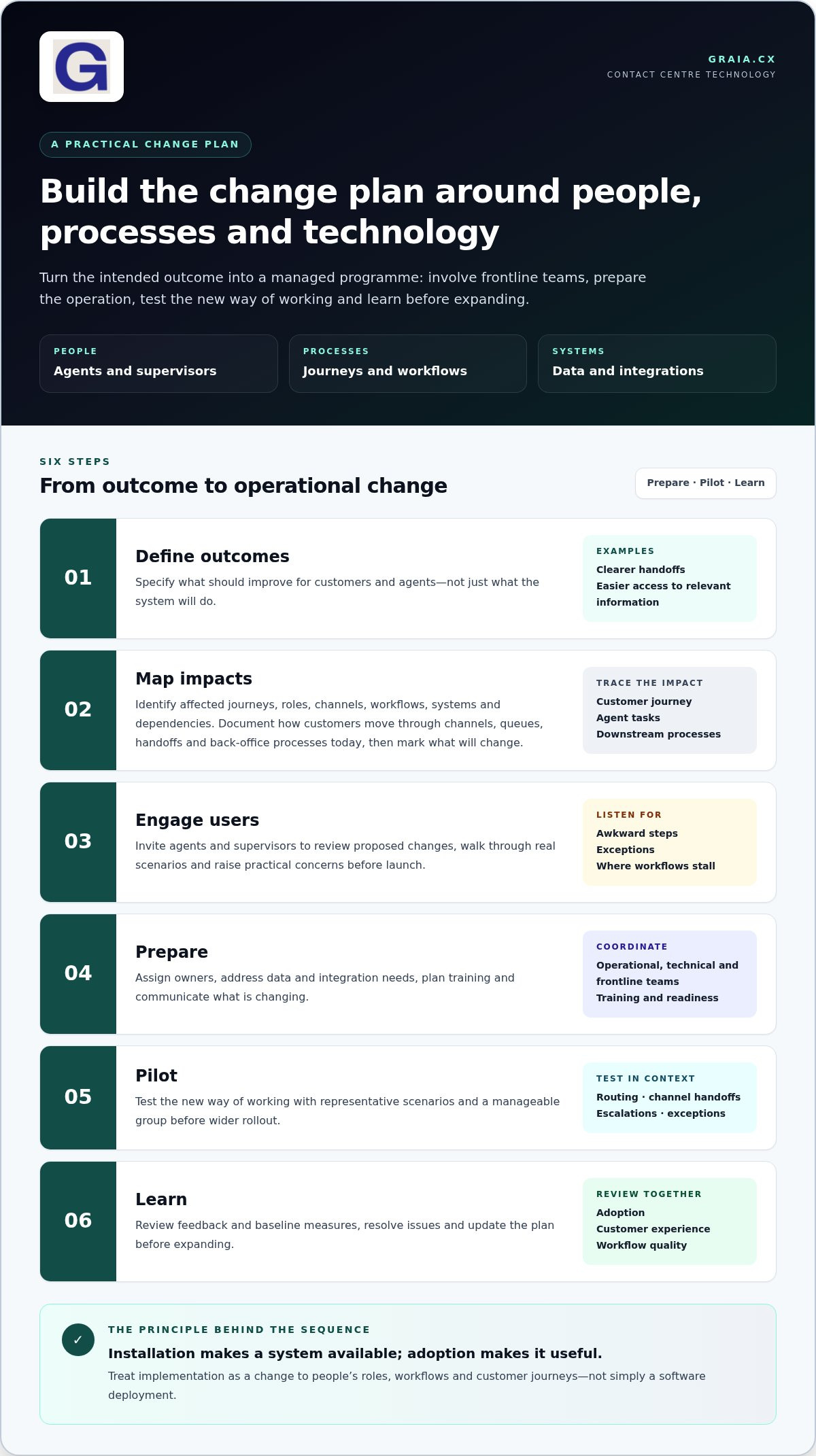
Use this sequence to turn the goal into a managed programme:
- Define outcomes. Specify what should improve for customers and agents, such as clearer handoffs or easier access to relevant information.
- Map impacts. Identify affected journeys, roles, channels, workflows, systems and dependencies.
- Engage users. Invite agents and supervisors to review proposed changes and raise practical concerns.
- Prepare. Assign owners, address data and integration needs, plan training and communicate what is changing.
- Pilot. Test the new way of working with representative scenarios and a manageable group before wider rollout.
- Learn. Review feedback and baseline measures, resolve issues and update the plan before expanding.
Participation makes a plan more relevant: agents help shape changes that fit real customer conversations because they know where workflows succeed, stall and need support.
Map stakeholders, workflows and customer journeys
Document how customers move through channels, queues, handoffs and back-office processes today, then mark what the proposed change will affect. Name an accountable sponsor to set direction and resolve escalated decisions, an operational owner to manage delivery, and clear contacts in IT and compliance. Supervisors can coordinate team readiness and surface service issues; agents can test whether revised workflows make sense in practice. Workshops with both groups can expose exceptions that process diagrams miss.
Set goals, readiness checks and communication
Translate broad aims into observable outcomes. If the goal is a smoother transfer from a conversational agent to a human, define what a successful handoff looks like for the customer and the receiving agent. Before launch, assess role impacts, training needs, data quality, integrations and operational dependencies. Establish a baseline for service measures, workflow quality and current use of relevant tools so later reviews have a meaningful comparison. Agree who monitors each measure and who acts when it moves in the wrong direction.
Communication should be regular and specific, not a single launch announcement. Explain what is changing, why it matters, when teams will experience it and where they can raise questions. Tailor updates for agents, supervisors and technical teams, and share what has changed in response to feedback. The contact centre technology insights can also help teams consider the wider context as they develop a change plan.
Compare rollout approaches and choose the right contact centre technology path
The right rollout depends on more than a preferred project method. Assess team readiness, service risk, workflow complexity and how quickly you need feedback. Then decide whether the technology should extend the current environment or replace core systems. These are separate choices: an integration that limits disruption can still require substantial preparation, while a major platform replacement may be introduced in phases.
Phased rollout or broader launch: how to decide
A phased rollout introduces change to selected teams, journeys or channels first. It creates space to learn and adjust, but requires clear boundaries and support across old and new ways of working. A broader launch may suit tightly connected processes and well-prepared teams, although issues can affect more of the operation at once.
| Decision factor | Phased rollout | Broader launch |
|---|---|---|
| Readiness | Useful when teams or workflows are ready at different times. | Best considered when affected teams and dependencies are prepared together. |
| Service risk | Limits initial exposure, but parallel processes need careful coordination. | Concentrates transition activity, so continuity planning is critical. |
| Complexity | Helps isolate issues, though repeated setup and support may be needed. | Can simplify the transition across connected processes, but demands broad coordination. |
| Feedback speed | Enables learning and adjustments before expansion. | Surfaces wider feedback quickly, with less opportunity to adjust before launch. |
Choose the approach that matches the operation’s ability to absorb change, not simply the implementation timetable. For example, if routing rules and agent guidance depend on one another, a narrowly scoped pilot may need to test both together to produce useful findings. If several teams rely on the same customer record or escalation process, include those dependencies in the pilot scope rather than testing each feature in isolation.
Extend existing CCaaS or replace core technology?
Extending an existing CCaaS environment can preserve familiar systems while adding capabilities, but success depends on integration fit and the effect on workflows. Replacing core technology offers a chance to redesign connected processes, yet expands the change footprint for agents, supervisors and support teams. Map dependencies, data flows and the customer journey before deciding which path is proportionate.
GraiaCX integrates with major CCaaS providers, including Genesys, NICE CX and Avaya. This can be relevant when planning how conversational AI or Agent Assist fits alongside existing channels and agent workflows. For more platform context, see the enterprise AI contact centre solutions guide.
Keep technology selection and change readiness aligned. A platform may meet technical requirements, but the organisation also needs clear ownership, prepared teams and workable processes. Equally, a strong change plan cannot compensate for integrations or workflows that don’t support the intended service. In change management for contact centre technology, make both decisions together: define the future operating model, then test whether the chosen rollout and technology can support it.
Implement the change: prepare agents, pilot workflows and protect service quality
Implementation is where the plan meets live customer demand. Keep the transition controlled: prepare systems and people in sequence, test realistic work, and make it easy to report issues. A clear fallback protects service if a new workflow behaves differently under live conditions than it did in testing.
- Configure: Set up workflows, permissions, knowledge and integrations for the agreed operating model.
- Test: Check functionality and end-to-end scenarios, including failures and exceptions.
- Brief: Explain what is changing, when it takes effect and where to get help.
- Train: Let each role practise the tasks and decisions they’ll encounter.
- Pilot: Introduce the change to a representative group and scope of work.
- Support: Keep supervisors and technical owners available through agreed escalation routes.
- Refine: Review issues and feedback, make adjustments, then decide whether to expand.
Test complete customer journeys, not isolated features. Check whether an enquiry reaches the intended queue, whether context carries across a channel handoff, and whether a human agent receives the information needed when automation escalates a complex case. Include exceptions such as missing customer details, an unavailable integration or a request outside the expected workflow. Record the expected result and what actually happens. This helps teams distinguish a training gap from a configuration or process issue.
Train for real work, not just product features
Build role-based practice around common enquiries, difficult cases and handoffs. If a conversational agent handles routine requests, agents still need to know how to take over when a customer needs judgement or a non-standard resolution. Explain how responsibilities change without implying that automation replaces human expertise. Let agents test the workflow and use their feedback to improve job aids, process steps and supervisor coaching before wider use.
Pilot, communicate and support go-live
Select a pilot that reflects real users, channels and enquiry types, then define what the team needs to learn before expanding. Prepare supervisors to coach in the moment, capture recurring issues and route urgent problems to named owners. Make escalation instructions visible, including how agents should continue serving customers if a feature is unavailable or a handoff fails. A fallback might mean using an established process while the issue is assessed. Rehearse it so teams know when and how to switch.
AI Agent Assist can be part of the workflow, but agents need practice interpreting its suggestions and applying their own judgement. Define which tasks it supports, how agents should handle a suggestion that doesn’t fit the customer’s situation, and where to report recurring issues. Explore GraiaCX’s contact centre technology insights for ideas to inform implementation planning.
Strong change management for contact centre technology continues after go-live. Review pilot observations, service signals and agent feedback together. Resolve high-impact friction before increasing the rollout scope, and keep the feedback loop open as new teams and journeys adopt the change.
Sustain adoption and connect contact centre change to measurable outcomes
Go-live is a milestone, not proof of lasting adoption. To understand whether a change is working, track how people use it alongside service quality and the customer outcomes it is meant to support. A single efficiency measure can hide friction: a workflow may be completed faster while creating repeat contacts or making work harder for agents.
Set a pre-change baseline and define each measure before comparing results. Be precise about what counts as successful use, a completed process, a resolved enquiry or a customer handoff. Keep the measurement period and data sources consistent, and segment results by channel or workflow where the data supports a fair comparison. This gives leaders a clearer view of where adoption is taking hold and where support or process changes may be needed.
Measure adoption without losing sight of customer outcomes
Use a balanced set of indicators rather than treating tool usage as the goal. Consider whether teams use the capability as intended, complete the relevant process and report that it supports their work. Read these signals alongside service quality and customer feedback. For example, an increase in automated handling matters only in context: check whether customers can still reach an agent when appropriate and whether enquiries are resolved effectively.
Compare like with like. Channel mix, enquiry complexity, staffing patterns and other operational changes can influence results after launch, so don’t attribute every shift to the technology alone. Pair quantitative measures with agent and supervisor observations to understand what may be driving the outcome.
Turn early learning into continuous improvement
Set a regular review cadence with agents, supervisors, operations and technology owners. Bring together performance trends, customer comments and reported workflow friction, then prioritise fixes by customer impact, operational risk and how often the issue occurs. Record each action, its owner and when it will be reviewed. Revisit unresolved issues rather than allowing them to disappear after the initial launch period.
Use these reviews to test whether the operating model still fits the work. GraiaCX’s conversational agents can resolve routine enquiries and escalate to human agents, while Agent Assist provides real-time support. These capabilities are options within a broader change programme, where roles, safeguards and workflows shape how people and automation work together. The contact centre ROI with AI guide offers further context for connecting improvement measures with business value.
Strong change management for contact centre technology keeps learning active after implementation, using evidence to refine the experience for customers and teams. As you plan the next change, explore more contact centre insights to help keep people and service outcomes in view.
Make your next change a lasting one
Your next contact centre technology decision is an opportunity to shape not only how work gets done, but how customers experience your service. Before committing to a solution or launch date, ask what should become easier for customers and frontline teams, and what needs to change in the operating model to make that possible.
That question gives change management for contact centre technology a practical starting point. It keeps decisions grounded in the outcomes your organisation values, while creating room to adapt as customer needs and working practices evolve. Treat each change as a chance to strengthen the relationship between people, processes and technology, not as a finish line reached when implementation ends.
To put this approach into practice, explore practical contact centre technology insights, choose one opportunity and bring the right people into the conversation. GraiaCX helps contact centres bring conversational AI, Agent Assist and omnichannel engagement into their operating model. Start a conversation with GraiaCX about the change you’re planning and how its technology can support your customer journeys.
Frequently Asked Questions
Is change management necessary for a small contact centre technology change?
Yes, but the effort should match the change’s impact. A new contact-disposition field may be quick to configure yet affect agent habits, reporting and how another team handles the case. Check who uses it, what task changes and how errors could surface. If the impact is limited, a short briefing and task check may be sufficient. The aim is proportionate preparation, not extra process for its own sake.
Who should own change management for contact centre technology?
A senior leader accountable for contact centre outcomes should sponsor the change and make decisions when priorities conflict. A named change lead can coordinate communications, readiness and feedback, while operational and technical owners deliver their parts. This distinction matters: the coordinator keeps activity moving, but the sponsor remains answerable for the intended outcomes. For change management for contact centre technology, make decision rights clear so unresolved issues don’t stall between teams.
How can you assess whether contact centre agents are ready for a technology change?
Readiness is demonstrated through practice, not attendance at a briefing. Ask agents to complete representative tasks in a safe test environment, then observe where they hesitate, seek help or choose a workaround. Check whether they can explain when to use the new process and how to recover from a common error. Combine these observations with direct feedback, and address gaps in confidence, access or training before widening the rollout.
What does a change champion do in a contact centre?
A change champion helps colleagues understand and use a new way of working. They can demonstrate tasks in team language, share recurring questions with project owners and highlight where written guidance doesn’t match real conversations. Choose champions who are trusted by peers and represent different workflows or shifts. The role supports adoption, but it shouldn’t make them solely responsible for training, resolving technical issues or persuading colleagues to accept unresolved problems.
How do you protect customer experience during a contact centre technology rollout?
Define what would trigger a pause or a return to the established process before launch, and make that decision route clear to supervisors. During rollout, watch for signs of customer friction such as failed transfers, repeat explanations or enquiries sent to the wrong queue. Give customers a clear next step if a journey is interrupted, and ensure agents know how to continue the interaction without relying on the new feature.
How can you sustain technology adoption after the contact centre goes live?
Make the new workflow part of everyday coaching and onboarding, rather than treating launch training as complete. Update relevant job aids, remove outdated instructions and ask supervisors to notice when teams revert to old workarounds. Give agents a simple way to flag recurring friction, then show what action followed. When the technology or process changes again, revisit the guidance so it stays useful and adoption doesn’t depend on memory alone.