
Contact centre implementation risks: how to reduce them
Successful contact centre implementation depends on more than choosing software. The main contact centre implementation risks include integration problems, inconsistent customer experiences, staff resistance and data protection gaps. Reduce them with careful planning, human oversight, staff preparation and clear accountability. In the UK, handling customer data also means considering the Data Protection Act.
New technology may promise faster service, but a rushed rollout can create friction for customers and agents alike. This article explains how to manage the risks, from checking system compatibility and introducing AI in stages to training teams, aligning managers and agents, and protecting customer information. You’ll also learn how contact centre software can handle routine enquiries and support agents with conversations that need human judgement, so implementation strengthens service rather than disrupting it.
Key Takeaways
- Map how customer and interaction data moves between your CRM and contact centre systems before introducing new tools.
- Roll out automation gradually, with human oversight for complex or sensitive conversations.
- Prepare agents for changes with practical training, clear role expectations and regular opportunities to share feedback.
- Keep managers and frontline teams aligned on what the technology changes, how success is measured and where people remain responsible.
- Build data protection into implementation decisions, including how customer information is accessed, handled and reviewed.
1. CRM integration and customer interaction visibility
Some of the most preventable contact centre implementation risks arise when customer records don’t follow an interaction across channels. Before configuring automation, map how voice, email, chat and social messages connect with the CRM. Identify the customer record, interaction history, case status and outcome agents need to see. For example, someone who reports a faulty delivery by email shouldn’t have to repeat the issue when they call later. If the CRM shows only the latest contact, agents lose context and customers repeat themselves.
Trace a customer journey across every channel and document where each detail is created, updated and accessed. Check how the system matches people to records, handles duplicate profiles and passes case ownership between teams. Test realistic scenarios, such as a changed address, an unresolved complaint and a follow-up after a call. Compare the CRM record with the contact centre history after each test. Mismatches can expose missing fields, delayed updates or unclear ownership before they affect live service.
Give agents useful context without automating every interaction. Automate predictable requests, such as checking an order status, and provide a clear route to a person when an issue needs judgement. A handover should include the customer’s stated need, previous steps and relevant case details. Agents can then respond with context instead of asking customers to start again. Complex complaints and signs of customer vulnerability need careful human attention. A system flag can prompt a review, but an agent should assess the situation and decide what support is appropriate.
Research customer needs before deciding which interactions to automate. Westminster City Council held discovery sessions with hundreds of local residents and businesses to identify pain points before adopting an AI tool. Apply the same principle by reviewing common contact reasons, listening to agents and gathering customer feedback across channels. Find out where people struggle, which issues recur and when they want human help. This helps teams distinguish a genuine service bottleneck from a process that simply needs clearer information.
Diagnose operational problems using interaction evidence, not assumptions. Review transcripts and call themes to spot repeated questions, transfers, unresolved cases and instances where customers give the same information twice. Speech analytics can identify key phrases that may need follow-up or aftercare. For example, repeated mentions of a missed appointment may indicate a scheduling issue, not an agent performance problem. Compare these patterns with case outcomes and customer satisfaction feedback before changing workflows or automation rules.
Set a baseline for the specific problems uncovered during discovery, then review the same indicators after each rollout stage. Check whether customers reach the right team, agents can see relevant CRM history and complaints receive suitable follow-up. Conversation transcripts can also help resolve disputes about what an agent or customer said. Regular reviews make gaps visible, support accountable decisions and help teams improve customer experience without removing the human judgement some interactions require.
2. How Can Modern Contact Centre Software Alleviate These Issues?
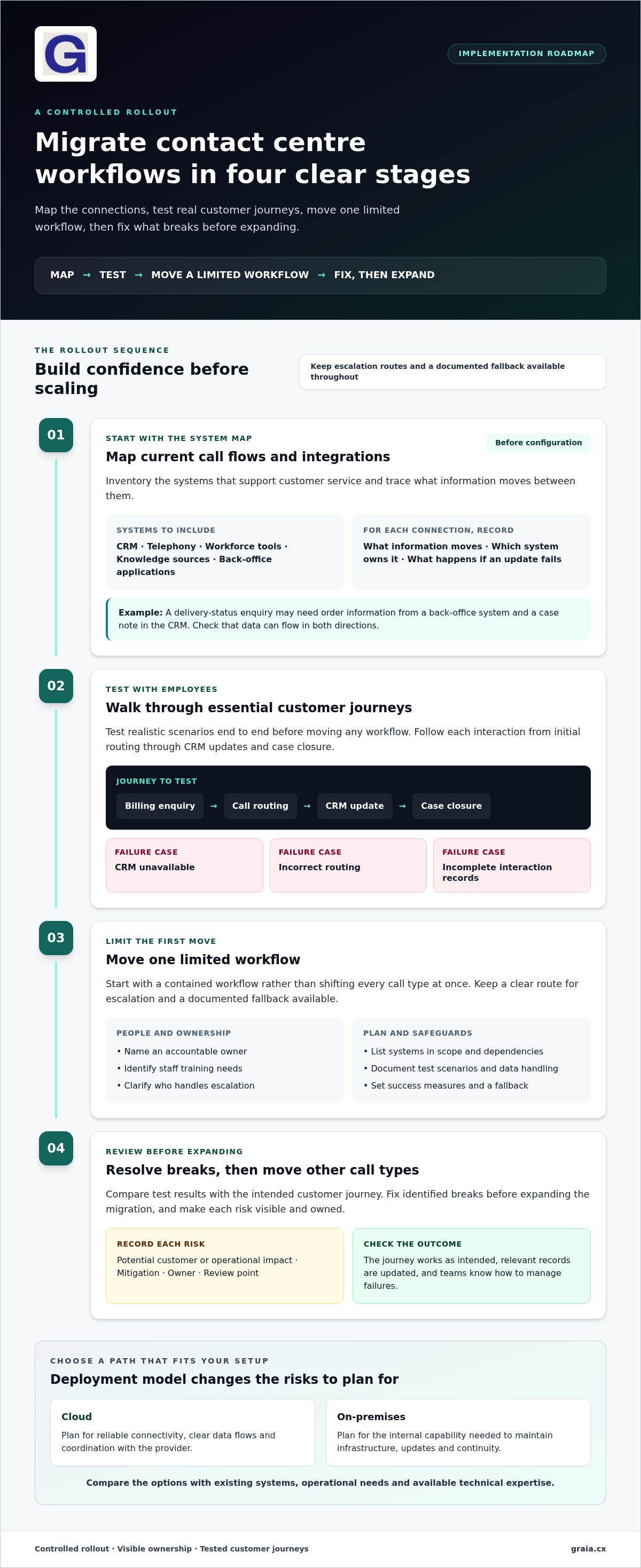
Cloud and on-premises contact centre systems have different implementation risks. Cloud deployments depend on reliable connectivity, clear data flows and coordination with the provider. On-premises systems require internal capability to maintain infrastructure, updates and continuity. Compare each option with your existing systems, operational needs and available technical expertise before choosing a migration path.
Minimise disruption by migrating in controlled stages. First, map current call flows and integrations. Next, test essential customer journeys with employees. Then move a limited workflow before expanding. Keep escalation routes and a documented fallback available at every stage. For example, test a billing enquiry from initial call routing through CRM updates and case closure, then resolve any breaks before moving other call types.
A practical implementation plan and risk checklist should identify an accountable owner, systems in scope, dependencies, test scenarios, staff training, data handling and success measures. Record each risk alongside its potential customer or operational impact, mitigation, owner and review point. Include failure cases, such as an unavailable CRM, incorrect routing or incomplete interaction records, and define how teams will detect and manage each one.
Start integration planning with a system inventory. List the CRM, telephony, workforce tools, knowledge sources and back-office applications that support customer service. For each connection, document what information moves, which system owns it and what happens if an update fails. A delivery-status enquiry, for instance, may need order information from a back-office system and a case note in the CRM. Test data flow in both directions to expose missing fields or outdated records before launch.
Front- and back-office integration should reduce hand-offs, not just connect more applications. Trace a request from the customer’s first contact to its completion. If an agent can’t see a service appointment or return status, the customer may be transferred or asked to repeat details. Assign ownership for each data field, test access permissions and verify that updates appear where employees need them. This improves efficiency while preserving a clear interaction record.
Call routing depends on accurate configuration across queues, skills and opening arrangements. Test scenarios such as a misrouted enquiry, a full queue and a transfer to a specialist team. Check that the destination receives relevant interaction context. During adoption, explain how routing rules work and gather feedback from employees about real calls. Their examples can reveal confusing transfers or workflow friction that system tests missed.
Use integration tests, employee feedback and staged rollout reviews to decide whether each workflow is ready to expand. For further contact centre implementation insights, explore practical planning guidance alongside your project’s own test results.
3. Staff motivation, retention and training
New contact centre technology changes people’s routines, not just their screens. Agents may worry that automation threatens their roles or disrupts familiar workflows. Address these concerns before rollout: explain which tasks may be automated, which decisions stay with employees and how customer conversations will change. For example, automation might handle a predictable account query, while an agent takes over when a customer raises an unusual problem.
Build training around actual tasks and give employees time to practise before launch. Start with short demonstrations of the new interface, routing process and escalation steps. Then use realistic exercises, such as handling an interrupted conversation or correcting an inaccurate automated response. Contact centre AI training takes time and may initially slow operations, so schedule practice around service demand rather than expecting agents to learn while managing a full queue.
Make learning ongoing. Assign a team lead to gather questions during the first weeks, then use them to update guidance and coaching. If employees repeatedly struggle to find a customer’s case history, address the workflow rather than blaming individual performance. Track training completion, common support requests and agent feedback at each rollout stage. These signals help managers identify skills gaps and target further coaching.
Retention also depends on showing how responsibilities may evolve. If automation reduces repetitive tasks, explain how agents can focus more on conversations that need empathy, judgement or problem-solving. Discuss role changes in team briefings and one-to-one meetings, and invite staff to identify tasks that remain frustrating or unclear. Employees who understand the purpose of a change can suggest practical improvements, while uncertainty about job security can deepen resistance.
Protect morale by making wellbeing support part of implementation planning. One practical approach described for contact centres is offering employees 30 minutes of wellbeing support every month. Managers can also review workload patterns, breaks and difficult interactions with their teams. For instance, a cluster of emotionally demanding complaint calls may prompt a discussion about coaching or support, rather than treating the issue as a simple performance shortfall.
Staff shortages make realistic scheduling essential. Training sessions, system testing and coaching all take people away from live customer service, so stagger participation and maintain cover for priority queues. Encourage agents to stand and move for 2–3 minutes every half hour, and take a five-minute screen break every hour. These steps can make demanding screen-based work more manageable during a busy transition.
Measure adaptation through practical evidence, not attendance alone. After training, ask agents to complete a sample customer journey using the new tools, then review where they needed help. Compare their feedback with customer outcomes and recurring support questions. If a process remains confusing, revise the guidance or workflow before expanding it. This makes staff experience part of implementation, helping teams reduce avoidable friction and improve service.
4. Communication and alignment between managers and agents
Managers and agents need a shared understanding of what a new platform changes. Before launch, brief teams on which tasks automation will handle, what remains an agent’s responsibility and how to raise issues. For example, explain whether agents should correct a CRM entry during a customer conversation or flag it for later review. This prevents teams from following conflicting processes and gives managers specific questions to address.
Investment plans show why frontline communication matters. In a CCW Europe community market study, 85 percent of thought leaders planned to invest in agent-facing AI over the following 12 months. Managers should translate that strategic intent into practical details: which workflows may change, what support agents will receive and how their feedback will shape implementation. A clear update connects investment decisions to the daily experience of handling customer interactions.
Start with practical workflow examples. Contact centre technology can automate gathering payment information and populating or updating CRM data, reducing repetitive steps for agents. Map the current process with the employees who handle it, then show how automation changes each hand-off. If the system fills a CRM field, clarify what agents must still verify and how to correct an error. A specific demonstration is more useful than a general promise of efficiency.
Make role changes clear early. As AI takes over routine tasks, agents may focus more on exceptions, complex enquiries and conversations requiring judgement. Managers can explain these shifts in team briefings and invite agents to identify tasks that remain unclear. For instance, ask how the team should handle a payment query when the automated workflow can’t match the customer’s record. Their feedback can expose gaps before they become routine frustrations.
Support should continue after the launch meeting. Schedule regular coaching check-ins where agents can bring examples of confusing workflows, incorrect system suggestions or unnecessary customer effort. Managers can review each interaction, clarify the expected action and send recurring problems to the implementation team. Keep a shared record of each issue, its owner and its resolution, so agents aren’t left reporting the same problem repeatedly.
Agree on shared measures before rollout, then review them with managers and agents. Use practical indicators such as repeat contacts, transfers, CRM corrections and unresolved workflow questions. If automation reduces manual data entry but leads to more corrections, investigate why instead of declaring success based on speed alone. Discuss findings in team reviews, explain resulting changes and track whether the fix improves subsequent interactions. This feedback loop grounds decisions in how the platform works in practice.
5. Data protection and regulatory compliance
Build data protection into contact centre design from the start, rather than treating it as a final software check. In the UK, call centres must consider the Data Protection Act when handling customer data. Map each process that collects, displays, records or transfers personal information. For example, trace how a caller’s payment details move from the conversation to a CRM record, and identify who can access them at each step. This can expose weak processes before they affect customers.
Start with a data-flow review across telephony, CRM, recordings and connected back-office systems. Record what information each system receives, where it is stored, who uses it and how it moves between applications. Then check that access permissions match each role. An agent handling an order query may need delivery details, but not every field in a customer’s account. Clear access boundaries reduce unnecessary exposure and clarify process ownership.
AI reliability depends on the quality of its inputs. Inaccurate or incomplete customer records can lead to unsuitable responses, incorrect recommendations or confusing handovers. Before using data to support automation, identify duplicate profiles, outdated guidance and missing fields. Test representative scenarios, such as a changed address or unresolved complaint, and compare the system’s output with trusted records. Assign an owner to fix recurring data problems and check whether those fixes improve the interaction.
Match security controls to the information being handled. Some contact centre software includes secure call recording, encryption and data masking to help protect customer information. Assess how these features fit your processes, including who can play recordings and how sensitive details appear to agents. Some systems can also generate compliance reports. Treat these as review tools: check that entries reflect actual interactions and that unresolved exceptions reach an accountable person.
UK teams should distinguish domestic data-protection considerations from wider regulatory references. The General Data Protection Regulation (GDPR) is a named framework for Europe, and AI solutions should comply with applicable data protection regulations. For each AI workflow, document what customer information it uses, why the workflow needs it and how an authorised person reviews its output. In Cirrus’s survey, 74% of contact centre leaders prioritised customer trust in AI, reinforcing the importance of transparent handling and oversight.
Make compliance part of ongoing operations, not a one-off launch check. Schedule reviews of permissions, data quality, recording access and AI-generated decisions. If a customer disputes an interaction, use available transcripts or recordings to examine what happened and whether the process worked as intended. Document the finding, assign corrective action and update staff guidance where needed. This connects governance with service quality rather than treating them as separate workstreams.
Use a structured data-protection review to identify process gaps before implementation and keep controls visible after launch. Explore contact centre implementation guidance to support your planning and governance discussions.
GraiaCX: Conversational Agent
GraiaCX offers a Conversational Agent for contact centres that want to automate routine enquiries while keeping people available for more complex conversations. Its Agentic Omni-Channel Platform brings voice, chat, email and social messaging together. Agent Assist supports agents in real time with features such as next-best-action suggestions.
For teams supporting customers across languages, Live Call Translation enables multilingual conversations without the need for bilingual staff. These capabilities can support priorities such as connecting customer channels, assisting agents during interactions and handling routine requests consistently. Choose workflows that match your needs, while keeping human oversight in place for situations requiring judgement or empathy.
To explore how GraiaCX could fit your contact centre, contact GraiaCX or visit graia.cx.
Turn implementation insight into your next move
Use your implementation plan as a living decision tool, not a document that ends at launch. As customer needs and workflows change, revisit which tasks technology should handle, where agents need support and how teams can learn from service outcomes. This keeps contact centre implementation risks visible as priorities evolve, rather than treating go-live as the finish line.
GraiaCX’s Conversational Agent can handle routine enquiries, Agent Assist supports agents during interactions, and Live Call Translation enables multilingual conversations. These capabilities can help organisations create a more connected customer experience while keeping people involved where judgement matters.
Contact GraiaCX to discuss your needs and explore a practical next step for your contact centre. With clear priorities and people at the centre of change, your team can move forward with purpose.
Frequently Asked Questions
How Can Modern Contact Centre Software Alleviate These Issues?
Modern contact centre software can reduce avoidable effort by connecting service channels and giving agents relevant information. For example, a customer who moves from webchat to a phone call can reach the appropriate team with interaction context available. AI can handle predictable requests or suggest next actions, while staff remain responsible for unusual cases. Start by matching each capability to a specific service problem and reviewing the results.
What can you do about it?
Start by identifying the customer or operational problem the implementation must solve. Assign an owner, record the systems and teams affected, then prioritise risks that could interrupt service or expose information. Test a representative customer journey before expanding the change. For example, run a sample enquiry from first contact through resolution and note where employees need extra guidance. Use the findings to adjust workflows, training and escalation routes before a wider rollout.
What are the main risks of implementing a contact centre?
The main contact centre implementation risks include broken integrations, inaccurate information, disrupted workflows, weak staff adoption and inconsistent customer experiences. These risks can compound: a missing CRM update may send an enquiry to the wrong team, causing repeat contact and agent frustration. Prioritise risks by their likely impact on customers, staff and service continuity. Assign each a named owner and response plan, then review the register throughout testing and rollout.
What are the most common causes of contact centre implementation failure?
Implementations can fail when teams choose technology before agreeing on the problem, underestimate dependencies or leave staff preparation until the last minute. Unclear ownership can also leave integration faults and workflow decisions unresolved. For instance, a project may test a new call flow but overlook how its outcomes reach a case-management team. Define success in operational terms, involve frontline employees in scenario testing and assign one person to coordinate decisions across teams.
What are the data protection and security requirements for UK contact centres?
UK contact centres must consider the Data Protection Act when handling customer data. In practice, map where recordings, messages and account details are accessed, and limit access to roles that need the information. Review how the chosen system protects data, including whether secure recording, encryption or data masking is available and relevant. Keep AI outputs under human review, especially when inaccurate customer records could affect a response or case decision.
What risks arise when integrating contact centre software with CRM and other systems?
Integration risks include mismatched customer identifiers, duplicate records, missing updates and failures between connected systems. A CRM may show an old case status even after a back-office tool records a resolution, leaving agents with conflicting information. Test common exceptions as well as successful journeys: changed customer details, reopened cases and unavailable system connections. Confirm which application owns each field and decide how teams will identify, report and correct data that fails to synchronise.
How can organisations manage staff training and adoption during contact centre implementation?
Make training specific to employees’ tasks, then let them practise before using the new system with customers. Use realistic examples, such as correcting a suggested response or escalating an enquiry automation cannot resolve. Give agents a clear way to report confusing steps and review their feedback with team leaders. After launch, provide targeted coaching and update guidance when repeated questions reveal a shared knowledge gap.
How long does it take to implement a contact centre platform?
Integration, data issues and agent adoption can take more than six months to produce real results.