
Compare contact centre platforms for large businesses
The most feature-rich platform isn’t automatically the right choice. The top-rated contact centre software for a large business is the one that fits its operating needs, connecting reliable reporting, existing systems, scalable capacity and consistent communication across channels. Contact centre software brings customer interactions and the tools teams use to manage them into one platform.
Choosing between platforms can feel complex when each promises a different mix of automation, analytics and customer experience. The decision gets clearer when you compare what matters in practice: whether leaders can see performance clearly, integrations fit existing workflows, and the platform can handle changing demand without fragmenting customer conversations.
This guide compares around 10 contact centre platform options and explains how to assess reporting, integrations, scalability and omnichannel communication. You’ll also find a practical way to weigh those criteria against your organisation’s priorities, so you can move from a crowded shortlist to a more confident decision.
Key Takeaways
- Prioritise dashboards that help leaders turn interaction data into clear operational decisions, not just more reports.
- Map CRM and collaboration workflows before comparing integrations, so you can spot where context may be lost between systems.
- Compare pricing models by what they include and how costs may change with usage, features and deployment needs.
- Assess how each platform handles growth and keeps customer conversations connected across voice, chat, email and social messaging.
- Use a consistent scorecard to compare providers against your organisation’s security, integration, scalability and support priorities.
Analytics, dashboards and reporting
Leading platforms bring AI, automation, workforce management and analytics together to help teams act on customer interactions. Capabilities may include speech analytics, call summaries, agent coaching, demand forecasting and dashboards that track service levels alongside customer experience.
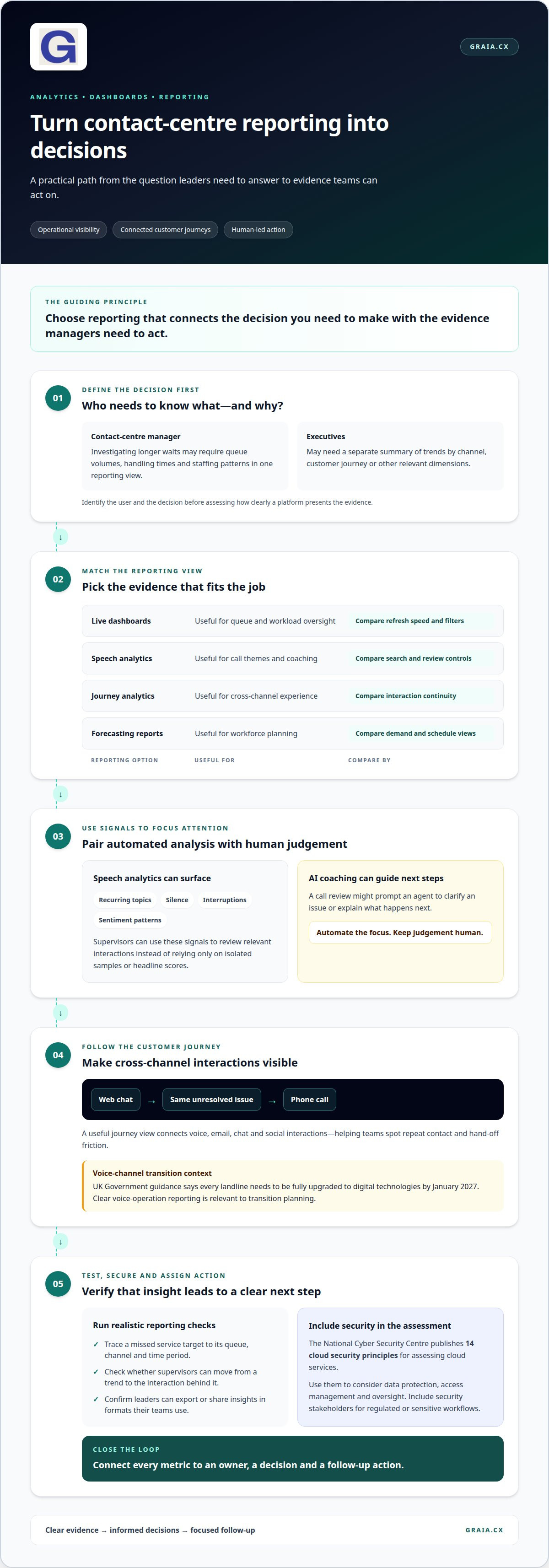
Start by defining the decisions your reporting must support. A contact centre manager investigating longer waits, for example, needs to compare queue volumes, handling times and staffing patterns in one reporting view. Executives may need a separate summary of trends by channel, customer journey or other relevant dimensions. Identify the user and decision first, then assess whether the platform presents the evidence clearly.
Speech analytics can surface recurring topics, silence, interruptions and sentiment patterns in calls. Supervisors can use these signals to review relevant interactions instead of relying only on isolated samples or headline scores. AI coaching can turn a call review into practical guidance, such as prompting an agent to clarify an issue or explain the next step. Use automated analysis to focus human attention, not replace human judgement.
Customer journey analytics connects interactions across voice, email, chat and social channels. Consider a customer who starts with a web chat, then calls about the same unresolved issue. A useful journey view makes that sequence visible, helping teams identify repeat contact and hand-off friction. In the UK, the UK Government’s guidance says every landline needs to be fully upgraded to digital technologies by January 2027, making clear reporting on voice-channel operations especially relevant during transition planning.
| Reporting option | Useful for | Compare by |
|---|---|---|
| Live dashboards | Queue and workload oversight | Refresh speed and filters |
| Speech analytics | Call themes and coaching | Search and review controls |
| Journey analytics | Cross-channel experience | Interaction continuity |
| Forecasting reports | Workforce planning | Demand and schedule views |
Choose reporting that connects the decision you need to make with the evidence managers need to act.
Security belongs in the reporting assessment because analytics can involve sensitive interaction data. The National Cyber Security Centre publishes 14 cloud security principles for assessing cloud services. Use those principles as a framework when evaluating how a platform protects data, manages access and supports oversight. For regulated or sensitive workflows, include security stakeholders in the review alongside contact centre operations and data teams.
Test reports against realistic scenarios before comparing platforms. Ask a manager to trace a missed service target from the dashboard to the underlying queue, channel and time period. Check whether supervisors can move from a trend to the interaction behind it, and whether leaders can export or share insights in formats their teams use. A useful analytics assessment links each metric to an owner, a decision and a follow-up action.
CRM and collaboration-tool integration
Contact centre software should connect customer conversations with the systems employees already use. A CRM record, for example, can show an agent recent cases before they answer, while a collaboration tool can help a specialist respond to an escalation. Map these journeys before comparing platforms: identify which teams need each data point, where it comes from and what action follows.
Assess Salesforce integration through a practical workflow, not just a tick beside the product name. Trace an inbound call from customer identification to case creation, then check how a follow-up appears in Salesforce. Repeat the exercise for outbound contact: confirm how the agent accesses the right record and logs the outcome. This can expose gaps in screen context, duplicate entries and hand-offs.
Enterprise integrations also require clear data ownership and flow. Decide which system is authoritative for customer details, case status and interaction history. Document what the contact centre platform reads and writes, and when updates should appear. If two systems can change the same field, define which update takes precedence. A clear ownership map helps prevent conflicting records as interaction volumes grow.
Collaboration tools matter when a frontline employee needs expertise without unnecessarily transferring the customer. Test a scenario in which an agent asks a specialist for help while keeping the conversation active. Check whether the request includes relevant case context, who can see it, and how the resolution returns to the CRM. Agent Assist can provide timely guidance; integration design determines how that guidance fits existing workflows.
- Customer records: Check how agents find and open the correct CRM profile.
- Case updates: Confirm which interaction outcomes transfer back to Salesforce or another CRM.
- Collaboration: Test how teams share context across tools such as Microsoft Teams or Slack.
- Outbound workflows: Follow a record from a CRM task through contact and outcome logging.
- Exceptions: Review how failed updates are surfaced, corrected and audited.
Run a controlled test with representative roles, records and permissions. Include an agent, supervisor, CRM administrator and enterprise technology owner. Give each person a realistic task, then note where they switch applications, re-enter data or lose context. This shows whether the integration reduces friction or merely shifts it between screens.
Finally, distinguish a native connector from an API-based integration in the proposed design. Ask how each supports authentication, field mapping, error handling and future changes to workflows. The right approach depends on your systems and processes, not a label alone. For more practical guidance on connected customer experiences, explore contact centre integration insights.
What Is Contact Center Software?
Contact centre software brings inbound and outbound conversations into tools for routing, agent handling and oversight. A cloud contact centre can connect voice workflows with digital channels, customer records and team processes. For a large organisation, the key question is how those components fit its infrastructure and operating model.
Pricing typically reflects more than the number of agents. Enterprise platform pricing depends on the requirements and is provided after a quote request; cost factors may include user seats, channel coverage, integrations, automation and deployment needs. Compare the full scope, including implementation, usage charges and optional features, rather than treating a starting licence price as the total cost.
Ask how pricing changes when teams add seasonal users, supervisors or channels. Minimum seat requirements can affect a small initial deployment, while user-based plans can make expansion easier to forecast. Pay-per-use models tie some charges to activity, such as call minutes or message volumes. They may suit variable demand, but budgeting requires clear assumptions about usage and included allowances.
Zendesk and Aircall are names buyers may encounter when comparing contact centre options. Assess each against the same workflow, not just its feature list. For Zendesk, map how customer conversations connect to support cases and existing service processes. For Aircall, examine the voice workflow, including inbound routing, outbound activity and how agents access customer context. Compare the capabilities and commercial scope described for each option without assuming the same package meets identical needs.
- Seat model: Identify which roles require paid access, including supervisors and administrators.
- Usage model: Separate fixed charges from activity-based costs and define expected call or message patterns.
- Included features: Compare reporting, integrations, automation and channel access in the proposed package.
- Growth path: Model how adding teams, locations or workflows changes the total contract.
For UK procurement, compare vendors on three documented contract points: local support arrangements, service-level commitments and data-centre locations. Assess Zendesk and Aircall using the same criteria, then weigh each against your organisation’s support coverage and infrastructure requirements.
Start your comparison with a representative operating scenario. Trace a customer query from first contact through resolution, then list the agents, tools and channels involved. Apply the same scenario to each platform and record what the quoted scope includes. This can reveal whether a low entry price leaves essential workflows outside the package.
Finally, distinguish scalable capacity from scalable cost. A platform may accommodate more agents or interaction types while its charging model changes with seats, usage or features. Compare those mechanisms with forecast demand and procurement priorities before deciding which structure best supports your contact centre.
Scalability and omnichannel communication
Scalable platforms handle changing interaction volumes while keeping customer conversations connected across channels. Compare capacity, routing controls and the continuity customers experience as communication moves between voice and digital service.
Omnichannel Communications and Routing
Omnichannel routing directs voice, chat, email and social interactions according to rules such as skills, availability or customer context. Unlike channel-by-channel routing, it can use the same customer journey to inform the next hand-off. Test a scenario where someone starts in chat and then calls: the agent should receive relevant context rather than restarting the conversation.
Scalability means more than adding users. Assess how a platform handles seasonal peaks, new teams and additional channels without forcing separate operating processes. The DVLA’s AI-powered web chat handles 300,000 sessions a month, demonstrating the scale a digital service can face. Its web chat manages 30% of interactions through self-service, while the project has reduced time customers spend in IVR by 50%.
Omnichannel Customer Support
Omnichannel customer support provides a connected experience across communication channels, rather than simply offering several ways to get in touch. Compare how platforms preserve interaction history, apply consistent service rules and support smooth transfers between channels. A customer following up by email after a call, for example, should not need to repeat details already captured.
For a large operation, test real journeys that reflect different customer needs. Use one example that begins with a routine request and another that requires a specialist. Track whether routing sends each interaction to an appropriate team, customer context travels with it, and agents can continue without creating duplicate records. These tests reveal the difference between broad channel coverage and joined-up support.
Five9 is one platform to include when comparing omnichannel and AI tools. Assess how its available capabilities match your workflows: examine channel routing, automation, agent hand-offs and the way customer context is presented. Compare those results with other shortlisted platforms using the same scenarios, rather than treating an AI label or channel count as proof of operational fit.
- Capacity: Test how the platform responds to demand peaks and expanding teams.
- Routing: Compare skill-based assignment, channel transitions and escalation paths.
- Continuity: Follow customer interactions across voice, chat, email and social.
- Automation: Identify which routine requests can be resolved without an agent.
- Control: Confirm managers can adjust workflows as services and customer needs change.
Choose a platform that can scale capacity while preserving context and consistent support across the customer journeys your organisation handles.
Contact centre platform providers
Independent reviews can help build a shortlist, but the right provider depends on your workflows and operating priorities. Compare platforms against the same criteria, then test how each supports customer service in practice.
Independent Reviewer Ratings
Independent reviewer ratings summarise user feedback or product assessments, but each score uses its own criteria. Check the review date, product edition and reviewer audience before comparing results. Feedback about setup, support or a particular feature may matter more to your organisation than the overall rating.
For a useful comparison, note what each review evaluates and match those points to your requirements. When assessing top-rated contact centre software for a large business, weigh reviewer feedback alongside operational evidence, such as whether a platform supports the required channels and workflows. Treat ratings as one input, not a substitute for scenario-based evaluation.
Platform Features, Scalability, and Integrations
Compare providers by tracing the same customer journey through each platform. For example, test how Genesys, NICE CX, Avaya, Five9, Zendesk or Aircall handles an inbound enquiry, its transfer to a specialist and the follow-up record. This highlights differences in routing, agent context and workflow continuity more clearly than comparing feature lists alone.
Next, test integration and growth requirements. Map how each shortlisted platform connects with your CRM and collaboration tools, including which system owns customer details and where interaction outcomes are recorded. Assess how workflows could extend to new teams, channels or service lines. A scenario involving a specialist escalation during a busy period can reveal whether the platform adapts without disrupting the customer response.
Provider employee numbers offer context, but they do not establish product quality or service capability. Consider the provider’s structure alongside its platform roadmap, support commitments and ability to meet your operational needs. When comparing top-rated contact centre software for large businesses, distinguish provider size from evidence gathered through product and service assessments.
- Review evidence: Note the audience, criteria and date behind each independent rating.
- Feature fit: Test a representative customer journey across shortlisted platforms.
- Integrations: Track how customer and case information moves between systems.
- Scalability: Compare how workflows accommodate new teams and channels.
- Provider assessment: Evaluate employee numbers as context, alongside documented commitments.
Use these comparisons to build a shortlist grounded in your organisation’s needs. Explore contact centre platform insights to inform your assessment.
GraiaCX: Conversational Agent
GraiaCX is a natural next step for organisations looking to connect automation with human support. Its Conversational Agent can understand customer intent and emotion, then resolve routine enquiries autonomously. For more complex conversations, Agent Assist provides real-time suggestions to support agents. The Agentic Omni-Channel Platform brings voice, chat, email and social messaging together, while Live Call Translation supports multilingual conversations in over 100 languages without bilingual staff.
Consider automation and agent-support capabilities when your comparison highlights disconnected channels, repetitive routine enquiries or the need to serve customers across languages. GraiaCX brings these capabilities into customer interactions through its Conversational Agent, Agent Assist and Live Call Translation. To explore how these solutions could fit your contact centre, schedule a consultation with GraiaCX.
Turn your shortlist into a confident decision
Connect your platform choice to the experience you want customers and employees to have. Define the changes that matter most, then use them to guide evaluation and implementation priorities. The top-rated contact centre software for a large business is the platform that supports those priorities in practice, not simply the one with the longest feature list.
For organisations bringing AI and human support together, GraiaCX offers a Conversational Agent, Agent Assist and Live Call Translation. These capabilities address different needs, from handling routine enquiries to supporting agents and multilingual conversations. Consider where each fits within your customer journey and operating model.
A thoughtful decision creates room to evolve without losing sight of the people behind every interaction. Set your priorities, align stakeholders around them and take the next step with a clear purpose. Talk to GraiaCX about your needs and explore how its approach could support your contact centre.
Frequently Asked Questions
How current is this list?
This comparison reflects information current to October 2026. Contact centre platforms change over time, so treat the comparison as a decision framework rather than a permanent ranking. Before choosing, compare the current product scope with your requirements, including channels, integrations, deployment model and contract terms. A feature that matters to your service may be available only in a particular edition or configuration.
Is a cloud contact centre secure enough for regulated sectors?
It can be suitable when the organisation’s security controls, data handling and governance meet its risk requirements. Assess identity and access management, encryption, audit records, incident processes and how suppliers handle sensitive interactions. The National Cyber Security Centre publishes 14 cloud security principles for assessing cloud services. For a regulated operation, involve security and compliance teams early and map controls to the organisation’s specific obligations.
What are the top-rated contact centre software platforms for large enterprises in the UK?
There is no single universal top-rated platform for every UK enterprise. The options covered here include Five9, Zendesk, Aircall, Genesys, NICE CX and Avaya, each to be judged against your operating needs. Compare them using the same customer scenario, then weigh integration fit, channel workflows, reporting and growth requirements. Independent ratings can inform a shortlist, but the criteria behind each rating matter as much as its score.
Which platforms support omnichannel customer service, including voice, email, chat, and social media?
Channel coverage varies between platforms, so compare the specific channels and how they work together. Check whether an agent can move from a customer’s email to a voice conversation while retaining relevant history, and whether social enquiries enter the same service workflow. GraiaCX’s Agentic Omni-Channel Platform combines voice, chat, email and social messaging. Assess each option using journeys that reflect your customers’ actual contact patterns.
How do enterprise contact centre platforms handle security, GDPR, and UK data residency?
Platforms support security through controls such as access management, encryption, logging and defined data-handling processes. UK call centres need to comply with GDPR. Data residency is a separate procurement question: examine where interaction data is stored and processed, how backups and subprocessors are handled, and whether data can move across borders. Record the agreed arrangements in your supplier assessment and contract review.
What CRM and business system integrations are available for leading contact centre software?
Integration options depend on the platform and the systems your organisation already uses. Common enterprise workflows connect contact handling with a CRM, ticketing system or collaboration tool. A Salesforce integration, for example, may present a customer record during an interaction and return the outcome to the case history. Compare available connectors, API options, data ownership and error handling against your actual workflow before choosing an approach.
What implementation timescales, migration steps, and training are typical for large businesses?
Implementation timing depends on the number of workflows, integrations, channels and teams involved. A practical migration begins with mapping current call flows and data, then configuring and testing a limited set of journeys before wider rollout. Plan role-based training for agents, supervisors and administrators, using realistic customer scenarios. GraiaCX's published typical deployment timeline is 4-6 weeks, while broader enterprise programmes depend on scope and readiness.
What are the main risks and limitations of deploying cloud-based versus on-premises contact centre software?
Cloud platforms reduce the need to operate contact centre infrastructure locally, but service quality depends on connectivity and supplier operations. On-premises deployments offer direct control over local infrastructure, while placing more responsibility for maintenance, upgrades, capacity and resilience on the organisation. Both models require integration planning, security controls and continuity procedures. Compare operational responsibilities and failure scenarios with your organisation’s support model and technology strategy.