
Chatbot vs Conversational AI: Differences and Use Cases
A chatbot that sounds more natural isn’t automatically more capable. A basic chatbot typically follows defined rules and decision paths. Conversational AI can interpret intent, retain context across turns and select or generate responses. Upgrading from a basic chatbot to conversational AI means changing not only how the system responds, but also what knowledge, integrations and permissions it can use.
If your current bot handles predictable questions but struggles when a customer rephrases a request or asks a follow-up, the difference matters. The right choice depends on the task: rule-based chatbots can suit structured, repeatable queries, while conversations requiring context or connected business actions call for broader capabilities.
This guide explains how chatbots and conversational AI differ, where chat and voice assistants fit, and how each can support customer service. It also covers how trusted knowledge, system integrations, access permissions and human handoffs shape what an AI assistant can safely and usefully do.
Key Takeaways
- Match the technology to the conversation: rule-based bots suit predictable paths, while conversational AI can interpret intent and context across follow-up questions.
- Start with customer-service tasks that have clear outcomes, such as answering routine queries or guiding troubleshooting.
- Ground responses in approved business knowledge and connect systems through controlled integrations, with permissions that limit what the assistant can access or do.
- Design a clear human handoff for requests that are sensitive, ambiguous or beyond the assistant’s authority.
- Assess conversational AI across chat and voice use cases, then measure whether it improves the customer journey and supports your service goals.
Chatbot vs conversational AI - What’s the difference?
A rule-based chatbot follows predefined prompts and routes, while conversational AI interprets natural language and context. For example, a customer can ask about a delayed order, then ask, “Can I change the address?” without restating which order they mean.
Machine Learning and Language Processing
Machine learning helps conversational AI identify patterns in language, while natural language processing analyses the words and structure people use. Together, these capabilities can help an AI assistant understand that “I can’t get into my account” is an access problem, even if the customer doesn’t use a prepared menu option.
This matters when customers describe the same issue in different ways. A menu-driven bot may require someone to select “account access”; a system using machine learning can classify the message and choose a relevant response or route.
Understanding Language and Generating Responses
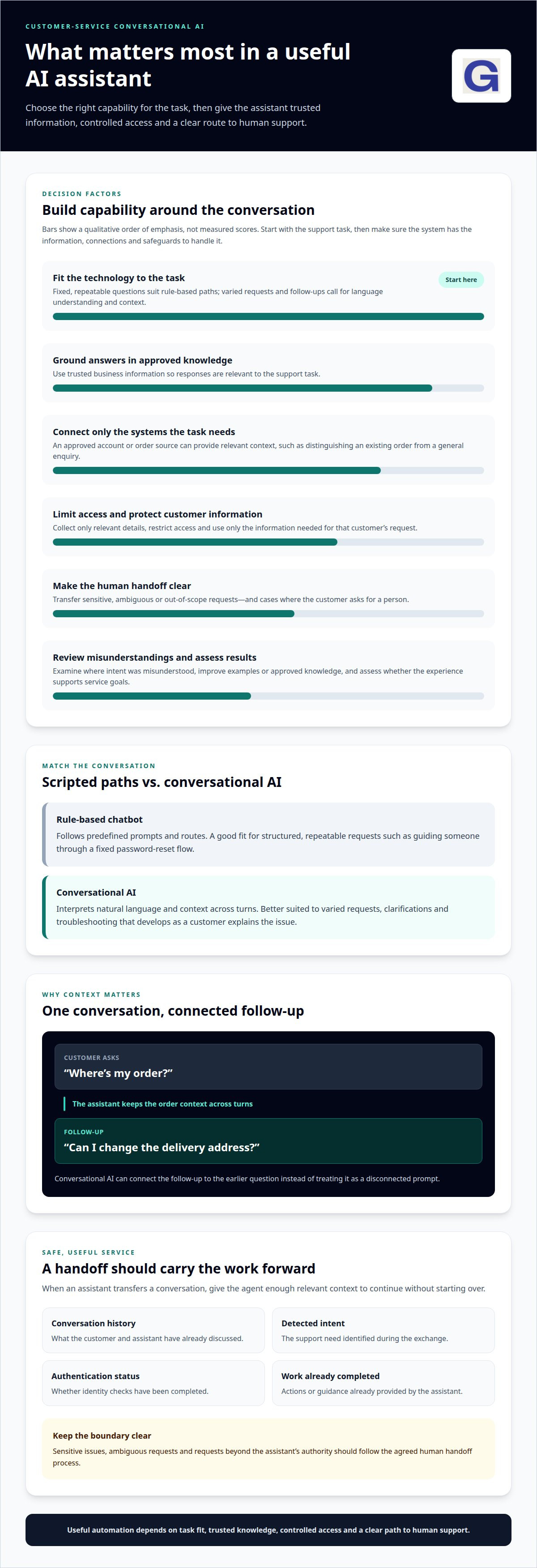
Natural-language understanding identifies a message’s intent and relevant details, while generative AI creates a response based on that interpretation. If a customer asks, “Where’s my order?” then follows up with, “Can I change the delivery address?”, conversational AI can connect the second question to the first.
That context can make an exchange feel coherent rather than like a sequence of disconnected prompts. A generative model, such as GPT-4, can produce natural-sounding language, but the system still needs appropriate knowledge and controls to answer usefully.
Some language models can also generate code and help explain errors. For example, a developer might describe a change in plain English and request a code snippet, or paste an error message and ask what it means. This can support routine development work, but generated code needs testing before it’s used in a live system.
Language understanding can improve through a clear review cycle. First, examine interactions where the system misunderstood intent, such as treating “I’ve been charged twice” as a general billing question. Then improve the examples, intent labels or approved knowledge for that case, and assess whether the revised response addresses it more accurately.
The difference is not simply whether a chatbot uses AI. A basic bot may follow fixed decision paths, while conversational AI combines language interpretation, dialogue context and response selection or generation. For teams upgrading from a basic chatbot to conversational AI, the practical question is whether customers need flexible exchanges, such as clarifying a support issue, rather than one-step answers to predictable questions.
Examples of customer-service chatbot and virtual-assistant deployments
For UK businesses, a suitable conversational AI platform should fit the support task, connect to relevant systems and give teams appropriate control. Chatbots handling customer information should follow UK data-protection requirements through limited data collection, restricted access and safeguards for information used in support.
Support Outcomes and Technology Choices
Support outcomes depend on matching automation to the type of customer interaction. A rule-based chatbot can guide someone through a fixed password-reset flow, while conversational AI can interpret a less predictable request, such as a billing query that needs clarification.
AI and automation can support complaint resolution, call processing, and customer and employee experiences. Outcomes depend on the use case and the quality of the information and workflows behind the system. An enterprise team might begin with order-status questions, where a clear request can be matched to an approved source.
Choose technology based on the work it needs to do. A menu-based bot suits repeatable enquiries with a small set of responses. Conversational AI is better suited to varied interactions, such as troubleshooting that develops as a customer explains the issue. A virtual assistant can also support agents by surfacing relevant guidance during a live conversation, rather than taking over the interaction.
Personalised Support and Agent Hand-Offs
Personalised support uses relevant customer context to make responses more useful. For example, an assistant connected to an approved account record could distinguish a question about an existing order from a general product enquiry. It should use only the information needed for that task, with access limited to the appropriate account.
Self-service works best for routine requests with a clear resolution, such as checking an order or finding troubleshooting guidance. If a customer asks for a person, describes a sensitive issue or raises a request outside the assistant’s authority, the system should start the agreed handoff process. A useful transfer gives the agent the conversation history, detected intent, authentication status and details of work already completed.
For UK operations, privacy controls should shape the whole interaction: collect only relevant details, limit who can access them and never use one customer’s information to answer another customer’s query. These safeguards support trustworthy personalisation without turning every service conversation into unrestricted data access.
To explore how conversational AI can support connected customer-service interactions, browse conversational AI insights.
Differences between rule-based chatbots and conversational AI
To upgrade a basic chatbot, first map its common journeys and identify where scripted paths fail. Then connect conversational AI to approved knowledge and relevant workflows, test its responses against real support examples, and retain clear routes to human agents.
A rule-based chatbot follows scripts and decision trees. For example, a visitor choosing “track an order” might then select “delivery date” or “report a delay”. Each answer leads to a prepared response or another defined option. This works well when enquiries follow predictable paths and the correct response can be written in advance.
The same structure can become brittle when a customer uses unexpected language. If someone types “My parcel hasn’t arrived”, a bot looking only for “track an order” may not recognise the request. Adding every possible phrase to each decision tree can make the platform harder to maintain and improve.
Conversational AI uses machine learning to interpret varied requests and select or generate a response. A customer might write, “The delivery’s late, can you tell me what’s happening?” The system can recognise a delivery issue without requiring the exact wording in its script. Its flexibility depends on the knowledge and controls behind it, not simply on sounding natural.
A hybrid design often makes sense. Keep rule-based responses for fixed processes, such as explaining how to update a contact preference. Use conversational AI when customers describe the same problem in different ways, such as asking for help with a product fault. Both approaches can work in one journey: AI identifies the request, then a scripted step confirms a choice before an action proceeds.
For teams upgrading from a basic chatbot to conversational AI, a practical sequence is:
- Review existing journeys. Use conversation logs to find repeated questions, misunderstood requests, and points where customers abandon a scripted path.
- Choose a focused use case. Start with a frequent interaction that has a clear outcome, such as finding guidance for a known service issue.
- Prepare knowledge and workflows. Select approved answers and define which actions the assistant can take, such as creating a support case.
- Test and refine. Try different phrasings of the same request, check the responses, and improve the instructions or knowledge when results miss the intended answer.
Keep assistants within a defined scope. For example, an AI system could explain a returns process but leave an unusual exception to an agent. Scripted responses remain useful when exact wording matters; conversational intelligence adds flexibility when customers use different language. Compare resolution, escalation and response quality across the chosen journey to decide what to expand next.
Knowledge sources, integrations and permissions
Conversational AI needs trusted information, connected systems and defined access. Together, these determine which answers it can give and which customer-service actions it can take.
Integrations Across Tools and Workflows
Integration connects an AI assistant to approved knowledge and business tools, so it can support a complete workflow rather than generate isolated answers. For example, a CRM connection can provide relevant case details, while a controlled API can create a support case. Standardised integration can span more than 300 tool categories, but each connection should serve a defined use case.
Consider the sequence of steps. Natural language processing can identify a request, after which the assistant retrieves relevant information or calls an approved tool. If a customer asks to update delivery details, the system should follow the existing verification and update workflow rather than inventing a new process.
Multi-channel integration helps keep service consistent across chat, email, voice and social messaging. A customer who starts in chat and continues by phone shouldn’t have to repeat completed steps. Shared workflow rules and consistent knowledge help teams manage these transitions as usage grows.
Migrating Content and Preserving Workflows
Migration means turning existing chatbot scripts and support materials into reviewed knowledge, dialogue rules and workflow actions. It matters because a familiar process, such as creating a case, should remain reliable while the assistant gains flexibility in understanding requests.
Start by grouping current content by customer intent. For example, separate password-reset answers from account-security escalations. Keep approved factual responses, update outdated instructions and map each journey to its existing system action. Then test the new experience against typical customer phrasings and confirm that each workflow still completes.
- Inventory existing content. Gather scripts, FAQs, decision paths and escalation triggers from the current chatbot.
- Map each journey. Record its starting request, required information, system action and completion point.
- Ground responses. Connect answers to approved sources, and use controlled APIs for actions requiring auditable outcomes.
- Test permissions. Confirm that access matches the task; an unauthorised request for another customer’s account data must be refused.
Keep actions within a defined scope during rollout. For instance, the assistant might answer a returns question while an agent handles exceptions. Teams should be able to review responses, restrict access and disable actions that aren’t ready. This helps organisations preserve proven support workflows while introducing conversational capabilities in measured stages.
Conversational AI applications, including chatbots and voice assistants
Conversational AI supports chat and voice interactions, from answering questions to guiding service workflows. Risks include inaccurate generated answers and unauthorised access, so businesses need approved knowledge, restricted permissions, response monitoring and human escalation.
In website chat, a virtual assistant can help a customer find a product, troubleshoot an issue or create a support case. Generative AI can interpret different ways of expressing the same intent, then draw on connected knowledge or tools to respond. The useful measure is whether the interaction reaches the customer’s intended outcome, not whether the answer sounds fluent.
Voice assistants apply conversational technologies to spoken requests. A caller might explain a billing problem in their own words, while speech processing identifies the request and routes it to an appropriate workflow. Voice can suit people who prefer speaking or need help away from a screen; chat can be more practical for sharing written instructions.
Applications can span channels. A customer could begin a query through social messaging, continue by email, then speak with an agent. Consistent context helps the next person or assistant understand what has already happened. Without that continuity, customers may need to repeat details and the service journey can feel fragmented.
Generative AI is one capability within conversational AI, not the whole system. Dialogue management, intent recognition, routing, integrations and operational controls shape how an assistant behaves. For example, it might explain a returns process using approved guidance, but route an unusual case to an agent instead of improvising an exception.
Hallucinations occur when a system produces a plausible-sounding answer that isn’t supported by reliable information. Reduce this risk by grounding responses in approved sources, limiting business actions to controlled workflows and reviewing answers against real customer examples. If the system can’t find a supported answer, it should avoid presenting a guess as fact.
Security needs equal attention. Restrict access to the information and actions required for each use case, and refuse requests for another customer’s account data when the requester lacks permission. Teams should also be able to review responses and disable actions that aren’t ready. These controls help organisations expand automation without giving every assistant unrestricted access.
Human access remains part of the design. In Gartner’s 2026 survey of 3,566 B2B and B2C customers, conducted in February and March, 87% said access to a human agent was essential when companies use generative AI for customer service. A strong hand-off should pass the conversation transcript, detected intent, authentication state, and completed work to the agent.
Choose applications by matching the channel and technology to the task: use chat for guided written help, voice for spoken support, and agents for sensitive or unusual cases. Explore conversational AI applications and how they can support connected service experiences.
GraiaCX: Conversational Agent
GraiaCX’s Conversational Agent helps customer-service teams handle routine enquiries through AI-driven conversations that understand intent and emotion. It can resolve suitable requests autonomously, while Agent Assist gives human agents real-time suggestions and next-best-action guidance.
For organisations serving customers across channels, the Agentic Omni-Channel Platform brings voice, chat, email and social messaging together with AI-driven automation. Live Call Translation supports multilingual conversations in over 100 languages, helping teams serve customers without relying on bilingual staff.
These capabilities may suit teams whose basic chatbot struggles with varied requests, disconnected channels or multilingual interactions. Start with a clear support need, such as resolving routine enquiries or assisting agents with complex conversations. Schedule a consultation with GraiaCX to discuss how conversational AI can fit your customer-service workflows.
Shape the next generation of customer conversations
Upgrading from a basic chatbot to conversational AI is an opportunity to rethink the customer support experience, not simply replace one tool with another. Start by choosing a customer need that matters, then shape an interaction that feels clear, useful and connected from the first message through to resolution.
Build momentum through deliberate decisions: define what the assistant should handle, what it should leave to a person and how success will be assessed. This gives teams a practical foundation for evolving service while keeping customer needs at the centre. Progress comes from improving real interactions, learning from them and refining the experience over time.
Contact GraiaCX to discuss your options, and take the next step towards more capable, thoughtful customer conversations.
Frequently Asked Questions
How is conversational AI different from generative AI?
Conversational AI describes systems designed to manage exchanges with people; generative AI describes technology that creates content, including text. A support assistant may use generative AI to phrase an answer, while dialogue management determines what happens next. For example, it could retrieve an approved returns policy, explain it in plain language, then direct an exception into the appropriate service process.
Is conversational AI part of NLP?
Conversational AI uses natural language processing, but it involves more than NLP alone. NLP helps a system work with human language, such as identifying a question or extracting a date. Conversational AI can combine that capability with dialogue management, context, routing and connected workflows. Recognising a requested appointment date is only one step; checking availability and confirming the booking are separate tasks.
What are the types of conversational AI?
Common types include text-based assistants, voice assistants, generative chatbots and hybrid systems. These categories can overlap: a voice assistant may use generative AI, while a hybrid assistant combines flexible language handling with fixed business rules. What matters is the job each system performs. A web chat assistant may answer product questions, while a voice assistant interprets spoken requests and routes callers.
What is the difference between a basic chatbot and conversational AI?
A basic chatbot usually responds through predefined menus, keywords or scripted paths; conversational AI can interpret varied wording and use context across an exchange. Imagine a customer typing “I need to move my booking” rather than selecting a prepared menu option. A basic bot may need a matching route, while a conversational system can recognise the likely intent and continue with relevant follow-up questions.
What business benefits can conversational AI provide compared with rule-based chatbots?
Conversational AI can handle varied phrasing, support follow-up questions and connect language understanding to business workflows. This can reduce the need to create a separate script for every way customers express an issue. For example, a service team could use it to triage product-support queries while retaining fixed rules for eligibility checks. Its usefulness depends on how well it fits customer needs and operational processes.
What data and integrations are needed to upgrade a chatbot?
Begin with current scripts, approved help content and examples of real customer questions. Then identify the systems needed for each task, such as a CRM for case history or a booking system for appointment changes. Give the assistant access only to relevant information and actions. For a booking change, it may need appointment details and an authorised update function, not access to unrelated account records.
How should businesses measure conversational AI performance and ROI?
Set a baseline for the chosen task, then track resolution, escalation, repeat contact and customer feedback. Add operational measures, such as agent time spent on transferred cases and tasks completed without manual intervention. To assess ROI, compare the value of improved service and released staff capacity with implementation and ongoing operating costs. Review results by use case, since averages can hide weak journeys.
When should conversational AI hand conversations over to a human agent?
Handover is appropriate when a customer requests a person, the issue is sensitive or the system can’t answer from reliable information. It also matters when a requested action exceeds the assistant’s permissions, such as changing account details without sufficient authentication. The receiving agent should get a concise conversation summary, the customer’s stated intent and details of completed steps, so the customer can continue without repeating the whole story.