
CCaaS integration with Salesforce for contact center agents
Disconnected tools create avoidable work for contact centre agents. A well-designed CCaaS integration with Salesforce connects customer records with voice and digital interactions, helping agents see relevant context and manage conversations within a connected workflow. It can also link call outcomes and recordings to customer records, giving teams a clearer view of what happened and what should follow.
Agents know conversations are harder to manage when customer history, channel controls and follow-up tasks sit in separate places. Integration can reduce that friction, but it works best when information flows reliably and the workflow reflects how the team serves customers. This guide explains how the connection works and what it can simplify.
You’ll learn how Salesforce and CCaaS can connect customer information across voice, chat, email and social messaging, support agents and capture interaction outcomes. We’ll also cover implementation choices, call logging and recordings, and factors that shape a practical integration. The goal is a more coherent agent experience, with customer context close at hand and fewer avoidable hand-offs.
Key Takeaways
- Design the agent workspace around the customer context and actions agents need, rather than simply placing more data on screen.
- Plan account lookup and field mapping carefully so interactions connect to the right Salesforce records and useful details remain consistent.
- Assess how a CCaaS integration will be implemented and supported, including the guidance available as workflows evolve.
- Set clear rules for call outcomes, activity logs and recordings so teams can use interaction data effectively.
- Explore how conversational AI, agent assistance and an omni-channel platform can support a more connected contact centre experience.
Unified customer views across voice and digital channels
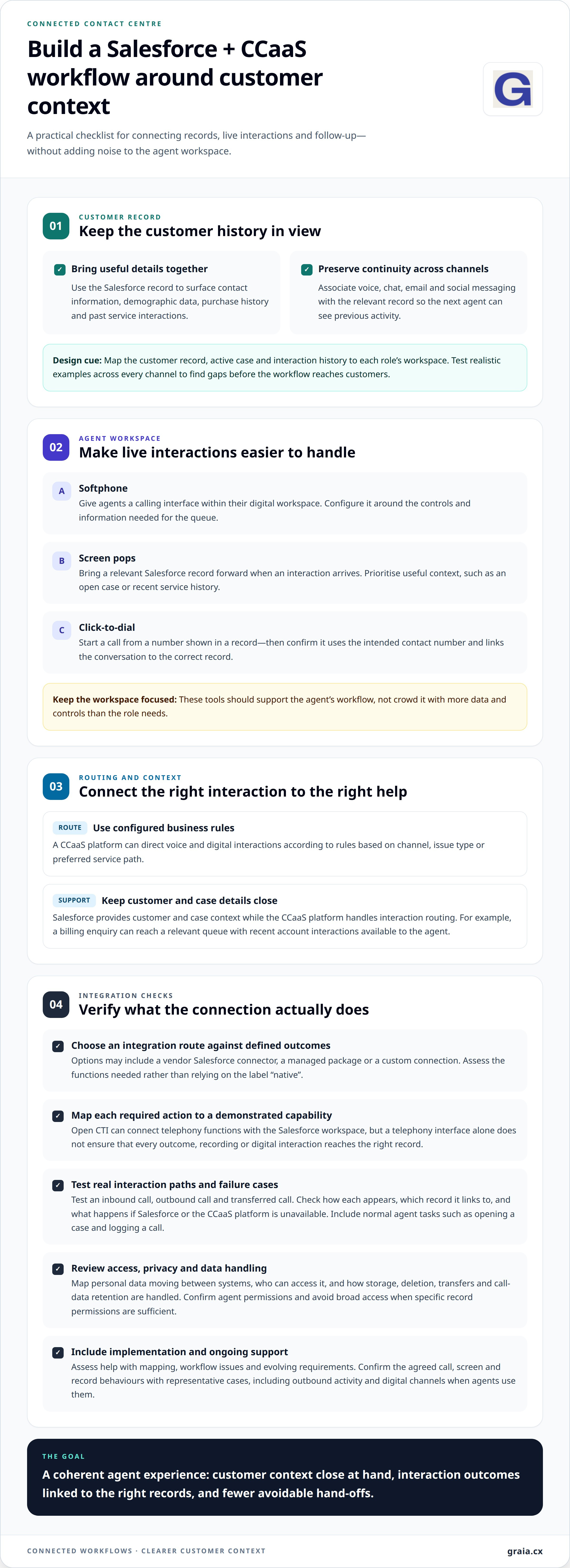
A CCaaS integration with Salesforce can bring customer records and contact-centre interactions into a more unified agent workflow. Salesforce acts as a central customer information system, holding details such as contact information, demographic data, purchase history and past service interactions. When a customer moves from a voice call to chat, agents can use that record to understand the context rather than starting again.
That view matters across channels. A customer might email about an order, then call about the same issue. If both interactions are associated with the relevant Salesforce record, the agent can see previous service activity and respond with greater continuity. The same principle applies to social messaging and other digital channels: capture each interaction in context so it can help the next person handling the case.
Softphones, screen pops and click-to-dial can make the connection practical during live work. A softphone gives agents a calling interface within their digital workspace, while a screen pop can bring a relevant Salesforce record forward when an interaction arrives. Click-to-dial lets an agent start a call from a number shown in a record. For example, an agent reviewing a customer’s case could select the displayed number instead of switching to a separate dialler and entering it again.
These tools should support the agent’s workflow, not crowd it. A configurable softphone can be arranged around the controls and information needed for a particular queue. Screen pops can prioritise useful records, such as an open case or recent service history. Click-to-dial is most helpful when it uses the intended contact number and links the resulting conversation to the correct record.
Routing also shapes the experience. A CCaaS platform can direct voice and digital interactions to agents according to configured business rules, while Salesforce provides customer and case context. Teams can design rules around the channel, issue type or preferred service path. For instance, a billing enquiry could reach a relevant queue, with the customer’s recent account interactions available to the agent.
Consistency can support customer satisfaction by helping customers avoid repeating information when they change channels. It also gives service operations a clearer view of interactions across voice, chat, email and social messaging. A connected platform won’t make every issue simple, but it can help agents focus on resolving the customer’s need instead of reconstructing its history.
For a UK contact centre, the key design decision is how much context each role needs. Map the customer record, active case and interaction history to the agent’s workspace, then test the flow with realistic examples across every channel. This helps reveal gaps before the workflow reaches customers.
Integrating third-party CCaaS providers with Salesforce
A third-party connection links a contact-centre platform with Salesforce records and agent workflows. The integration may use a vendor’s Salesforce connector, a managed package or a custom connection. The right approach depends on which interactions must appear in Salesforce and how agents will use them. Define the required outcomes before choosing an integration route.
Which CCaaS providers offer native Salesforce integrations? Providers whose products include a Salesforce connector or managed package offer native options. The available choice depends on the CCaaS platform and the Salesforce features the business needs, so assess each integration’s functions rather than relying on the word “native”.
Open CTI can connect telephony functions with a Salesforce agent workspace, including call controls and customer-record context. Its limits depend on the provider’s implementation: a telephony interface alone doesn’t ensure that every call outcome, recording or digital interaction reaches the right Salesforce record. Map each required action to a demonstrated integration capability.
For example, test an inbound call, an outbound call and a transferred call. Confirm how each appears to agents, which record it links to, and what happens if Salesforce or the CCaaS platform is unavailable. Test the agent’s usual workflow too, including opening a case and logging a call, rather than judging the connection from a demonstration screen alone.
What security, privacy and UK GDPR risks apply to CCaaS and Salesforce integrations? Risks include excessive access to customer records, unclear retention of call data, and recordings or interaction details moving between systems without suitable controls. Map the personal data flowing through each connection, who can access it, and how the systems handle storage, deletion and transfers.
Salesforce editions, licences and permissions depend on the connector and features being deployed. Which editions, licences and permissions are required? The integration design determines the answer: make sure agent accounts can access relevant Salesforce records and functions, and that the chosen connection supports the required capabilities. Avoid broad access when specific record permissions are sufficient.
Choosing a vendor is also a relationship decision. Assess implementation support, ongoing support and strategic guidance, including help resolving mapping or workflow issues. Ask how the vendor will deliver the agreed call, screen and record behaviours, then test them with representative cases. Include outbound activity and digital channels if agents will use them.
A structured review helps teams turn these considerations into practical integration requirements. Explore contact-centre integration insights alongside your workflow planning, and keep the focus on agent tasks, customer data and the service experience.
Account lookup and Salesforce field mapping
Account lookup connects an incoming interaction to the relevant Salesforce record. The integration searches customer data, such as a telephone number or email address, then presents a matching contact or account. Clear matching rules help agents avoid opening the wrong record when several people share a name or business number.
Start by deciding which identifier takes priority. A caller’s telephone number may match a contact, while an account reference may identify a business. If the first search returns several records, the workflow should show useful distinguishing details, such as the account name or case status, before an agent proceeds.
Unmatched details also need a defined route. For example, if a new caller’s number has no Salesforce match, the agent may need to create a lead or search manually. If a shared switchboard number returns multiple contacts, the interaction should not automatically attach to an arbitrary person.
Field mapping determines where each value goes between the CCaaS software and Salesforce. Map fields by purpose and format, not just by similar labels. A caller’s number might populate a phone field, while an interaction outcome belongs in an activity field. Keep customer data distinct from call metadata, such as queue or direction.
Agree which system owns each field before enabling automatic updates. Salesforce might remain the source for account names, while the CCaaS platform supplies call duration or disposition. If both systems can edit the same value, define which update takes precedence. Otherwise, an agent’s correction could be overwritten during a later sync.
Field types matter. A text value may not populate a date field correctly, and an empty CCaaS value should not erase useful Salesforce information without an explicit rule. For example, map a completed-call outcome to a defined Salesforce field and keep notes separate from structured status values.
Test the mapping with representative interactions before rollout. Include a known contact, a new caller, a shared company number and an outbound call. For each example, confirm the lookup result, the Salesforce record updated and the values shown to the agent. These cases reveal mismatches that a successful connection test alone can miss.
Also test what happens when an agent edits a record during an active interaction. Confirm whether the change appears in the other system, how conflicts are handled and whether failed updates can be identified. A useful integration depends on accurate rules, not just automatic data movement. Document each field’s purpose, direction and exception behaviour so later workflow changes don’t silently undermine record quality.
CCaaS implementation
Implement the connection in stages, aligning Salesforce workflows, agent needs and digital channels before launch. Test, monitor and troubleshoot by following representative conversations from connection through record updates, then tracing any failure across both systems.
CCaaS Integration Implementation
Implementation starts with a shared plan involving the contact-centre team, Salesforce administrators and integration partner. Define which interactions need to appear in Salesforce, what agents must do during each conversation, and which records or fields the connection can access. These decisions shape the configuration and keep the workflow focused.
Next, configure the connection around the agreed use cases. For example, an inbound enquiry might open the agent interface, identify a contact and create an activity after the call. Include digital channels if agents handle chat or email through the same process. Specify how the implementation handles exceptions, failed updates and access permissions.
Review compliance and data handling during setup, including what information passes between platforms and which roles can see it. A useful partner explains the configuration, supports testing and guides later workflow changes. Look for a clear handover that gives administrators enough detail to manage routine updates without disrupting agent work.
Integration Testing and Monitoring
Testing should follow complete agent journeys, not just confirm that the systems connect. Use a known Salesforce contact to test an inbound call, then check the screen shown, the matched record and the activity created. Repeat with an outbound conversation and a digital interaction if those channels are included.
Include exception cases. Test an unknown caller, a record with incomplete details and an interaction that ends before an agent completes their notes. Confirm that agents can recognise the problem and continue the conversation without losing customer context. These scenarios show whether the integration handles everyday variation as well as the standard path.
After launch, monitor connection status, failed record updates and agent-reported workflow issues. Compare CCaaS interaction details with the Salesforce activity to identify missing or mismatched information. Assign responsibility for reviewing alerts and recurring issues, so failed updates have a clear route to resolution.
Troubleshooting Integration Issues
Start troubleshooting by identifying where the expected behaviour stops. If a screen pop shows no record, examine the lookup value and matching rules. If a call appears but its outcome is missing, inspect the activity mapping and update permissions. Isolate an example conversation before changing the configuration.
Then trace the same interaction through the CCaaS platform and Salesforce. Compare its identifier, timestamp, destination record and outcome. This helps distinguish a data mismatch from a connection or permission problem. Record the error and steps to reproduce it, so administrators and the integration partner can investigate consistently.
After a fix, repeat the original test and related journeys. Check that the correction hasn’t affected another channel or agent workflow. Keep a short change record covering the issue, adjustment and test result. This gives support teams useful context if the same fault returns.
Call logging, outcomes and recordings
A useful Salesforce call record captures the interaction’s purpose, result and next action. The integration should make these details easy to review without confusing call metadata with the customer’s case history. Define what agents record, which fields store it and how recordings link to the activity.
Short or abandoned calls may need to be represented differently from completed conversations in Salesforce. Account for this behaviour when defining how short or abandoned calls appear in Salesforce. Test a brief call alongside a completed conversation, then compare the resulting records and case activity.
Agree on a concise set of call outcomes that reflects real agent work. Examples might include “resolved”, “follow-up required” or “transferred”, provided each label has a clear operational meaning. Consistent outcomes help agents complete records accurately and make later analytics more useful than free-text notes alone.
For each logged call, decide which details the integration captures automatically and which agents enter themselves. A record might include call direction, start time, linked contact, outcome and follow-up task. Keep required fields focused: if agents must complete too many unrelated values, logging can interrupt the conversation and weaken record quality.
Recordings add context, but their relationship to Salesforce activities needs deliberate configuration. Decide whether an activity stores a recording link, a reference or another permitted indicator. Set access according to job responsibilities, and define how the organisation handles recording storage and retention. These choices affect who can review a conversation and how its information is managed.
Test recording behaviour across representative call paths. For example, compare an inbound call, an outbound call and a transferred interaction. Confirm that each recording, where enabled, is associated with the intended activity and customer record. Also check what agents see when a recording isn’t available, so the workflow doesn’t imply every call has one.
Use Salesforce reports and contact-centre analytics to examine patterns such as outcomes by queue, follow-up activity and call-record completeness. Treat these insights as operational signals, not automatic explanations. If one queue shows many “follow-up required” outcomes, review sample records and agent workflows before changing routing or coaching practices.
Before rollout, test the complete sequence: place or receive a call, select an outcome, save the activity, and review its associated recording details. Compare the agent view with the saved Salesforce record, then document any differences for correction. This validates the data trail from conversation to analysis.
To strengthen how conversations become reliable service insights, explore contact-centre guidance on call data and agent workflows.
GraiaCX
GraiaCX helps contact centre teams bring voice and digital service workflows together through its Agentic Omni-Channel Platform. When agents need support during complex conversations, Agent Assist provides real-time assistance, while the Conversational Agent can handle routine enquiries autonomously. Live Call Translation supports multilingual conversations in over 100 languages.
These capabilities are relevant when your Salesforce integration needs to support a broader service operation, connecting channels, automation and agent assistance. The right configuration depends on your customer journeys, the information agents need and how interactions should move through your workflows. Talk with GraiaCX about how these needs could shape your contact-centre approach.
Shape the next stage of connected service
A CCaaS integration with Salesforce is more than a technical connection. It can become part of how your organisation adapts service as customer expectations and team needs change. Use the next step to define what a more capable contact centre should enable, then align technology choices with that direction.
GraiaCX brings together capabilities that can support different parts of that ambition: Conversational Agent for routine enquiries, Agent Assist for real-time agent support, and Live Call Translation for multilingual conversations. The value comes from choosing how these capabilities fit your service model, rather than adding technology without a clear purpose.
Start with the customer and agent experience you want to create. Consider where conversations need more continuity, where agents could use timely support, and where language should not become a barrier. These priorities can guide a practical discussion about your contact-centre approach.
Discuss your integration with GraiaCX and take the next step towards a more connected service experience.
Frequently Asked Questions
How do integrations improve agent productivity?
Integrations reduce the effort agents spend switching between tools and rebuilding customer context. For example, a Salesforce record linked to an interaction can help an agent prepare a relevant follow-up without searching several systems. Automation can handle routine steps, while agent assistance can suggest next actions during a conversation. Productivity depends on how well these capabilities fit the actual workflow, rather than adding screens or alerts for agents to manage.
How much do integrations cost?
The cost depends on the deployment and is provided after a quote request. Factors include the number of seats or interaction volume, selected platform modules, integration scope and the workflows being configured. A connection involving several channels and tailored Salesforce processes may require a different scope from a straightforward setup. Define the functions agents need first, so the proposed integration can be assessed against real requirements.
What is CCaaS and how does it integrate with Salesforce?
CCaaS means contact centre as a service: cloud-based technology for managing customer conversations and service workflows. A Salesforce connection links that contact-centre environment with CRM records and relevant agent actions. With a ccaas integration with salesforce, an agent might handle a voice conversation while using a Salesforce case to understand its background. The systems exchange selected information according to the connector and configured workflow.
What Salesforce features can a CCaaS integration support, such as screen pops and click-to-dial?
A connection may support telephony controls, screen pops, click-to-dial and interaction activity creation, depending on its implementation. For instance, an agent could select a number from a Salesforce record to start an outbound call, then review a related case when the call arrives. Check how each feature works with the Salesforce objects and agent roles in scope, including what happens when a record match is ambiguous.
How do you connect a CCaaS platform to Salesforce step by step?
Connect the platforms by defining requirements, configuring access and workflows, then testing complete agent journeys before rollout. A practical sequence is:
- Set the interaction types and Salesforce actions the integration must support.
- Configure the connector, permissions and record associations.
- Test representative inbound, outbound and digital journeys.
- Review errors, refine configuration and monitor the live workflow.
Include Salesforce administrators and contact-centre stakeholders in the process.
How do CCaaS integrations synchronise call recordings, transcripts and customer data with Salesforce?
Configured connections associate selected interaction details with Salesforce records. Depending on the platform and setup, those details may include activity information, transcript content or a recording reference. For example, a completed call could link to a contact and case, while authorised users access related information. Define data fields, access and retention processes carefully, and test how updates appear in Salesforce.
How much does CCaaS integration with Salesforce cost in the UK?
UK pricing depends on the deployment and is provided after a quote request, rather than through a universal integration fee. The scope can be shaped by seat numbers, interaction volumes, selected capabilities, channels and the Salesforce workflows involved. Consider whether the requirement covers a connector alone or also configuration and testing. A defined set of agent tasks helps clarify the work included in a tailored proposal.
How do leading CCaaS platforms compare for Salesforce integration and features?
Compare platforms by the Salesforce tasks their integrations support, not by connector labels alone. Assess record matching, call controls, activity updates, channel coverage, administration and support during implementation. GraiaCX integrates with major CCaaS providers, including Genesys, NICE CX, Avaya and Five9. Their specific Salesforce capabilities vary by integration, so compare documented workflows against your agents’ needs and test representative interactions before deciding.