
CCaaS implementation: how to plan a smooth rollout
A smooth CCaaS rollout is shaped before go-live. Strong CCaaS implementation best practices start with clear business goals, then align the platform with your customer channels, existing systems and service workflows. Test the setup, prepare agents for new ways of working and launch in phases so you can resolve issues before they affect the wider operation.
Choosing a cloud contact centre is only the beginning. The real challenge is bringing voice and digital interactions together without losing customer history or forcing agents to navigate disconnected tools. A well-planned implementation brings technology, processes and people together.
This guide explains how to assess an implementation approach, plan integrations and migration, and support agents through change. It also covers capabilities that connect customer channels and context, from intelligent automation to real-time agent assistance. Use it as a practical framework for planning a rollout around your organisation’s needs and improving it after launch.
Key Takeaways
- Assess a provider’s reliability, integrations and migration approach against your existing systems, customer data and future needs.
- Prepare agents for workflow changes with practical training and clear communication, so new tools support rather than disrupt their work.
- Set business objectives before implementation, involve teams across the organisation, and use controlled testing and phased rollout to surface issues early.
- Plan routing across voice and digital channels so customer history and intent stay connected when an interaction moves between channels.
- Compare platform capabilities such as automation and agent assistance with the needs of your customers and the work your agents handle.
How to choose your CCaaS provider?
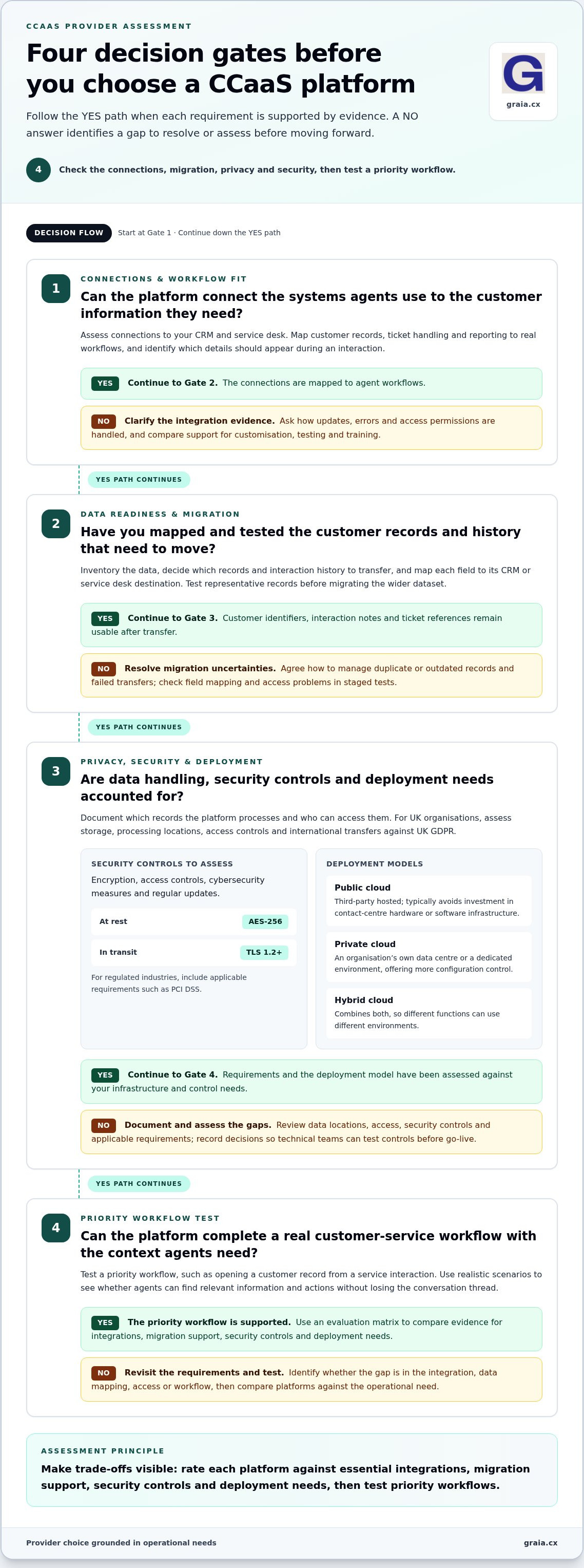
Choose a platform around your customer service needs, existing systems and migration requirements. Strong CCaaS implementation best practices begin by assessing how well a provider can connect the tools agents use with the customer records they need.
Platform Integrations and APIs
Platform integrations connect CCaaS with business systems, while APIs let those systems exchange data and actions. This matters because agents need relevant information without switching between disconnected screens. Assess how the platform connects with your CRM and service desk, including which customer details appear during an interaction.
Map each connection to a real workflow before comparing providers. List the systems used for customer records, ticket handling and reporting, then identify what information must pass between them. Ask how integrations handle updates, errors and access permissions. Compare implementation support for customisation, testing and training too. These practical steps show whether integrations can support real customer service processes.
Data Readiness and Migration
Data readiness means preparing customer records and interaction history for transfer to the new platform and connected systems. Incomplete or inconsistent records can leave agents without useful context after migration. Inventory existing data, identify which records and history need to move, and map each field to its destination in the CRM or service desk.
Test representative records before migrating the wider dataset. Confirm that customer identifiers, interaction notes and ticket references remain usable after transfer. Agree how teams will manage duplicate or outdated records and failed transfers. A staged test can expose mapping and access problems early, while showing whether agents can find the information their workflows require.
Privacy, Residency, and Security Requirements
Privacy, residency and security requirements shape how personal data is handled, stored and protected within CCaaS. For UK organisations, assess the platform and migration against UK GDPR, including data storage and processing locations, access controls and international data transfers. Data residency describes where data is held; location alone does not establish whether data handling meets privacy obligations.
Document which records the platform will process and who can access them. Review the provider’s security controls, including encryption, access controls, cybersecurity measures and regular updates. Consider AES-256 encryption at rest and TLS 1.2+ encryption in transit as security controls to look for. For regulated industries, include applicable requirements such as PCI DSS in the assessment. Record these decisions alongside migration plans so technical teams can test controls before go-live.
Compare deployment models with your infrastructure and control needs. Public cloud is hosted by a third-party provider and typically avoids investment in contact-centre hardware or software infrastructure. Private cloud uses an organisation’s own data centre or a dedicated environment, offering more configuration control. Hybrid cloud combines both, allowing different functions to use different environments.
Use an evaluation matrix to connect requirements with evidence. Rate each platform against essential integrations, migration support, security controls and deployment needs. Then test priority workflows, such as opening a customer record from a service interaction. A clear comparison makes trade-offs visible and grounds your provider choice in operational needs.
Agent user experience and ease of use
Effective CCaaS change management pairs comprehensive training with transparent communication about workflow changes. Involve agents early, practise real customer interactions, and give teams clear support as digital tools and processes change.
Agent Interface and Experience
The agent interface is the workspace where agents handle customer interactions and access the tools they need to resolve them. A fragmented workspace can distract agents from listening and responding. Map a typical conversation, from customer identification to resolution, then assess whether the interface presents relevant information and actions in a clear sequence.
Use realistic scenarios to test the experience. For example, ask agents to find a customer record, review a previous interaction and record a follow-up. Note where they switch screens, repeat data entry or lose the conversation thread. These observations help distinguish a training gap from an interface or process issue that needs attention.
Agent Onboarding and Training
Agent onboarding introduces the CCaaS workspace, workflows and customer service expectations, while training builds practical competence through guided use. Both matter because agents need to use tools confidently while maintaining a natural conversation. Build training around their tasks, such as handling a voice interaction, documenting an outcome and transferring a case through the correct workflow.
Provide practice in a controlled environment before agents handle live interactions. Use sample cases covering routine enquiries, complex requests and hand-offs to another team. Let agents repeat tasks, ask questions and receive feedback. Pair concise reference materials with instructor-led demonstrations so agents can revisit key actions during early use.
Training alone will not make a rollout stick. Customer service, operations, IT and team leaders should explain what is changing, why workflows are changing and where agents can raise issues. Share process updates before launch, then collect agent feedback during testing and after go-live. This creates a clear route for resolving practical friction instead of leaving staff to work around it.
Engage agents in decisions that shape their daily work. Invite a small cross-section of experienced and newer staff to test common scenarios, including handling a customer who moves from a digital enquiry to a phone call. Ask them to identify unclear labels, missing information and steps that interrupt service. Feed findings to the implementation team and communicate which changes follow.
- Before launch: explain new workflows and provide hands-on practice with common tasks.
- During testing: observe agents completing realistic interactions and capture points of friction.
- After launch: share updates, offer ongoing support and use agent feedback to refine processes.
For practical perspectives on customer experience and contact-centre technology, explore contact-centre insights and guidance as your team shapes its training and change approach.
How can you implement CCaaS in your organisation?
Start with measurable service objectives, then map the customer journeys and workforce changes the platform must support. A phased plan connects technical readiness, team preparation and launch decisions.
Implementation Timelines and Planning
An implementation timeline sequences discovery, configuration, integration, testing, training and go-live. Each stage depends on people, systems and approvals being ready. Set objectives first, such as improving how teams handle enquiries across channels, then assign owners from customer service, operations, marketing and IT. Allow time for call-flow design, permissions, phone-number transfers and testing, rather than treating go-live as the only milestone.
Build the schedule around dependencies, not assumptions. Carrier-dependent SIP trunking can delay technical preparation; one project was postponed by about two weeks. Allow time for internal decisions too, including who approves call flows and who resolves integration issues. Scope, data readiness and stakeholder availability all shape the sequence, so use milestones to expose dependencies before they affect launch.
Migration Planning
Migration planning defines how existing contact-centre operations, records and workflows move into the new environment. Changes to channels or routing can affect customers and workforce operations at the same time. Inventory phone numbers, queues, call flows, ticket handling, user permissions and customer records. Identify dependencies, including carrier arrangements and integrations, and assign an owner to each migration task.
Test the planned move in a controlled environment before wider deployment. Run representative call flows and interaction types, confirm records remain accessible, and practise fallback actions if a transfer or integration fails. For a multi-team rollout, move one defined group or workflow first, review the results, then apply lessons to the next phase. This allows adjustments before the change reaches the entire operation.
Customer journey planning turns broad objectives into specific service scenarios. Map how a customer reaches support, what information they provide and which team handles the next action. Include voice, email, chat and social messaging where they serve your audience. For a billing query, document the path from initial contact through case handling and resolution. This can reveal configuration gaps before build work begins.
Bring stakeholders into planning early, including those who will use or support the platform. Customer service teams can identify common interaction patterns; operations can map workforce processes; IT can assess system dependencies. Include these groups in demonstrations and selection decisions, then use their feedback to prioritise configuration and testing. A cross-functional plan also clarifies who owns decisions when a call flow or process needs adjustment.
- Before configuration: define objectives, journey maps, channels and accountable owners.
- During testing: exercise call flows, permissions, ticket handling and data access.
- After launch: track agreed metrics, including interaction volumes and customer feedback, then use analytics to refine workflows.
Set a review rhythm after go-live. Compare performance with the original objectives, listen to agent and customer feedback, and prioritise adjustments by impact. Analytics and clear ownership help teams improve service as needs evolve.
Omnichannel routing and unified customer context
Omnichannel service connects customer interactions across voice and digital channels, allowing hand-offs to preserve useful context. Effective routing helps agents continue the conversation instead of making customers start again.
Omnichannel Routing
Omnichannel routing directs interactions across channels using shared customer information and service rules. Customers may begin in chat and continue by phone, so agents need to see what has already happened.
Contact centre tools can bring voice, email, text and social messaging into one operating view. Define how each channel enters the queue, which team handles it and what triggers a transfer. For example, a customer moving from web chat to a call should reach an agent who can see the chat history, not an unrelated queue.
Testing Omnichannel Capabilities
Testing omnichannel capabilities means checking complete customer journeys across channels before full deployment. A channel may work on its own while its hand-off or context transfer fails.
Build test cases around realistic journeys: start with a social message, follow with an email, then call customer service. Confirm routing sends each interaction to the intended team and records remain linked. Test missed transfers, duplicate contacts and changes in customer details too. Record the expected outcome and compare it with what the agent actually sees.
Unified Customer Context
Unified customer context brings interaction history and customer intent together across channels. This helps agents respond to the current need without asking customers to repeat information they have already shared.
Omnichannel routing can organise interactions into a shared data thread, allowing customer history to follow a channel change. However, the record is useful only when it is clear and relevant. Give agents a 360-degree view that highlights recent contact, open cases and the customer’s stated purpose, rather than presenting an unfiltered archive.
The customer experience depends on continuity, not simply the number of channels available. 96% of consumers say switching channels without repeating themselves is critically important. Meanwhile, 70% have abandoned an interaction because technology failed to maintain context. These figures show why teams should assess successful hand-offs alongside channel availability.
Use a journey map to define the information each team needs at every stage. For a delivery enquiry, an agent may need the earlier email, the current case status and the customer’s preferred contact channel. Set rules for how those details appear, who can update them and how routing responds when a case needs specialist handling.
- Map: document customer journeys across voice and digital channels.
- Test: verify routing, hand-offs and context using realistic scenarios.
- Refine: review agent and customer feedback to improve continuity.
After launch, monitor where customers repeat details or switch channels without a smooth hand-off. Review those interactions with agents, identify whether routing or shared records caused the break, then adjust the relevant workflow. A unified design should make the next action clear to both the customer and the agent.
CCaaS platform capabilities
Platform capabilities matter when they improve customer service and fit daily operations, not simply because a feature is available. Assess each capability against a defined use case, the people who will use it and the information it needs.
Channels, automation and agent support
A CCaaS platform can bring voice, email, text and social media into one omnichannel environment. Voice calls use Voice over Internet Protocol (VoIP), which carries calls over the internet. Review how these channels work together in a customer journey, including whether routing preserves useful context when an interaction moves from chat to voice.
Automation can handle routine enquiries, answer frequently asked questions and guide customers through troubleshooting. Decide where automation should stop and human support begin. Define service policies, permission limits, approval thresholds, human hand-off paths, audit logs and error handling before deploying AI. For example, a routine order-status enquiry could follow an automated path, while a complex complaint moves to an agent.
Agent-support capabilities can also surface next-best-action suggestions during an interaction. Use a realistic scenario to assess whether the suggestion helps an agent respond, or adds another task to their workflow. Quality-management tools can help supervisors review interactions and provide real-time coaching, while forecasting and scheduling tools use historical data to help plan workforce coverage.
Security, analytics and operational fit
Assess security capabilities alongside the workflows they protect. Common controls include encryption, access controls, cybersecurity measures and regular updates. For a UK organisation, connect those controls to the data and systems in scope, then consider how the vendor communicates operational changes and supports ongoing enhancements.
Analytics turn contact-centre activity into signals for improvement. Track measures such as call volume, average handle time and customer satisfaction against business goals. For example, a rise in repeat contacts about one enquiry type may point to unclear information or a routing issue. Use the finding to refine a workflow, then monitor whether the change improves the intended outcome.
Capability requirements can differ by sector. Financial institutions can use AI-driven compliance tools to analyse 100% of agent interactions for adherence to regulatory scripts and disclosure requirements. That example makes the evaluation principle clear: match each capability to a genuine operational need, rather than selecting features without a defined purpose.
- Define: connect every priority capability to a customer or workforce need.
- Test: use real scenarios to assess automation, agent support and channel hand-offs.
- Measure: use analytics and relevant metrics to guide ongoing refinement.
For further practical ideas on assessing contact-centre technology and implementation choices, explore CCaaS implementation insights.
GraiaCX: Conversational Agent
GraiaCX’s Conversational Agent can understand customer intent and emotion, then resolve routine enquiries autonomously. For teams planning connected service across voice, chat, email and social messaging, its Agentic Omni-Channel Platform brings these channels together with AI-driven automation. Agent Assist provides real-time next-best-action suggestions to support agents during interactions, while Live Call Translation enables multilingual support in over 100 languages.
These capabilities are useful when your priorities include automating routine contacts, giving agents timely guidance or connecting customer conversations across channels. They can support a rollout shaped around your workflows and customer needs.
Contact GraiaCX to discuss your CCaaS implementation.
Make your next rollout decision count
A CCaaS rollout should keep evolving after launch. Use service priorities to guide each improvement, then give teams a clear way to assess whether it helps customers and agents. The most effective ccaas implementation best practices make implementation an ongoing discipline: learn from real interactions, refine workflows and keep technology aligned with changing customer needs.
When automation, real-time agent guidance or multilingual voice support are priorities, GraiaCX offers a Conversational Agent, Agent Assist and Live Call Translation. These capabilities can support a contact-centre approach shaped around your customers and operational goals.
Consider which service challenge you want to address first, and make that the focus of your next planning conversation. Explore how GraiaCX can support your CCaaS plans.
With a clear direction and a commitment to learning, your team can build a more connected customer experience over time.
Frequently Asked Questions
What are the main features and benefits of CCaaS?
CCaaS commonly brings call handling, digital messaging, routing, reporting and automation into a cloud-based contact centre platform. These capabilities can help teams manage customer conversations in one environment, adapt capacity to changing demand and give supervisors operational insights. For example, a service team could use interaction analytics to identify recurring questions, then update knowledge content or automate a suitable response. Benefits depend on how well features fit real workflows.
What does CCaaS actually mean in 2026?
CCaaS means Contact Centre as a Service: contact-centre capabilities delivered through a cloud platform rather than managed entirely through an organisation’s own infrastructure. In 2026, the term can include voice and digital channels, integrations, analytics and AI-enabled tools. The label alone doesn’t tell you which capabilities are included. Compare the platform’s actual functions with your service model, such as whether it supports the channels your customers use.
What is CCaaS, and how does it work?
CCaaS is a cloud-based way to run contact-centre operations using software accessed over an internet connection. Customers reach a business through supported channels, and the platform can route interactions to agents, connect records from other systems and capture activity for analysis. For instance, an incoming call might go to a suitable team while an agent views relevant account information. The exact workflow depends on configuration and integrations.
How do CCaaS architectures compare?
Public cloud, private cloud and hybrid cloud are the main CCaaS deployment approaches. Public cloud is hosted by a third-party provider; private cloud uses an organisation’s own data centre or a dedicated environment; hybrid cloud combines environments for different functions. Compare them by weighing operational control, infrastructure responsibilities, configuration needs and where workloads should run. For example, an organisation might assess whether a particular function needs a dedicated environment.
How do you ensure a smooth CCaaS deployment?
Make deployment smoother by aligning technical work with the people and processes affected by change. Give each workstream an owner, define how teams will handle issues, and test real service scenarios before launch. For example, include a case where a customer changes channels and another that requires specialist escalation. After launch, review service metrics alongside agent feedback, then prioritise fixes that remove friction from live operations.
What are the key steps in a CCaaS implementation?
Begin by setting business outcomes, then document customer journeys, channels, team workflows and system dependencies. Next, configure the platform, prepare integrations and records, and test representative scenarios. Train affected staff before a controlled launch. For example, a pilot team could handle a defined set of enquiry types first, allowing the organisation to gather feedback and resolve operational issues before expanding access across the wider contact centre.
How should businesses define requirements and choose a CCaaS provider?
Define requirements by translating service goals into practical capabilities and constraints. Identify expected interaction types, customer channels, existing systems, security considerations and reporting needs. Then compare providers against those requirements, including implementation support, integration approach, reliability, scalability and plans for ongoing updates. Ask each shortlisted platform to demonstrate the same customer scenario so teams can compare how well it supports the desired workflow.
How do you plan CCaaS integrations with CRM, telephony and other systems?
Plan integrations by mapping the information and actions that must pass between CCaaS, the CRM, telephony and other business applications. Specify which system owns each record, what agents need to see and what updates should flow back. For example, a completed support interaction might create or update a CRM activity. Test data exchange, permissions and error handling together so a failed connection does not leave agents relying on incomplete records.