
Business Case for Contact Centre Automation: Costs and Value
Automation’s value isn’t measured by how many conversations it removes. A business case for contact centre automation compares the cost of adopting and running automation with its effect on operating costs, efficiency, routine enquiries and customer service. Gartner predicts that agentic AI will reduce operating costs by about 30% by 2029, but the value for an individual contact centre depends on where and how automation is applied.
It’s reasonable to ask whether a business case for contact centre automation can show savings without weakening the customer experience. The answer is to target repetitive, straightforward interactions while keeping human agents available for complex or sensitive issues, then measure both cost and service outcomes. This article explains what contact centre automation includes, how it can change routine enquiry handling and agent performance, and which costs and benefits to weigh for a UK operation.
Key Takeaways
- Start with one process or pilot, connect it to existing systems and involve IT early; pilots requiring more than three custom integrations typically fail to scale.
- Focus self-service on common, straightforward enquiries, with a smooth handoff that preserves context when a human agent needs to take over.
- Assess automation as a combination of AI routing, knowledge retrieval and task execution across voice, chat and messaging, not simply as a chatbot.
- Build the financial case around measurable changes such as handling time, repeat contacts, quality assurance effort and customer satisfaction, then track results over time.
- Use automation to support agent performance as well as reduce routine workload, and weigh its effect on service quality alongside operating costs.
Integrating automation across contact centre technology
Automation works best when it connects with the systems agents already use. A focused integration plan links customer conversations, routing and follow-up without creating disconnected workflows.
Existing System Integration
Integration connects automation with contact centre tools such as customer records, telephony, IVR and diallers. This matters because agents need relevant customer context, while automated workflows rely on accurate information to route or resolve enquiries. Map each system’s role before implementation, then involve IT teams early to assess data flows, access controls and integration requirements.
For example, an IVR can identify why a caller is contacting you, then pass that information to an AI tool or agent queue. After an unsuccessful outbound call, a dialler can trigger an email or text, giving the customer another way to respond. Connecting these steps helps teams manage volume across channels without asking agents to re-enter information.
In the UK, relevant frameworks include UK GDPR and the Data Protection Act 2018 for personal data, and PECR for certain electronic communications. Contact centres should assess how each automated flow uses customer information and whether messages are service-related or marketing communications.
Pilot Scalability and Implementation
A pilot tests one defined workflow before wider implementation, so teams can identify integration problems and refine the experience. Start with a single process, involve IT early, and select tools that work with existing systems. Pilots requiring more than three custom integrations typically fail to scale, so limit dependencies and document what each connection must do.
Test the pilot with a harness that simulates 10, 100 and 1,000 concurrent users. This reveals how routing, system connections and response times behave as conversation volume rises. Review failures with agents and IT, refine the workflow, then scale gradually to another process only after the first performs as intended.
To build and present a business case for contact centre automation, define the objective, compare implementation options, assess achievability, and evaluate value for money and affordability. The UK Government identifies these as core business-case considerations. Include integration effort, system dependencies, expected service improvements and measures for tracking results.
Keep the evidence practical: show which IVR paths or dialler follow-ups the pilot changes, which systems provide customer context, and how agents handle exceptions. Mapping those steps helps decision-makers understand the implementation sequence, resources involved and issues to resolve before expansion. It also makes the proposed improvement easier to assess against operational priorities.
Self-service and routine enquiry handling
Self-service can resolve straightforward enquiries without an agent, while routing complex cases to people. Its value depends on customers reaching a genuine resolution, not simply leaving the queue.
Digital Self-Service and Call Deflection
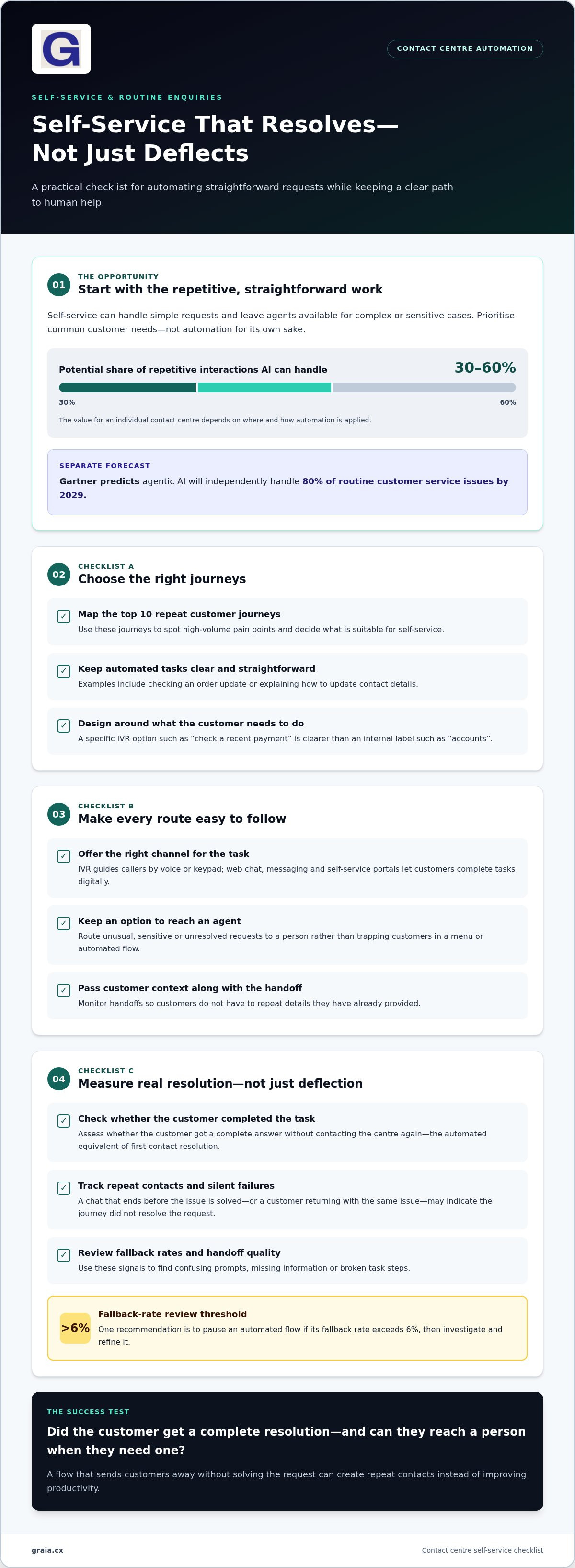
Digital self-service lets customers complete tasks through channels such as web chat or messaging instead of calling. For example, a customer can request an order update online, freeing agents to handle a delivery problem that needs investigation. AI can handle 30-60% of repetitive contact centre interactions, making routine handling a practical focus for automation.
Deflection alone doesn’t prove success. Track whether customers complete the task, return with the same issue, or need an agent. Mapping the top 10 repeat customer journeys helps teams prioritise high-volume pain points. A flow that sends customers away without resolving their request can create repeat contacts and reduce productivity rather than improve it.
IVR Systems and Self-Service Portals
An IVR guides callers through voice or keypad choices, while a self-service portal lets customers find information or complete tasks online. For example, either can direct a billing question to an account option instead of placing every caller in the same agent queue. Clear choices help customers reach the right resolution with less unnecessary handling.
Design each route around a customer need, not an internal department name. An IVR option such as “check a recent payment” is more specific than “accounts”. Keep an option to reach an agent when the portal or menu can’t resolve the request. Monitor handoffs to ensure customers don’t have to repeat details they’ve already provided.
AI-Powered Routine Enquiries
AI-powered self-service interprets a customer’s request and responds using relevant information or an automated workflow. It can handle simple questions, such as explaining how to update contact details, while passing unusual or sensitive cases to an agent. Gartner predicts that agentic AI will independently handle 80% of routine customer service issues by 2029.
First Call Resolution (FCR) measures how effectively agents resolve enquiries during the customer’s first call. For automated journeys, assess the equivalent outcome: did the customer get a complete answer without contacting the centre again? Measure genuine resolution alongside deflection, and track silent failures, where a chat ends before the issue is solved.
Review fallback rates and handoff quality as part of ongoing improvement. One recommendation is to pause an automated flow if its fallback rate exceeds 6%; teams can then examine confusing prompts, missing information or broken task steps. For practical contact centre automation insights, explore how journey design can support useful self-service without leaving customers stranded.
What is contact center automation?
Contact centre automation uses software and AI to route interactions, retrieve information and complete defined tasks. A business case for contact centre automation sets out the expected value, required investment and operational changes, linking tools such as chatbots to measurable customer experience and service outcomes.
AI Routing and Knowledge Retrieval
AI routing interprets a customer’s language, intent and urgency, then directs the interaction to an appropriate queue or agent. For example, a caller reporting a payment issue can be routed differently from someone asking about opening hours. Matching interactions to agent skills gives customers a clearer route to support.
Knowledge retrieval finds relevant information to support an answer, rather than leaving an agent to search several systems. A chatbot might use an approved response about account access, while an agent receives related guidance during a complex conversation. The business case should explain how information quality and routing logic support accurate answers, not just faster transfers.
Task Execution and Interaction Routing
Task execution means automation performs a defined action after identifying what a customer needs. For example, a system could update a CRM record, create a call summary or acknowledge an incoming message. These actions reduce repetitive administration, leaving agents more time for judgement, explanation and resolution when a request needs human attention.
Intelligent routing applies across voice, chat and messaging, not just telephone calls. A customer who starts with a message and later calls can be directed using the conversation’s intent and available context. This can make the experience more coherent and reduce avoidable transfers between teams. Define which tasks automation may complete and when an agent must take over.
Queue Management and Omnichannel Routing
Queue management organises incoming interactions by factors such as language, intent and urgency. An urgent account-access problem, for instance, can follow a different route from a general product question. Clear routing rules help teams respond to changing volumes and give agents the context they need. Monitor whether each interaction reaches the right destination.
Omnichannel routing coordinates customer conversations across voice, chat and messaging. Rather than treating each channel as a separate service, it helps teams assign work according to the interaction and agent availability. An Agentic Omni-Channel Platform brings these channels together with AI-driven automation. Assess whether this approach supports your service priorities and delivers improvements customers can recognise.
Automation proves its value through outcomes, not activity counts alone. Track whether routing reduces unnecessary handoffs, knowledge retrieval supports accurate responses, and completed tasks prevent repeat work. Pair operational measures with customer feedback to see whether faster handling also delivers useful resolutions.
Operational efficiency and cost savings
Automation can affect contact centre costs by changing how routine work, agent time and service processes are handled. The financial case should weigh these operational benefits against implementation and ongoing costs.
Contact Centre Cost Savings
Contact centre cost savings come from reducing manual effort, repeat work and avoidable handling across customer journeys. Gartner predicts agentic AI will reduce operating costs by about 30% by 2029, while Deloitte Digital’s 2026 Global Contact Center Survey found 43% of organisations expect AI to reduce contact centre expenses by at least 30% in the next three years.
These are forecasts and expectations, not guaranteed results for an individual operation. Identify where savings could arise in your processes: fewer manual quality checks, less administration, or improved resolution that prevents repeat contacts. McKinsey research found automation reduced quality assurance expenses by over 50%, illustrating one potential efficiency lever.
Operating Cost Reduction
Operating costs can fall when automation changes the resources needed to handle a given volume of work. Automated call summaries, for example, can reduce post-interaction administration, while intelligent routing can direct conversations to agents with relevant skills. Assess the combined effect on handling time, repeat contacts and agent capacity rather than treating one metric as the whole result.
Cost efficiency also depends on customer outcomes. A flow that deflects calls but creates repeat contacts may shift effort rather than remove it. Track genuine resolution, customer satisfaction and agent productivity together, then compare results with the original process. This gives operations teams a clearer view of whether automation improves the entire service journey.
Implementation and Ongoing Costs
There is no single typical UK implementation or ongoing cost: the amount depends on the technology scope, integration work, channel coverage, usage and continuing support. A provider’s price depends on the case and is given after a quote request; cost factors include system complexity, required integrations and the scale of deployment.
Separate one-off implementation effort from recurring operating costs in the financial model. Include workflow design, system integration, testing, staff training and ongoing platform usage or maintenance. A pilot connected to one existing process, for example, may have a different cost profile from a multi-channel rollout involving several systems.
ROI and Payback Calculation
ROI compares the net financial benefit of automation with its total cost; payback estimates how long cumulative savings take to recover the investment. List costs and expected benefits separately, then calculate ROI as net benefit divided by total cost. For payback, compare implementation costs with net savings over each period.
Model expected cost or revenue changes at 3, 6 and 12 months. Include measurable effects such as reduced handling time, fewer repeat contacts and lower quality assurance effort. Keep assumptions visible, then compare actual results with the baseline at each review point. This helps decision-makers see whether performance, affordability and customer satisfaction are moving together.
Automation's impact on contact centre costs and performance
Automation can change both the cost of handling interactions and the quality of service customers receive. Gartner predicts agentic AI will reduce operating costs by about 30% by 2029, but a useful evaluation also tracks resolution, agent productivity and customer experience.
Quality monitoring shows how automation can influence oversight as well as frontline work. Automated systems can assess 100% of customer interactions against predefined criteria, giving managers broader visibility than a small sample review. McKinsey research found AI-powered automatic scoring achieved accuracy above 90%, compared with 70-80% for manual scoring. Contact centres can use these insights to identify coaching needs and recurring workflow problems.
Agent support can affect the pace and consistency of conversations. A Harvard Business School study of a year of customer service chat transcripts found AI assistance enabled agents to reply about 20% faster. Deloitte Digital’s 2026 Global Contact Center Survey also found that 64% of service leaders had experienced increased agent productivity from AI use. Faster replies matter most when they preserve accurate, relevant support.
Customer outcomes deserve equal weight. Assess the full interaction: whether the customer reached a resolution, whether an agent had to repeat work, and whether the chosen channel suited the request.
Use a balanced view of performance rather than relying on one headline measure. For example, compare handling time with repeat contacts, customer satisfaction and quality results across voice, chat and messaging. If a faster workflow increases unresolved enquiries, it may shift work elsewhere instead of reducing it. If routing gives agents relevant context, it can support efficient conversations without sacrificing service quality.
Build a baseline before introducing automation, then compare results against the same measures after implementation. Track changes in agent productivity, resolution, quality monitoring and customer feedback. Deloitte Digital’s figures describe surveyed organisations’ experiences and expectations, not guaranteed results for every contact centre. Use them as context, then assess your own operational data and service priorities.
For a practical review, connect each automation workflow to a cost measure and a customer outcome. Explore contact centre automation insights to consider how channel design and agent support fit into that assessment.
GraiaCX: Conversational Agent
GraiaCX’s Conversational Agent can handle routine enquiries autonomously, helping contact centres reduce repetitive work while keeping agents available for more complex conversations. It fits when your business case identifies recurring customer questions as a clear opportunity for automation, and when you want to assess resolution quality alongside efficiency.
For broader service needs, an Agentic Omni-Channel Platform brings voice, chat, email and social messaging together, while Agent Assist provides real-time suggestions to support agents. Live Call Translation supports multilingual conversations in over 100 languages, without requiring bilingual staff.
Use these capabilities to connect your automation priorities with the customer journeys and operational outcomes you want to improve. Contact GraiaCX or visit graia.cx to discuss your contact centre automation needs.
Turn the case into a focused next step
The next step is to turn your priorities into a clear operational direction. Decide which customer experience you want to strengthen, where agents need better support, and how you’ll measure progress. A business case for contact centre automation is most useful when it guides these choices, rather than treating technology adoption as the goal in itself.
GraiaCX’s Conversational Agent supports automated customer conversations, while Agent Assist helps agents during interactions. Live Call Translation can support multilingual conversations. These offerings give your team options to consider against the priorities already identified, whether the focus is routine enquiries, agent support or language access.
Explore how these capabilities could fit your contact centre’s aims, then shape a practical next step with your stakeholders. Explore contact centre automation with GraiaCX and move forward with a clear focus on better service and stronger operations.
Frequently Asked Questions
Why Are More Organizations Treating Automation As Essential Rather Than Optional?
Organisations increasingly see automation as part of how customer service can scale and adapt. According to the IBM Institute for Business Value, 67% of nearly 1,500 customer service leaders said their organisations were already using generative AI. McKinsey’s 2025 State of AI survey found 88% of organisations used AI regularly in at least one business function. For contact centres, the practical question is how to apply it usefully, not simply whether to adopt it.
Why is Call Centre Automation Important?
Call centre automation matters because customers want quick, straightforward service while agents need time for cases requiring judgement or empathy. Automated routing can direct a caller by intent, language or urgency, while a callback option can preserve their place in a queue. These capabilities help organisations manage demand across service channels and reserve human support for conversations where personal attention matters most.
What cost savings can contact centre automation deliver in the UK?
There is no single savings figure for every UK contact centre; the business case for contact centre automation depends on workload, existing processes and implementation scope. To estimate value, distinguish cash savings from capacity released for other work. Assess changes in repeat contacts, administration, quality assurance and channel use, then compare them with integration, training and ongoing operating costs. This provides a grounded estimate without assuming every efficiency becomes a budget reduction.
How does contact centre automation affect call handling time, first-contact resolution and customer satisfaction?
Automation can shorten handling by retrieving information or assisting agents, but speed alone doesn’t establish a better outcome. Compare call handling time with first-contact resolution and customer feedback for the same enquiry types. If conversations become faster while customers call again, the process hasn’t resolved the underlying issue. Separately, 97% of customer service providers reported that conversational AI positively affected customer satisfaction, a reported finding rather than a guarantee for every deployment.
How do contact centre automation options compare, including IVR, chatbots, voicebots and agent-assist tools?
An IVR guides callers through menu choices, while chatbots handle text-based conversations and voicebots interact through spoken dialogue. Agent Assist tools work alongside human agents, providing information or suggestions during live interactions rather than serving customers alone. Choose according to the task and channel: a simple status request may suit self-service, while a complicated complaint may need an agent supported by relevant guidance.
What contact centre tasks are best suited to automation?
Tasks are well suited to automation when they’re repetitive, have clear inputs and lead to a defined outcome. Examples include acknowledging incoming messages, routing requests, creating call summaries and updating customer records. Processes involving exceptions, sensitive decisions or unclear information need a reliable route to human review. Assess each task by how often it occurs, how consistently its rules can be applied, and what customers need if automation can’t complete it.
What are the risks and challenges of contact centre automation, including impact on staff and customers?
Key risks include incorrect responses, lost customer context, poor escalation and workflows that make service harder to access. Customers may have to repeat details if a bot-to-agent handoff doesn’t preserve the conversation. Staff roles can also change as routine work is automated, making clear escalation responsibilities and training important. Test real customer journeys, review failed interactions and give agents a way to flag problems for improvement.
What metrics should be used to measure contact centre automation performance?
Measure completed resolution, repeat contact, escalation, fallback and customer satisfaction together; no single metric shows the full experience. A contact centre can collect satisfaction feedback by asking callers to enter a rating between 1 and 10 on their phone keypad. Also examine performance by enquiry type and channel, so a strong overall result doesn’t conceal a workflow that regularly leaves customers without an answer.