
Automated call summary generation for customer service teams
A call summary can sound clear and still miss a crucial detail. Accurate automated call summary generation depends on transcript quality, when the summary is created, and whether it captures the customer’s requests, commitments, decisions and next actions rather than merely shortening the conversation.
Accuracy means more than fluent wording. Misheard speech, unclear speaker attribution or an action stripped of context can change a summary’s meaning. Comparing the transcript with the summary helps pinpoint where errors begin and which details need attention.
This guide explains how transcription feeds into a summary, what information a useful call record should capture, and how real-time and post-call timing affect the result. You’ll also learn how teams can assess summaries during implementation, refine them for different call types, and keep customer records useful without losing the human context behind each conversation.
Key Takeaways
- Shape call notes around decisions, customer requests, commitments and next steps so teams can act on what matters.
- Understand why a concise AI summary and a full transcript serve different purposes when reviewing a conversation.
- Assess how speech recognition, accents and call context can affect the accuracy of generated notes.
- Choose between live and post-call summaries based on when agents need the information and how they use it.
- Explore how live call translation can support customer conversations across languages.
Meeting decisions, key points and action items
A useful call record turns conversation into clear outcomes: what the customer raised, what the team agreed, and what happens next. Advisors can spend several minutes after each call writing notes, summarising actions and selecting dispositions. Structured summaries help organise this record.
Each summary should distinguish decisions from discussion and connect every action to an owner or next step when the call establishes one.
Reviewing Key Points and Agreed Actions
Check the summary against the call’s purpose, customer requests, commitments and outcome. A billing call, for example, may need to capture the disputed charge, the explanation given and the agreed follow-up, not every exchange about unrelated account details.
Make sure decisions are recorded as decisions, not possibilities. If an advisor says they will investigate an issue, the summary must not imply that it has already been resolved.
Suggested Post-Call Actions
Post-call actions should turn commitments into practical next steps. When supported by the conversation, a summary might prompt an advisor to send information, refer a case to the relevant team or follow up on a customer request.
Check each suggested action against its trigger and context. If a customer asks for a callback after a technical investigation, the action should mention both, rather than create a vague task such as “contact customer”.
Action Item Extraction
Action-item extraction identifies statements that assign or imply future work. It should distinguish a commitment such as “I’ll update your account” from general discussion of what could happen next, while retaining relevant context, including the customer’s request and the call outcome.
Check extracted actions for ownership and meaning. Preserve the advisor or team named in the call; if no owner or deadline is specified, don’t invent one in the record.
AI summaries can capture key discussion points, customer requests, commitments, action items and outcomes. They can also tag calls by topic, outcome, sentiment and disposition, making records easier to sort and patterns easier to find. Tags should support the summary, not replace an explanation of what happened.
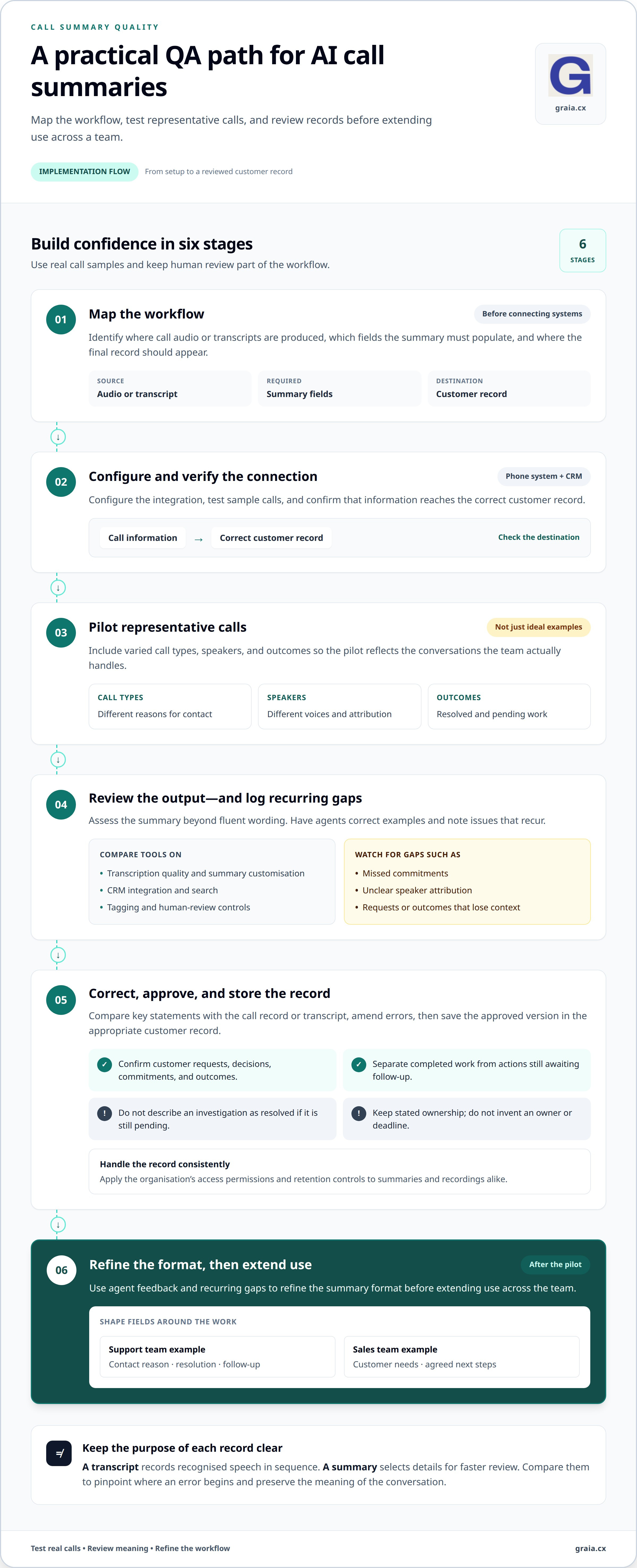
To review, correct and securely store summaries, compare key statements with the call record or transcript, amend errors, then save the approved version in the appropriate customer record. Apply the organisation’s access permissions and retention controls to summaries and recordings alike, so sensitive details are restricted to authorised users and handled consistently.
- Confirm that each customer request and agreed decision appears accurately.
- Correct names, commitments or outcomes that the summary misrepresents.
- Separate completed work from actions still awaiting follow-up.
- Use clear tags and dispositions to make the record easier to retrieve.
AI-generated call summaries
AI summaries turn recorded or transcribed conversations into shorter, structured records. A useful evaluation looks beyond fluent wording to accuracy, relevant fields and fit with existing workflows.
Compare tools by assessing transcription quality, summary customisation, CRM integration, search, tagging and human-review controls. A support team, for example, may need each summary to capture the contact reason, resolution and follow-up, while a sales team may prioritise customer needs and agreed next steps.
Before connecting summaries to a phone system or CRM, map the workflow. Identify where call audio or transcripts are produced, which fields the summary must populate and where the final record should appear. Configure the integration, test sample calls and confirm that information reaches the correct customer record.
During a pilot, test representative calls, not idealised examples. Include varied call types, speakers and outcomes. Ask agents to correct summaries and record recurring gaps, such as missed commitments or unclear speaker attribution. Refine the summary format before extending use across the team.
Call Summary Tool Costs
There is no single UK price for call-summary software. Costs depend on factors such as call volume, integrations, summary features, implementation requirements and ongoing support. The price of a particular service depends on the case and is provided after a quote request.
Compare what each quoted plan includes, not just its headline fee. A platform requiring extra integration work may have a different total cost from one that fits existing systems. Call volume and required functionality also shape the overall scope.
AI Tools for Call Summaries
Tools that combine speech recognition and summarisation can create records from phone and customer-service conversations. Contact-centre platforms may connect summaries to agent workflows, customer records and call classifications. A Conversational Agent is another capability to consider when exploring AI across customer interactions.
Ask how the tool handles corrections, transcription quality and different call types. Automated call summary generation should produce records agents can review, not just polished paragraphs. Test the platform with your own call samples and check whether it preserves the meaning of requests, decisions and commitments.
For a practical view of connected customer-service technology, explore contact-centre technology insights. Use the same evaluation criteria when assessing any platform: test representative calls, review the outputs and confirm that the workflow supports agents’ real tasks.
AI-generated summaries compared with transcripts
A transcript and a summary serve different purposes. The transcript records recognised speech in sequence, while the summary selects details for faster review. For a customer complaint, the transcript may preserve the full exchange; the summary should highlight the issue, response and outcome.
Neither format is a perfect account of a call. Speech recognition can mishear names, specialist terms, overlapping speakers or accents. If a transcript records “fifteen” instead of “fifty”, a summary may repeat the error and change the meaning of an agreed amount. The transcript can help locate the source, but doesn’t automatically prove what was said.
Use the transcript when context, exact phrasing or sequence matters. A quality reviewer assessing how an advisor explained a decision may need the surrounding conversation, not a shortened account. Use the summary to scan routine records, find the outcome or prepare for follow-up. Each format serves a different operational need.
For example, a customer might explain a delivery problem, reject one proposed solution and agree to another. A summary can prioritise the issue and final agreement but omit why the first option failed. A transcript gives reviewers that detail and helps them judge whether the summary fairly captures the customer’s position.
Accuracy depends on transcription as well as summarisation. If a speaker’s words are misrecognised, later processing can’t reliably restore the intended meaning. Language, accent, background noise and call-specific vocabulary can all affect recognition. Compare the transcript with the audio when a disputed phrase could change a decision or commitment.
A practical review can follow three steps:
- Check the transcript: inspect names, dates, figures and specialist terms that shape the case.
- Compare the summary: confirm it preserves the customer’s request, the advisor’s response and the outcome.
- Correct the record: amend errors and retain the relevant detail for the next agent or reviewer.
Manual notes offer another reference, but reflect what an advisor chose to capture during or after the conversation. A transcript provides a broader record of speech, while an AI summary makes selected details easier to scan. For instance, an advisor’s brief note saying “follow up” may lack context found in either format.
Set clear expectations for each record. Use the transcript to investigate wording and context, and the summary to find key information quickly. With automated call summary generation, reviewing both outputs from representative calls can reveal whether recognition errors are distorting summaries or the summary format needs refinement.
Real-time versus post-call summarisation
Real-time and post-call summaries support different moments in a customer-service workflow. A live summary develops during the conversation, giving an agent context when it is needed immediately. A post-call summary captures the completed interaction and can be available within a few seconds of the call ending.
During a live call, an agent may need to understand what has happened before joining a transferred or escalated conversation. A developing summary can surface the customer’s issue and earlier steps, helping the incoming agent avoid asking for the same details again. It can also help the current agent track a complex discussion.
Live summaries need careful handling because the conversation is still unfolding. A customer could revise a request, reject an option or add important context before the call ends. Treat interim details as provisional, then use the completed record to capture the final outcome. An initial request for a refund, for example, might become an agreed replacement.
Post-call summaries suit tasks that begin after the interaction. They present key points, commitments and outcomes for the next agent or customer record. A generated summary can appear within a few seconds of the call, allowing teams to review it while the conversation is fresh rather than reconstructing events later.
Choose the timing according to the decision the summary needs to support. For a transfer, a live view can provide immediate context. For follow-up or analysis, a completed summary offers a stable account of the whole call. Some workflows may use both: live intelligence during the conversation and a structured final summary afterwards.
Timing also determines what a summary can confidently describe. A live version reflects the conversation so far and may not include the final decision or outcome. A post-call version can capture the ending, but won’t help an agent who needed context during an earlier transfer. Define who needs each view and what information they need at that moment.
Test both approaches with representative scenarios before deciding how to use them. Include a transferred call, an escalation and a routine enquiry. Check whether the live summary gives the receiving agent useful context, then compare the final summary with the completed conversation. Note missing details, unclear wording and actions recorded before the customer agrees.
Define a clear review path for each output. During a call, agents should treat changing details as provisional; afterwards, they can assess the final record and correct errors. This lets teams use real-time summaries for continuity and post-call summaries for documentation without mistaking an interim snapshot for the completed account.
Automatic transcription and summary generation
Automatic transcription turns spoken interactions into text for summary software to organise. The system then identifies details such as the contact reason, customer requests and call outcome. A structured summary can be generated within seconds of a call ending, but its usefulness depends on what the transcript captured.
Accuracy starts with speech recognition. Systems are trained to understand multiple languages and dialects with different accents, but some voices and call conditions can still cause difficulties. Background noise, overlapping speech and unfamiliar product names may affect transcription. If “cancel” becomes “renew”, the error could change the apparent meaning of the interaction.
Transcription and summarisation are linked stages. First, speech recognition converts the call into text. Next, the summarisation process selects relevant details and organises them into fields such as issue, response and outcome. The resulting record can then be reviewed and corrected. Because each stage has a distinct role, a fluent summary alone doesn’t prove that the source words were accurate.
Volume shows why the process matters. An agent handling 60 calls a day can spend up to 3 hours typing notes instead of talking to customers. Automation can reduce manual note-writing effort, while giving teams a consistent starting point for records. The summary still needs useful structure: a short paragraph may be difficult to scan if it blends customer context, actions and outcomes.
Summary fields can be customised for different call types, sectors or business needs. A service enquiry might prioritise the product issue and troubleshooting steps. A complaint workflow may need the customer’s concern, the response and the resolution. Clear fields help teams assess whether the system captures what each interaction requires.
To assess performance, run a focused pilot using representative call samples. Include routine enquiries, complex cases and conversations with varied accents. Compare transcripts with the original audio when important details arise, then check whether summaries preserve them. Track recurring errors, such as names, dates or commitments, and refine the prompts or summary structure accordingly.
- Test source quality: review how accurately speech becomes text across different call types.
- Assess summary usefulness: confirm that the output captures the fields agents need.
- Refine and review: correct recurring errors before expanding the workflow.
Automation should support reliable customer records, not hide transcription errors behind polished prose. A pilot that examines both stages shows where problems begin and which adjustments improve the record. Explore contact-centre automation insights to consider how these workflows can fit broader customer-service operations.
GraiaCX: Live Call Translation
GraiaCX offers Live Call Translation for customer-service teams supporting multilingual conversations. It translates live calls across over 100 languages, helping customers and agents communicate without the need for bilingual staff.
This can help when customers prefer to speak a different language from the agent. Clearer communication can also preserve details summaries need, such as the customer’s request, an agreed next step or the call outcome. Translation and summarisation have different purposes, but both can help teams retain important context across interactions.
For teams looking to make multilingual support part of their customer-service experience, contact GraiaCX to discuss Live Call Translation.
Make every customer interaction count
Start by defining what a dependable customer record should enable across your service operation. Set a clear standard for using conversation intelligence, then align the technology with the customer experience you want to deliver. This keeps automation focused on meaningful outcomes, not simply producing more text.
As your needs develop, consider how call summaries fit alongside other support capabilities. GraiaCX offers a Conversational Agent, Agent Assist and Live Call Translation to support a broader approach to customer interactions.
If you’re ready to explore the right direction for your team, contact GraiaCX about call summaries. A thoughtful approach to automated call summary generation can help your organisation build clearer, more useful customer records and create a stronger foundation for every next conversation.
Frequently Asked Questions
How do you guarantee the accuracy of AI-generated summaries?
Assess accuracy through testing, review and correction, not fluent wording alone. Compare summaries with representative calls, paying close attention to customer names, figures, commitments and outcomes. Track recurring errors, such as incorrect speaker attribution or missing context, then refine the summary format or recognition setup. Human review is particularly useful during implementation and whenever a summary could influence a customer decision.
What are the benefits of automatic call summarisation for contact centres?
Automatic summaries can make customer histories easier to scan, help agents prepare for follow-up and give supervisors a consistent basis for reviewing interactions. For example, a returning customer’s previous issue and agreed resolution may be easier to find in a structured record than in lengthy notes. Teams can also review summaries across call topics to spot recurring sources of confusion and inform coaching or process improvements.
Are automatic call summaries secure, and do they respect data confidentiality?
Security depends on how the system handles customer data and how the organisation configures access. Treat summaries as sensitive customer records: restrict access by role, set retention and deletion practices, and assess how transcripts and recordings are stored, protected and processed. Include the summary workflow in existing data-handling procedures, and make sure staff know which details belong in the record and which need not be copied.
Can summary settings be customised for different call types?
Yes. Summary fields and instructions can reflect the information each call type needs. A delivery enquiry might capture the order issue and requested resolution, while a technical support call may need the fault, troubleshooting already attempted and next diagnostic step. Keep the format focused: too many fields can make records harder to use, while missing fields can leave later agents without important context.
How does the automatic call summarisation tool adapt to different dialects or accents?
Speech-recognition systems can be trained to understand multiple languages, dialects and accents, but some voices or call conditions may still lead to errors. Background noise, overlapping speech and unfamiliar names can affect the transcript. Test samples that reflect the accents and terminology your customers use, then check misheard phrases against the audio. Correcting recurring vocabulary issues helps identify where recognition needs attention.
Is automatic call summarisation compatible with all telephone systems?
Compatibility depends on the telephone system and whether the summarisation workflow can access call audio or transcripts, then send completed records to the right customer system. Before deployment, map how calls are captured, where summaries should appear and which integration method is supported. Include transferred calls and different call routes in testing, as each may follow a distinct system path.
What is automated call summary generation and how does it work?
Automated call summary generation uses speech recognition and language-processing software to create a concise account of a customer conversation. The system converts speech into text, identifies relevant information and organises it into a readable summary. For example, a completed record might capture the reason for a billing call and its outcome. Agents can then review the output and correct details before using it for follow-up.
How accurate are automated call summaries, and how can accuracy be measured?
Accuracy varies with speech recognition, call conditions, terminology and summary format. Measure it using a sample of real calls: compare key facts in the transcript and summary with the audio, then record errors such as missing requests, incorrect names or distorted outcomes. Also check whether agents can use the records correctly. Reviewing varied call types can reveal patterns a single example might miss.