
AI for complex customer service queries: compare tools
AI for complex customer service queries works best as a combination of conversational chatbots, agent-assist tools and ticket triage. These tools can answer routine questions, guide customers through troubleshooting and route unresolved cases to a person with relevant context. Nearly 90% of customer experience leaders expect AI to resolve most customer issues in the coming years, but accuracy and resolution time depend on how well each tool fits the task.
It’s understandable to want faster support without sacrificing the judgement and empathy complex cases require. The useful comparison isn’t simply which tool answers fastest. It’s how each handles routine requests, recognises uncertainty and passes a difficult issue to a person without losing important context.
This article compares practical AI tools for customer service, from customer-facing chatbots to systems that support agents and organise incoming cases. You’ll learn what each can do, where it may fall short, and how to assess its effect on answer accuracy and resolution time.
Key Takeaways
- Compare tools by the work they perform: answering routine questions, guiding troubleshooting, assisting agents or routing cases.
- Assess whether the AI can use relevant knowledge and customer context to help agents respond accurately.
- Set clear escalation paths so unresolved or sensitive issues reach a person with the conversation history intact.
- Evaluate accuracy and resolution time together; a quick answer is only useful when it helps resolve the customer’s issue.
- Choose a chatbot workflow that gives customers a clear next step when it can’t confidently resolve their query.
1. AI customer support platform comparisons
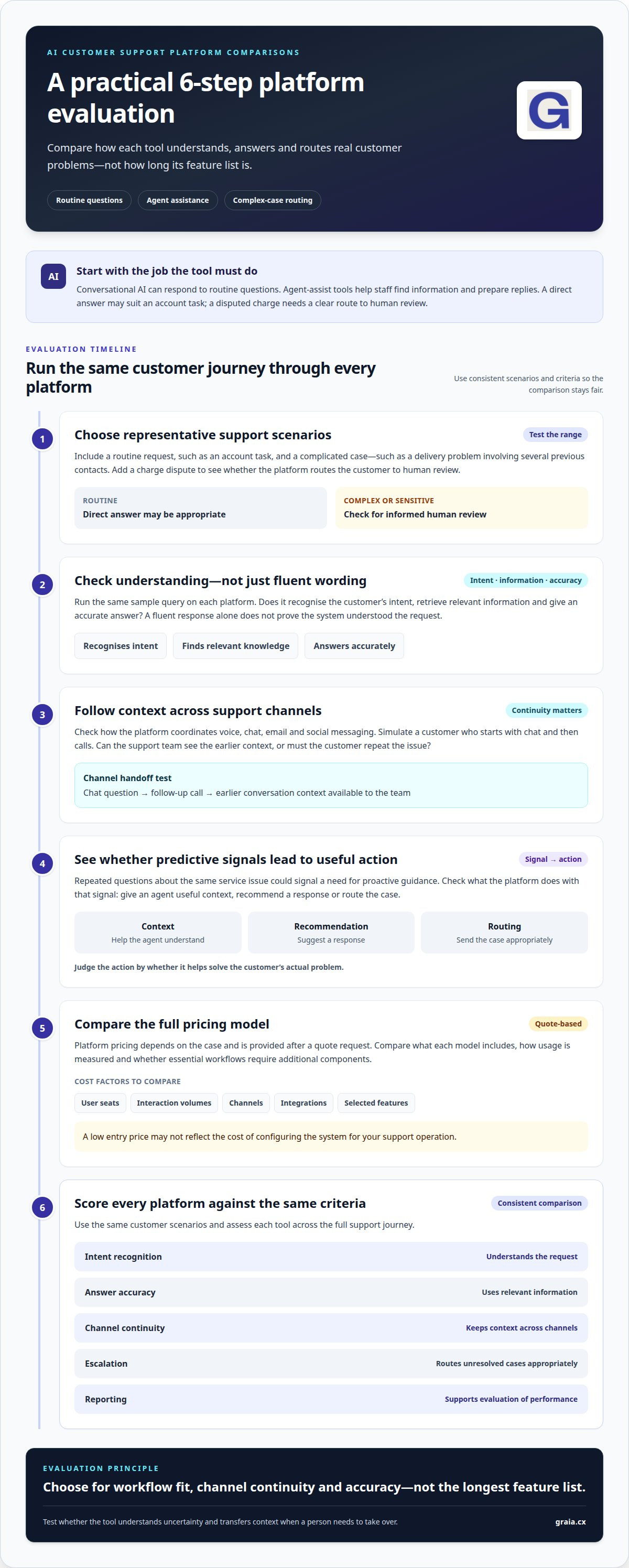
Compare platforms by the customer problems they handle, not by the length of their feature lists. Conversational AI can respond to routine questions, while agent-assist tools help staff find information and prepare replies. For example, a customer asking about an account task may need a direct answer; someone disputing a charge needs a clear route to human review.
Conversational AI uses natural language processing to interpret what a customer means and generate a response. Machine learning allows systems to improve through experience without explicit programming. When comparing tools, test the same sample query on each platform: does it recognise the intent, retrieve relevant information and give an accurate answer? A fluent response alone doesn’t prove the system understood the request.
Next, examine how the platform handles different support channels. An omnichannel customer support system coordinates interactions across channels such as voice, chat, email and social messaging. Consider a customer who starts with a chat question, then calls for help. Check whether the support team can see the earlier context, so the customer doesn’t have to repeat the issue.
Predictive customer support uses patterns in customer interactions to anticipate likely needs or identify cases requiring attention. Repeated questions about the same service issue, for example, could signal a need for proactive guidance. Compare how each platform turns a signal into action: does it give an agent useful context, recommend a response or route the case? Its value depends on whether that action helps solve the customer’s actual problem.
Pricing requires a structured comparison. Platform pricing depends on the case and is provided after a quote request; cost factors include user seats, interaction volumes, channels, integrations and selected features. Compare what each model includes, how it measures usage and whether essential workflows need additional components. A low entry price may not reflect the cost of configuring the system for your support operation.
For a fair evaluation, use the same customer scenarios and score each platform against consistent criteria: intent recognition, answer accuracy, channel continuity, escalation and reporting. Include both a routine request and a complicated case, such as a delivery problem involving several previous contacts. This shows whether the tool can distinguish a straightforward answer from a case requiring informed human judgement.
AI for complex customer service queries should support the full journey, from understanding a request to taking the right next action. Conversational AI can help provide customer support around the clock, but comparisons should also test how it handles uncertainty and transfers context. Choose a platform that fits your workflows, channels and accuracy needs, not simply one with the longest feature list.
2. What is AI in customer service?
AI in customer service combines language-processing systems, machine learning and workflow automation. A support agent might use it to analyse a message, find relevant knowledge-base guidance and draft a reply. A customer describing a failed payment, for example, may need account-specific help rather than a generic troubleshooting script. AI assistance can bring useful information together while leaving the agent responsible for the response.
AI agents can also handle multi-part requests by tracking intent and context across messages. A customer might report a damaged item, ask about a replacement, then ask about delivery timing. Generative AI can interpret the conversation in sequence, use approved information to formulate replies and move towards the next required action. The system needs access to relevant policies and customer details for its answers to be useful.
In the UK, businesses using customer-service AI should respect UK GDPR and consumer-protection rules. Handle personal information responsibly, and ensure answers about refunds or account terms don’t mislead customers.
Quality monitoring helps support teams identify where conversations go off course. Review a sample of AI-assisted replies for factual accuracy, tone and whether they address the request. If agents repeatedly correct the same explanation, update the knowledge base or workflow instead of treating each correction as an isolated mistake. Coaching can then focus on the judgement needed for sensitive or unusual cases.
AI also carries risks. Generative AI can produce confident but incorrect answers or reflect bias in its training material and outputs. An invented returns condition could mislead a customer; an unfair assumption about a person could distort how their case is handled. Ground answers in approved content, test varied customer scenarios and give agents a clear way to flag questionable responses.
For AI for complex customer service queries, start implementation with one defined workflow, such as helping agents resolve billing questions. Map the information required, the actions AI may take and the point at which a person must review the case. Then test real examples with incomplete details, conflicting information and follow-up questions. Track answer accuracy and resolution progress before expanding to other workflows.
Keep people central as the system develops. Give agents practice reviewing AI suggestions, correcting errors and explaining decisions to customers. Use their corrections to improve the knowledge base and workflow design. This feedback loop helps teams analyse recurring issues while preserving human judgement for complex requests.
Businesses exploring these workflows can use customer-service AI insights to consider how agent guidance and automation fit their support needs.
3. AI handling routine queries and escalating complex interactions
Effective automation distinguishes requests a machine can resolve from interactions requiring human judgement. A chatbot can provide an order status, explain a familiar product-use step or guide someone through a standard account task. These routine enquiries follow known patterns, allowing the system to respond consistently using approved information. The goal is to streamline straightforward support, not force every customer into automation.
Before taking action, the system needs to identify the customer’s intent. “I can’t access my account” could mean a forgotten password, a locked account or a wider technical issue. Conversational intelligence can interpret the wording and ask a clarifying question. If that still doesn’t resolve the request, the system can create a support ticket rather than repeat an ineffective instruction.
Complex cases need a deliberate hand-off. A customer reporting a faulty item alongside a delivery problem may have connected issues that need different responses. A useful escalation gives the agent the conversation history and the customer’s stated needs. That context helps avoid making the customer explain the situation again and gives the agent a clearer starting point.
Intelligent routing can use details from the request and patterns in previously routed tickets. For example, an account-access question can go to the team that has handled similar cases. The workflow should also account for uncertainty: if the system can’t confidently identify the issue, it can send the case for human review. Machine learning can improve through experience, but routing still relies on useful case information and sound workflow design.
To implement this approach, define what the chatbot may resolve and what it must escalate. Start with repeatable enquiries, such as order status or product usage, then set clear hand-off conditions for unresolved or multi-part questions. Test both paths with example conversations: one with a simple answer and another where the customer adds details or contradicts an earlier message. This shows whether the system can adapt instead of following a fixed script.
Track the quality of the whole journey, not just the automated reply. Review whether routine questions get correct answers, tickets arrive with enough context and agents can move complex cases forward. Customer satisfaction depends on the complete interaction, including a smooth escalation when automation reaches its limits. A well-designed workflow uses AI for consistency while keeping human attention available for cases that need it.
4. AI-powered chatbots for immediate answers and troubleshooting
An AI-powered chatbot can answer common enquiries without making customers wait for manual support. Someone asking how to update an email address, for example, can receive the relevant steps directly. Artificial intelligence helps the chatbot interpret everyday language rather than rely only on exact words or menu choices. A good experience makes the next action clear, so customers can follow instructions or explain what happened.
Troubleshooting works best as a guided sequence. If a customer reports a failed online payment, the chatbot can clarify what they were trying to do, suggest a relevant check such as reviewing the error message, then ask whether the issue persists. Each answer informs the next prompt. If the steps don’t help, the conversation should move to human assistance with the details already provided.
Sentiment analysis can help a chatbot recognise whether a customer sounds upset, angry, happy or neutral. “I’ve tried this three times and still can’t log in” signals frustration as well as an access problem. The system can respond in an appropriate tone and prioritise a useful next step. Sentiment is a cue, not a substitute for understanding the issue or resolving it accurately.
Results can vary by question type. An AI system used by a major UK retail and commercial bank produced a 150% boost in satisfaction for some answers. That example highlights the value of focused responses to defined enquiries, rather than proving every chatbot interaction will have the same effect. A bank query with a clear, established answer differs from a complaint requiring account history and individual judgement.
To assess a chatbot, test realistic customer messages, not just polished demonstration prompts. Include a misspelt question, an incomplete description and a follow-up that changes the original request. For example, test whether the system can respond appropriately when a customer asking about delivery status then reports a damaged parcel. These scenarios show whether it can maintain context, ask useful clarifying questions and avoid repeating irrelevant instructions.
Keep answers grounded in current, approved support information. If a chatbot draws on an outdated returns explanation, it could give the wrong next step despite fluent wording. Check its responses against the source material and update the underlying content when needed. Customer service teams should also monitor unresolved enquiries, repeated prompts and customer feedback. These signals show where manual support remains necessary and which troubleshooting paths need improvement.
Immediate answers matter only if they move the customer towards resolution. Measure whether the chatbot completes the intended task, such as explaining a product feature or helping with a sign-in issue. Also review where customers abandon the conversation or ask for a person. This evidence helps teams refine prompts, update support content and focus AI on enquiries it can handle well.
5. Customer service accuracy and resolution time
Speed matters only when the answer is accurate. A chatbot might close a conversation quickly but send the customer down the wrong troubleshooting path. Measure resolution alongside response time: was the issue solved, or did the customer return with the same question? This distinction links automation to customer satisfaction and the overall customer experience.
Published results offer useful benchmarks, not universal promises. Mature AI adopters in customer service reported a 38% lower average inbound call handling time and a 17% higher customer satisfaction percentage. Customer support professionals given access to AI agents increased productivity by an average of 14%. These figures point to potential improvements in speed, service quality and agent capacity.
Resolution outcomes can also differ by workflow. One case-study card reports a 50% reduction in time to resolution, while another reports 90% accuracy and coverage in classifying new tickets. Ticket classification can help teams direct customer interactions to the right workflow. It doesn’t, by itself, prove that the underlying issue was resolved correctly.
To evaluate performance, establish a baseline before introducing AI. Track time to resolution, repeat contacts, escalation rates, classification accuracy and customer satisfaction. For example, compare how often customers return about the same billing problem before and after introducing AI support. Review the language used in conversations, too: even a technically correct answer can confuse someone if it relies on unfamiliar terms.
ROI comes from comparing measurable operational gains with the costs of implementing and running the system. AI can save customer service teams up to 7.3 hours per week, while mature adopters have reported lower call handling time. Assess whether saved agent time is redirected towards complex cases, and whether repeat contacts decline. These measures connect efficiency to outcomes rather than treating automation volume as value.
Nearly 90% of customer experience leaders expect AI to resolve most customer issues in the coming years. That expectation makes accuracy controls essential. Sample AI responses against approved information, record corrections and investigate recurring errors. If a system repeatedly misclassifies a particular query, refine its knowledge sources or routing rules before expanding that workflow.
Use a balanced scorecard, pairing speed measures with resolution quality, customer satisfaction and agent feedback. Compare results across interactions and channels, since a quick chat outcome may not reflect a longer voice case. This approach shows whether AI is improving support or simply shifting work between channels.
Build a measurement plan around customer service AI insights to connect accuracy, resolution and customer experience in your evaluation.
GraiaCX: Conversational Agent
GraiaCX brings conversational automation and human support together for customer service teams handling routine and complex enquiries. Its Conversational Agent understands intent and emotion, resolves routine enquiries autonomously and helps route issues that need a person. Agent Assist gives staff real-time next-best-action suggestions, helping agents respond with relevant guidance during demanding interactions.
The Agentic Omni-Channel Platform combines voice, chat, email and social messaging with AI-driven automation, supporting connected customer interactions across channels. For multilingual voice support, Live Call Translation enables conversations in over 100 languages without requiring bilingual staff. These capabilities are relevant when a business wants to automate straightforward requests while giving agents support with more involved cases.
To discuss how GraiaCX could fit your customer service workflows, contact GraiaCX or visit graia.cx.
Make your next support improvement deliberate
The next step is to turn your customer-service priorities into a focused improvement programme. Choose a customer friction point that matters to your team, define what a better experience would look like and agree how you’ll assess progress. Shared direction helps service leaders, operations teams and technology stakeholders make decisions around the same customer need.
AI for complex customer service queries is most valuable when it supports a clear service ambition rather than becoming a technology project in isolation. Keep the human experience at the centre: customers should feel understood, and agents should have the confidence and context to act. A considered approach gives your organisation room to learn, refine its processes and build more capable support.
Ready to explore a practical next step for your support operation? Discuss your support needs with GraiaCX and move forward with clarity.
Frequently Asked Questions
What Are Some Examples of AI that Businesses Can Use Now?
Businesses can use customer-facing chatbots, agent-assist tools and automated ticket classification. A retailer, for example, could use a chatbot to explain delivery options while an agent-assist tool helps staff respond to a damaged-item complaint. Ticket classification can direct an incoming message to the relevant team. These tools support different stages of service, so match each to a specific task.
What is AI in customer service?
AI in customer service is software that interprets customer messages and helps answer questions or support service workflows. A system might recognise that “I can’t get into my account” is about access, then suggest relevant guidance or direct the case for review. Some tools also help agents draft replies or find information. The key distinction is whether AI responds directly, assists an employee or does both.
What AI tools handle complex customer service queries?
For AI for complex customer service queries, consider conversational agents, agent-assist tools and omnichannel platforms. A conversational agent manages a dialogue, while agent assist can surface guidance for a staff member handling a sensitive account issue. GraiaCX offers Conversational Agent and Agent Assist for these distinct roles. Compare how each handles context, actions and hand-offs using a scenario relevant to your service.
How accurate are AI customer service agents on complex queries?
Accuracy depends on whether the system has reliable information and can interpret the full customer request. Assess more than grammatical quality: check whether the answer follows company policy, uses relevant details and avoids unsupported claims. For example, test a refund question that depends on a purchase condition. Record errors by type, such as missing context or incorrect guidance, then use those findings to improve content and workflows.
What are the best AI customer service platforms compared?
The best fit depends on the support workflow, channels and level of human involvement required. Compare customer-facing conversational tools with agent-assist systems and platforms coordinating voice and digital interactions. GraiaCX’s Agentic Omni-Channel Platform combines voice, chat, email and social messaging with AI-driven automation. Use the same customer scenarios to assess context handling, knowledge access, routing and reporting, rather than relying on feature descriptions alone.
Can AI customer service agents escalate complex cases to human staff?
Yes. AI can create a support ticket when it can’t answer a customer’s question, and routing can direct it based on similar cases. A useful escalation includes a concise account of the issue, the customer’s previous responses and the steps already attempted. This gives the receiving employee a practical starting point. Define escalation conditions for unresolved, multi-part or sensitive requests before deploying the workflow.
How do businesses train AI on company policies and customer data?
Businesses typically ground AI responses in approved materials, such as policy documents, help articles and product guidance, then test them against realistic customer questions. Keep source content current and make ownership clear when a policy changes. Handle customer information responsibly and use it only for appropriate service tasks. For instance, test whether an answer about returns reflects the current policy without exposing unrelated account details.
What UK GDPR and consumer protection rules apply to AI customer service?
Businesses should handle personal information responsibly under UK GDPR and ensure AI answers about refunds or account terms don’t mislead customers.