
AI Agent Assist Software and How It Supports Contact Centres
The strongest contact-centre AI doesn’t take conversations away from people; it helps agents lead them with better context. AI agent assist software for contact centres can interpret live calls and digital conversations, surface relevant information, and suggest responses or next steps while the agent remains in control.
This support matters most when customer details, knowledge and interaction history are spread across systems and channels. Connected to CRM and knowledge sources, agent assist can bring context into voice, chat, email and social messaging, then prepare summaries or notes for agents to review. The aim is a smoother experience, not automation at any cost.
This guide explains what agent assist does, how it works across contact-centre channels and CRM systems, and where human oversight and handover belong. It also covers why agents need to understand, review and correct AI suggestions, especially when a conversation calls for judgement, sensitivity or escalation to a person.
Key Takeaways
- See how real-time conversation analysis can surface relevant knowledge, suggested replies and next steps while agents remain in control.
- Understand how to assess productivity and customer outcomes using measures such as resolution, handling time and interaction quality.
- Build human oversight into the workflow so agents can review, correct or reject suggestions and take over when a conversation needs judgement.
- Learn how CRM context and connected voice and digital channels can help keep customer interactions coherent across touchpoints.
- Identify the platform capabilities that matter for your contact centre, from knowledge connectivity and analytics to security and scalability.
What is agent assist software?
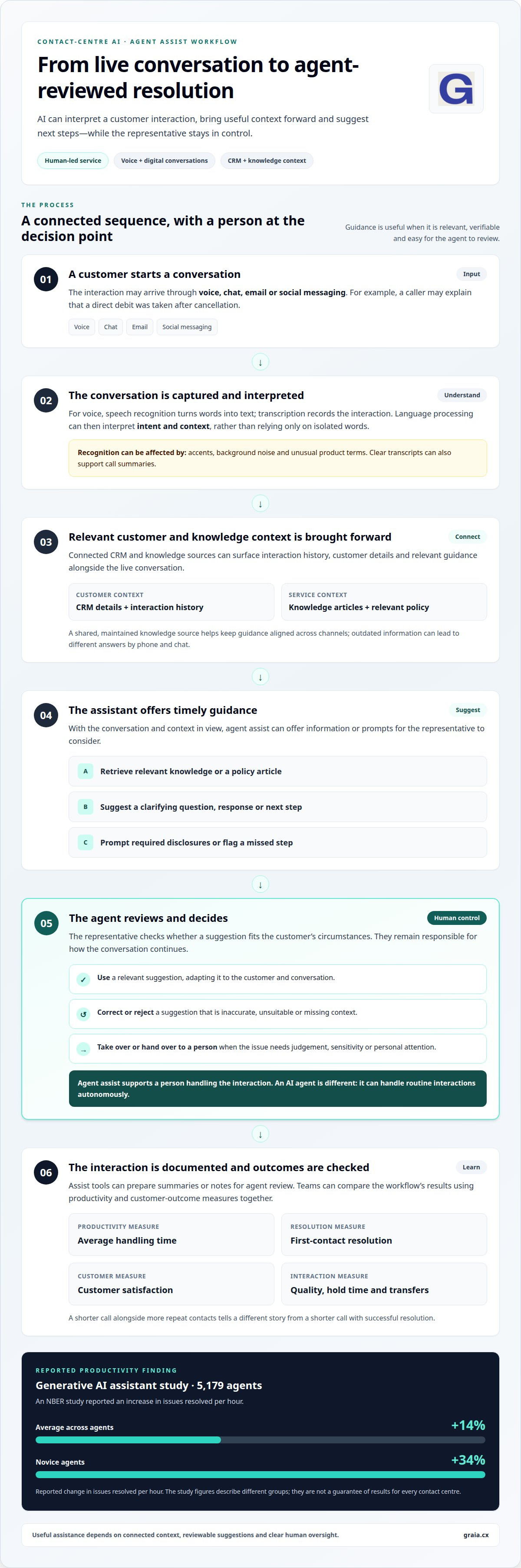
Agent assist software analyses a customer conversation and gives a service representative timely guidance, rather than handling every interaction alone. For example, it can bring a relevant policy article into view while an agent discusses a delayed delivery.
Live Conversation Analysis and Guidance
Live conversation analysis interprets spoken or typed exchanges to identify intent, context and possible next steps. During a conversation about a missing parcel, the system might surface delivery guidance, suggest a clarifying question or draft a response for the agent to review.
This guidance can reduce time spent searching separate knowledge screens. The representative still decides whether a suggestion fits the customer’s circumstances, keeping the exchange responsive rather than turning it into a script.
Transcription and Speech Recognition
Speech recognition converts a caller’s words into text, while transcription records the conversation for analysis. The system can then use natural language processing to interpret what the customer and representative mean, rather than simply matching isolated words.
For example, if a caller says a direct debit was taken after cancellation, the transcript gives the system context to retrieve relevant guidance. Clear transcripts can also support call summaries, but accents, background noise and unusual product terms can affect recognition.
For service representatives, real-time assistance may include retrieved knowledge, suggested answers, recommended actions and prompts to complete a record. An AI agent is different: it can handle routine interactions autonomously, while assist software primarily supports a person handling the conversation. Handover matters when an issue requires judgement or personal attention.
Compare products by capability, not by a single headline feature. Consider whether each can analyse voice and digital conversations, connect to existing knowledge and CRM systems, provide useful analytics, and let agents review suggestions. A polished answer without relevant context may be less useful than a concise, verifiable policy.
Real-time checklists can prompt agents to cover required disclosures or complete a script during a call. They can also flag a missed step or detected sensitive information, helping a representative correct the interaction while it is underway. These prompts should support careful service, not replace agent judgement.
For UK GDPR and data protection, assess what customer data enters the system, where it is processed, how long it is retained, whether it is used for model training, and who can access it. These factors shape how a contact centre manages recordings, transcripts and generated notes.
UK pricing depends on the project’s scope, integrations, channels and usage, and is given after a quote request. The features to assess include transcription, contextual knowledge retrieval, reviewed response suggestions, summaries, CRM updates and agent controls.
What is contact centre AI?
Contact-centre AI uses language technology and automation to support customer service across routine and complex interactions. A delivery enquiry, for example, might be handled through self-service, while an agent receives context for a more involved complaint.
Productivity and Customer Outcomes
Contact centre AI can take repetitive actions off agents’ hands and help them focus on the customer’s underlying need. In an NBER study involving 5,179 agents, a generative AI assistant increased issues resolved per hour by 14% on average, and by 34% for novice agents.
These measures connect productivity with service quality. A team can monitor average handling time alongside first-contact resolution and customer satisfaction, then see whether faster work also resolves the customer’s issue. Shorter calls paired with more repeat contacts signal a different outcome from shorter calls with successful resolution.
AI agents extend support into self-service by responding to routine requests without a representative handling each step. A customer asking for an order update could receive an answer automatically, while an unclear or complex request can move to a human with its context intact. Salesforce research reported an expectation that AI would resolve 30% of service cases in 2025 and expects 50% by 2027.
Personalised and Consistent Experiences
Personalisation uses customer history and current intent to shape a response, while consistency keeps guidance aligned across interactions. If a returning customer asks about a delayed delivery, relevant order context can help avoid making them repeat details and connect the response to the earlier exchange.
Consistency depends on the information behind each answer. If one channel draws on an outdated returns policy, the customer may receive different guidance by phone and chat. A shared, maintained knowledge source helps align responses while allowing an agent to adapt their language to the customer’s situation.
Omnichannel Customer Support
Omnichannel AI supports customers across voice, chat, email and social messaging, carrying context between channels. Someone who starts in web chat and then calls can continue the same issue without explaining every detail again, provided the interaction history is connected.
This continuity also helps teams manage actions across channels. A chat may create a follow-up task, while an email response updates the same case record. The practical value is not simply adding channels; it is keeping the customer journey coherent as people move between them.
To assess success, compare outcomes with the previous workflow, including resolution, hold time, transfers and customer satisfaction. Review customer feedback and agent edits too: repeated corrections can reveal where information or automation needs refinement. For a closer look at how AI can support contact-centre operations, explore contact-centre AI insights.
Human oversight and handover guardrails
AI agent assist can produce inaccurate, outdated or irrelevant suggestions, and agents may rely on them too readily. During a complaint about a disputed charge, an incorrect policy answer could frustrate the customer and prolong resolution. Human review must remain part of the interaction.
In live conversations, AI should suggest actions rather than take them independently. An agent can check a proposed answer against the customer’s circumstances, then accept, edit or reject it before it reaches the customer. This decision point matters most when a conversation involves distress, sensitive information or advice with regulatory implications.
Handover needs a clear trigger. If a customer becomes upset, disputes an entitlement or asks a question outside trusted knowledge, escalation should be straightforward. The human agent should receive relevant conversation context and summaries, so the customer does not have to explain the issue again from the beginning.
Quality assurance should assess both AI output and the resulting service. Contact centres can review suggestion acceptance and rejection, agent edits, correct-answer rates, escalations and customer outcomes. Frequent edits to refund guidance may reveal outdated knowledge, while repeated escalations on one topic can expose a missing answer.
Monitoring should continue after launch because products, policies, customer language and integrations change. Teams can log AI interactions and review failures to identify whether the cause was a weak transcript, stale source material or a recommendation lacking context. Agents also need a visible way to flag suggestions as incorrect, irrelevant or incomplete.
Training makes these controls usable in real conversations. Agents should practise checking a suggested answer, finding its source, correcting an error and escalating when confidence is low. A role-play in which a customer changes their request mid-call can show whether staff recognise when AI guidance no longer fits.
Supervisors can use conversation analytics to identify service recovery opportunities, frustrated customers and recurring points of confusion. That intelligence should support coaching, not leave agents feeling watched without explanation. Teams need to understand what the system captures, how recommendations are used and how to report a problem.
Human oversight is especially important when an AI suggestion could affect a customer’s status or entitlement. Keep the decision with a live agent, and ensure the system can indicate when it lacks trusted information. This guardrail protects customers from confident-sounding answers unsupported by available knowledge.
These capabilities work best when people and systems share responsibility: AI can surface context, while people interpret nuance and own consequential decisions. Review handovers alongside successful interactions, then refine training and knowledge sources based on what agents encounter across channels.
Omnichannel support and CRM integration
Omnichannel support connects customer interactions across voice, chat, email and social messaging. A customer who starts in chat and later calls can have one service history, rather than separate records for each channel. That continuity depends on integration: the contact-centre platform must connect interaction data with the systems agents use to handle cases.
CRM integration gives agents relevant context before they respond. A CRM record might show an open complaint, a previous delivery issue and the customer’s preferred contact method. Agent assist can use this context to surface relevant suggestions or prepare notes. If the record is incomplete or duplicated, recommendations may miss important details, so data quality affects practical usefulness.
Useful integration also connects telephony and knowledge sources. During a call about a product return, an agent may need the customer record, current returns guidance and interaction history in one workflow. This reduces switching between systems. Automated summaries, action items and CRM notes can support consistent case handling, with agents reviewing generated updates before they become part of the record.
For home-based agents, cloud access can bring the same connected workflow to remote teams. An agent working from home can handle a voice call, view associated CRM history and consult the same knowledge base as colleagues in an office. The practical benefit depends on how well those systems work together, not simply on remote access to separate applications.
Adoption requires more than technical integration. Agents need to understand what suggestions are for, when to use them and how to report poor results. A team can practise handling a chat that becomes a phone call, then review whether the interaction history followed the customer. Training should also explain how automation supports service rather than measuring agents without context.
A controlled rollout helps teams identify operational issues before expanding use. Start with a defined workflow, such as summarising email cases, then gather feedback from agents and supervisors. Check whether summaries capture the customer’s request, agreed actions and outstanding questions. If agents repeatedly rewrite the same field, the integration or summary instructions may need refinement.
Success measures should reflect both system performance and customer handling. Teams can compare transfer rates, agent search time, resolution and customer feedback across connected channels. Knowledge managers can also review searches with no useful result and articles agents repeatedly correct. These signals show where information, automation or CRM connections need attention.
Strong integration makes each channel part of a coherent service journey. It gives remote and office-based agents shared context, while keeping people responsible for reviewing important suggestions and records.
Contact-centre channels and platform fit
A platform fits when its AI support works across the channels customers use and the systems agents already rely on. A voice-led team needs different workflows from one handling email, web chat and social messaging. Start by mapping each channel’s customer journey, then identify where agents need relevant context, suggested responses or an escalation path.
Channel coverage is only the first test. A useful platform should preserve an interaction’s meaning as it moves between channels. A customer who describes a billing issue in chat should not have to repeat the same details when calling. The platform needs to connect that history to the agent’s workspace and make the right information easy to find.
Assess each channel against the work it involves. In voice, live assistance may need to surface knowledge during a call. In email, an agent may benefit more from a draft response and case summary. For social messaging, teams may need a clear view of the thread and its next action. The same automation will not suit every exchange.
Integration determines whether these capabilities are operational or merely available. Check how the platform connects with the CRM, telephony and knowledge base agents use. A return request, for instance, may require order history from the CRM and current policy guidance from a knowledge source. If either connection is missing, responses may lack context.
Compare platforms across the capabilities that affect daily handling:
- Channel coverage: voice, chat, email and social messaging support.
- Knowledge connectivity: access to authoritative articles and policy guidance.
- CRM integration: customer history, notes and case updates within the workflow.
- Controls and insight: compliance monitoring, analytics and agent review of suggestions.
- Security and scalability: controls for customer information and capacity to support changing operations.
Then test a complete journey, not an isolated feature. Follow a sample customer issue from its first channel through a transfer, agent response and final record update. Confirm that the right context remains available, the agent can edit suggestions, and the resulting summary reflects the conversation. This reveals integration gaps that a feature checklist alone can miss.
Platform fit also depends on the knowledge behind its responses. Duplicated or outdated guidance can make an otherwise capable system inconsistent. Contact centres should establish which source is authoritative, assign ownership for updates and test whether the platform retrieves relevant material when customers use unexpected language.
For a clearer view of platform and channel considerations, explore contact-centre AI insights.
GraiaCX: Agent Assist
GraiaCX brings agent support into a connected contact-centre experience, helping teams give representatives timely guidance while people remain responsible for customer-facing decisions. Its Agentic Omni-Channel Platform combines voice, chat, email and social messaging with AI-driven automation, so teams can support customers across channels in one environment.
Turn to Agent Assist when representatives need relevant context or next-best-action suggestions during interactions. Conversational Agent can handle routine enquiries autonomously, while Live Call Translation supports multilingual conversations. Together, these capabilities address different needs: agent guidance, routine automation and communication across languages.
If you’re considering how these capabilities could fit your contact-centre workflows, schedule a consultation with GraiaCX.
Turn the next customer moment into a better experience
Choose the customer moment where clearer support would make the greatest difference. It might be a handover that loses context, a recurring enquiry that takes up agent time, or a difficult interaction where staff need more confidence. This priority gives your contact-centre improvement a practical starting point.
Then define what a better outcome means for that workflow. You might want fewer repeated explanations, more complete follow-up records or greater agent confidence when handling complex enquiries. These goals help shape how AI agent assist software for contact centres should support your people, rather than letting technology dictate the service experience.
Bring operational leaders and frontline agents into the conversation early. Their perspectives can reveal where suggestions would help, where human judgement must lead and what information teams need in the moment. A focused discussion can turn those priorities into a considered direction for your contact centre.
Contact GraiaCX to discuss your needs. With a clear priority and the people who understand it, you can take the next step towards more confident customer service.
Frequently Asked Questions
What is AI agent assist software for contact centres?
It’s software that supports a human agent during customer service interactions with relevant information and suggested actions. Unlike a self-service agent, it works alongside a representative rather than taking ownership of the whole conversation. During a complex account enquiry, for example, it could help locate a relevant knowledge article while the representative remains responsible for understanding the customer’s needs and deciding what to do next.
What measurable benefits and ROI can contact centres expect from agent assist AI?
Measure its value against a defined starting point, then compare agent and customer outcomes after deployment. Useful measures include handling time, resolution, transfers, customer satisfaction, time spent searching and how often agents edit suggestions. To assess ROI, compare the value of measured operational gains with the full cost of implementation and ongoing use. Include quality indicators, so faster handling does not disguise unresolved issues or poorer customer experiences.
How does AI agent assist integrate with contact centre platforms and CRM systems?
Integration connects interaction data and customer records with the agent’s workflow, allowing suggestions to draw on relevant case context. GraiaCX integrates with major CCaaS providers, including Genesys, NICE CX and Avaya. In a CRM-connected workflow, a representative might use an existing customer record during a call, then review proposed notes or follow-up actions before saving them.
How can a provider implement AI agent assist software in a contact centre?
A provider can start by selecting a focused use case, such as helping agents find approved answers to a recurring enquiry. Next, connect relevant contact-centre systems and trusted knowledge, then test suggestions against realistic customer language. Agent feedback can identify inaccurate or missing guidance before broader use. Training, human review and ongoing checks of service outcomes help keep the system useful as customer questions and business information change.
Which AI agent assist platforms are best for UK contact centres?
Compare platforms by their voice and digital conversation analysis, CRM and knowledge-base connectivity, analytics, security, scalability and agent controls for reviewing suggestions. The best fit meets your contact centre’s needs and provides relevant, verifiable context.