
Seamless Channel Switching for Customers: A Practical Guide
What if a customer could move from chat to a phone call without starting the conversation again? That’s the promise of seamless channel switching for customers, but it takes more than offering several ways to get in touch. If channels don’t share relevant context, customers repeat details and agents have to piece together what happened.
It’s reasonable to expect a smooth handover when switching channels is meant to make service more convenient. The key is continuity: carrying useful information forward and giving the next agent a clear summary of the issue and what needs to happen next. Without that, a choice of channels can still feel like a series of disconnected conversations.
This guide explains how to preserve customer context as an interaction changes channel, structure handoffs between automated support and human agents, and assess whether systems can work together effectively. You’ll find practical criteria for comparing solutions, including continuity, integration and governance, so you can build a more joined-up service journey without assuming every interaction will transfer perfectly.
Key Takeaways
- Seamless channel switching for customers depends on carrying relevant context between connected channels, not simply offering more ways to get in touch.
- Map how identity, conversation history, case details and channel-specific information move through each handoff.
- Compare channel silos, point-to-point integrations and unified orchestration against your systems, workflows and continuity needs.
- Start implementation with high-friction customer journeys, then identify entry points, decision owners and routes to human support.
- When assessing GraiaCX, verify which channels and interaction types support session continuity and preserved-context handoffs in your proposed setup.
What seamless channel switching for customers really means
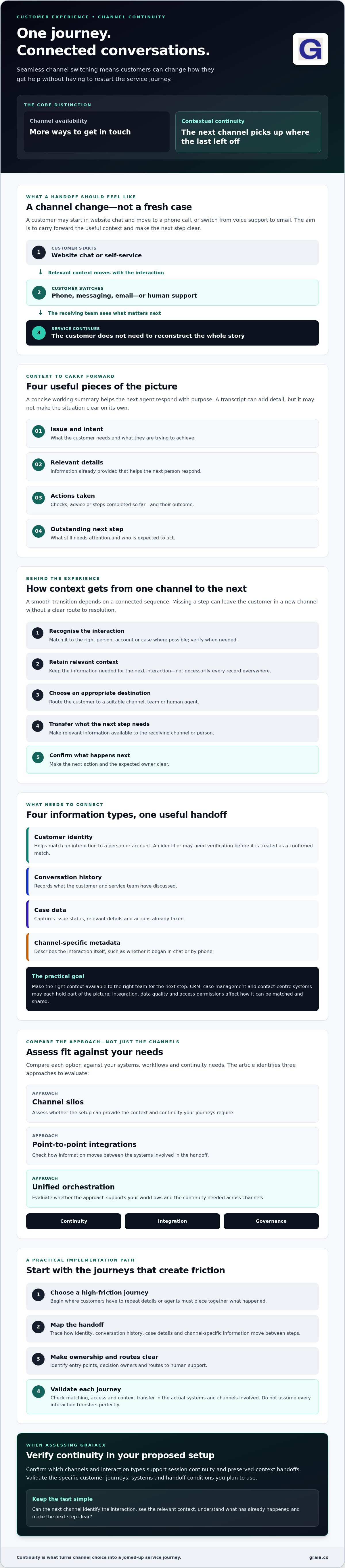
Seamless channel switching for customers means continuing the same service journey through a different channel while carrying forward the context needed to resolve the issue. A customer might move from website chat to a phone call, or from voice support to email, without the new interaction feeling like a fresh case.
Offering voice, chat and email is channel availability. Connecting the conversations is continuity. An omnichannel strategy aims to create a joined-up experience across contact channels, but the practical test is whether the customer’s unresolved need travels with them. Omnichannel presence gives customers more ways to get in touch; contextual continuity helps each channel pick up where the last one left off.
Channel choice is not the same as a continuous journey
A customer might try self-service to update an account, then ask an agent for help when the change won’t go through. Or they may start in chat and switch to a messaging channel because it’s easier to continue later. The change can be the customer’s choice, a response to operational routing, or a deliberate move to a channel better suited to the request.
Without continuity, each transition risks creating friction. The customer may have to explain the issue again, repeat identity checks that aren’t needed, or guess what happens next. Appropriate verification may still be necessary, and a channel change won’t always preserve every detail. The aim is to avoid unnecessary repetition while making the next step clear.
What customers and agents need to carry forward
A useful handoff gives the receiving agent a concise working picture, not simply a long transcript to search. It should make clear:
- The issue and intent: what the customer needs and what they’re trying to achieve.
- Relevant details: information already provided that helps the next person respond.
- Actions taken: checks, advice or steps completed so far, including their outcome.
- Outstanding next step: what still needs attention and who is expected to act.
That summary helps the agent respond with purpose and gives the customer a clearer sense that progress is being made. A transcript can provide useful detail, but without a clear summary, the agent may still need to reconstruct the situation. Continuity also depends on whether systems can match the interaction to the right customer, whether the agent has permission to view the information, and whether relevant systems are accessible. Validate context transfer for each journey rather than assuming perfect memory across every channel.
How seamless channel switching works behind the customer experience
Behind a smooth transition is a sequence of decisions and data movements. A system needs to recognise the interaction, retain relevant context, choose an appropriate destination, transfer the information the next person or channel needs, and confirm what happens next. If any step is missing, the customer may arrive in a new channel without a clear route to resolution.
These information types serve different purposes:
- Customer identity helps match an interaction to a person or account. Matching may need verification, and systems shouldn’t assume every identifier points to the right record.
- Conversation history records what the customer and service team have discussed.
- Case data captures the issue’s status, relevant details and actions already taken.
- Channel-specific metadata describes the interaction itself, such as whether it began in chat or by phone.
CRM, case-management and contact-centre systems may each hold part of this picture. Integration design determines whether relevant information can move between them, while data quality and access permissions affect what can be matched and shared. The goal isn’t to copy every record everywhere. It’s to make the right context available to the right team for the next step.
How context moves between channels and systems
For example, a customer might begin an account query in self-service and then request a person. A workflow could look for a matching customer or case, attach the self-service outcome, and pass relevant details into the agent’s contact-centre view. If the match is uncertain or access is restricted, the process should require an additional check rather than treat the context as confirmed.
How automation and human handoffs preserve momentum
An automated agent can handle a request within its scope, then escalate when the task remains unresolved or needs human judgement. Routing rules can consider intent, urgency, the outstanding task and the type of expertise required. Instead of asking the customer to begin again, the handoff can give an agent a recap of the interaction, depending on the system’s configuration and the information available.
A useful handoff summary states the customer’s intent, the relevant facts, what’s already been tried, the current status and the next action. That gives the agent a practical starting point; an unstructured transcript alone may leave them searching for essential details. For more on tools that support agents during an interaction, see the AI agent assist tools guide.
These mechanics are central to seamless channel switching for customers, but they depend on the channels and systems involved. To explore related approaches, browse Graia’s customer experience insights.
How to compare channel-switching approaches without replacing everything
The right architecture is the one that carries dependable context into the next step and fits the way your contact centre operates. A broad channel list can look impressive in a demonstration, but it won’t show whether customer identity, case status and handoff information will reach the right place in your live workflows.
- Channel silos: Each channel works independently. This may be straightforward to maintain, but agents can lack visibility of earlier interactions and customers may need to explain the issue again.
- Point-to-point integrations: Specific systems exchange selected data. This can address a defined gap without replacing the core platform, though each additional connection may create dependencies to maintain and monitor.
- Unified orchestration: A coordinating layer can connect interactions across channels and systems. Assess whether it handles identity, conversation history, case status and summaries consistently, and whether its routing fits your processes.
Look beyond channel coverage. Check how the approach affects agent workflows, reporting, governance, fallback routes and integration effort. Confirm who can view or edit transferred context, how errors are surfaced, and whether teams can trace what happened when a handoff fails. Assess seamless channel switching for customers against real operational needs, not just a polished demo.
Which architecture fits your current contact centre?
Connecting existing systems may suit organisations whose core contact-centre platform works well but whose interactions don’t share enough context. Wider architecture changes may be worth considering if customer records are fragmented, routing rules conflict or teams can’t reliably identify the case being continued. Graia supports integrations with platforms including Genesys, NICE CX and Avaya. Confirm availability and configuration requirements for your intended use case.
What to test in a solution demonstration
Ask to see a customer move from self-service to an agent while continuing the original request. Check whether the transferred details are visible in the agent’s workflow, structured enough to use, relevant to the issue and editable only by authorised staff. Then test an uncertain identity match, an unavailable integration and a channel outage. Ask the supplier to show what the customer and agent experience in each case, including a safe route to human support.
Use the same test journeys to compare solutions rather than relying on feature lists. That makes trade-offs in context quality, resilience and implementation effort easier to see. For more perspectives on connected customer experiences, explore Graia’s CX articles.
How to implement seamless channel switching step by step
Start where the experience breaks down, not with a wholesale technology change. Identify customer journeys where people often move from one channel to another, repeat details or wait while an agent searches for the right record. A focused starting point makes it easier to see what needs to change and what can stay in place.
Map the journey and define the context to transfer
Trace the journey from the customer’s first contact to resolution. Record channel entry points, identity checks, system updates, routing decisions and moments when information is lost. Then agree which details the next channel needs and which shouldn’t be transferred. Name owners for data quality, routing logic, privacy review and frontline feedback so each part of the handoff has clear accountability.
Turn the map into a working specification. For each transition, note the system of record, the information available to the next team, and the fallback if a customer can’t be identified or an integration doesn’t respond. This makes the intended experience testable and surfaces access or process gaps before a pilot reaches customers.
Pilot, measure, and improve the handoff
Choose one representative journey with a clear start, channel transition and outcome. Test the normal route and exceptions, such as an incomplete identity match, a missing case update or a request that needs human judgement. Review interaction transcripts, handoff summaries, agent feedback and customer effort together. No single measure explains the full experience.
Before the pilot, establish a baseline. Track how often customers repeat information, whether handoffs succeed, whether the issue is resolved, what customers say about the journey, and whether agents can use the transferred context in their workflow. Compare results with the baseline, investigate exceptions, and adjust the process before expanding to other journeys. This helps establish whether seamless channel switching for customers is improving in practice, not just on a process diagram.
Use the findings to refine handoff content, routing criteria and fallback steps. Expand only when teams understand what works, where context still gets lost and who owns each fix. For broader platform assessment, read the enterprise agentic CCaaS platform guide.
For more perspectives on the wider customer-experience picture, explore Graia’s CX articles.
How Graia can support a more continuous customer journey
Technology can help connect channel changes to the customer journey you’ve mapped, but the fit depends on what needs to transfer and how your contact centre works. Graia’s agentic CCaaS platform supports voice, chat, email and social messaging. Its capabilities include session continuity and handoffs that can provide agents with a recap of prior interaction context. Verify these capabilities against your specific channels, interactions and deployment rather than assuming every detail follows every customer.
Where Graia’s agentic CCaaS approach may fit
If a customer starts with a conversational agent and then needs a person, an escalation with a context recap may help the agent pick up the enquiry with a clearer starting point. The practical test is whether information from your chosen journey, such as the request, actions taken and remaining task, reaches the right agent in a usable form.
Graia integrates with platforms including Genesys, NICE CX and Avaya. This may suit organisations assessing ways to connect capabilities with an existing contact-centre environment rather than assuming a complete replacement is necessary. Confirm current integration availability, configuration requirements, deployment model and which channel interactions support context transfer before drawing conclusions.
Questions to resolve before selecting a solution
Ask practical questions tied to the journey you want to improve. Which interaction details transfer between channels, where are they stored, and which teams or agents can access them? How does escalation work when automation can’t resolve the request or human judgement is needed? Clarify integration dependencies, what happens if a system or channel is unavailable, and who owns operational issues and changes to routing or handoff rules.
Then request a scoped demonstration using a representative customer journey and evaluation criteria agreed in advance. Follow the interaction from its first channel through any transfer to the final next step. Check that the right context appears, authorised staff can use it, and the fallback is understandable if identification or transfer fails. This makes it easier to judge whether the approach supports seamless channel switching for customers in your operating environment.
Choose based on the match between the customer journey, supported channel scope, integrations and governance needs, not on channel count alone. Explore Graia’s customer experience insights to continue your evaluation.
Build continuity into every customer handoff
Seamless channel switching for customers isn’t about adding more contact options. It’s about carrying the right context into the next interaction, making the next action clear, and giving agents a usable handoff. Start with a journey where customers commonly change channels, map where information is lost, then pilot and measure the experience before expanding.
Compare solutions by how they handle identity, interaction history, case status, integrations and fallback routes, not just by the channels they support. Graia’s platform supports voice, chat, email and social messaging, with session continuity and context-preserving handoffs among its capabilities. Confirm the available scope for your intended journey, channels and deployment.
With a focused plan and clear evaluation criteria, channel changes can feel less like a restart and more like a natural next step. Explore Graia’s customer experience insights as you assess how to make that continuity work in your contact centre.
Frequently Asked Questions
What does seamless channel switching mean for customers?
It means a customer can move between service channels and continue the same unresolved journey with relevant context available. For seamless channel switching for customers, the next agent or system should be able to see useful details and actions already taken, so the customer doesn’t have to restart unnecessarily. It doesn’t mean every channel has identical features or that every handoff can be automated.
How can a business let customers switch channels without repeating themselves?
Map the customer journey, identify what context each step needs, and connect relevant customer, case and interaction records. Set routing and escalation rules, then give the receiving agent a concise summary and clear next step. Test identity mismatches and integration failures as well as the expected path. Reliable data and fallback processes matter: adding channels alone won’t prevent customers from having to repeat information.
Does seamless channel switching require an omnichannel contact centre platform?
No. Some organisations can improve continuity by connecting their existing contact-centre, CRM and case-management systems. Others may need broader orchestration if records and workflows remain fragmented. Compare options against the channels you need, context transfer, routing, governance and your operating model. A demonstration based on a real customer journey can help establish whether integrations are sufficient or a wider change is needed.
What information should transfer when a customer changes channels?
Transfer only the information needed to continue the service task. This may include the issue, customer intent, relevant verified details, actions already completed, case status and outstanding next step. A concise summary helps the receiving team understand the situation without searching a full transcript for key facts. Define access permissions and retention requirements with the appropriate privacy and security teams before setting up the transfer.
How do you measure whether channel switching is working?
Establish a baseline, then assess whether handoffs preserve context and help customers make progress. Useful measures include repeated explanations, successful transfers, resolution outcomes, customer feedback and agent usability. Review them together rather than treating one measure as definitive. A faster interaction isn’t necessarily better if the customer still has to repeat details or the issue remains unresolved.
Can AI hand a customer conversation to a human agent without losing context?
It can, if the system is configured to pass relevant interaction history and a clear summary to the agent. The handoff should state what the customer needs, what the AI has already done and what remains unresolved. Test unclear intent, failed system actions and missing customer records, and confirm there’s a practical human fallback. Context transfer depends on the systems and interaction involved, so verify the intended setup.
How can a business preserve customer context while protecting privacy?
Define what information each service task needs, who may access it and how long it should be retained. Apply suitable authentication, permissions and security controls across connected systems, and review data flows before deployment. Avoid transferring sensitive details that aren’t needed for the next step. Ask your privacy and security teams to assess the proposed solution and configuration against your organisation’s legal, regulatory and internal requirements.