
Avoiding Common CCaaS Migration Pitfalls: The 2026 Checklist
A CCaaS migration can be technically complete and still fail customers. The real test is whether calls, digital conversations, integrations and customer context continue to work as expected after cutover. That’s why avoiding common ccaas migration pitfalls starts with operational continuity, not simply moving telephony to a new platform.
It’s understandable to worry about missed interactions, broken CRM connections or agents facing unfamiliar workflows on go-live day. These risks often hide in dependencies between routing, reporting, data and systems that have evolved over time. A successful plan brings them into view early, assigns clear owners and sets measurable readiness criteria, such as whether a priority journey reaches the right team and delivers the required customer context.
This practical checklist will help you identify risks before implementation, protect continuity across channels and customer journeys, and prepare agents for the change. It also outlines what to clarify with vendors, how to test integrations and data, and which acceptance measures can show whether the migration is ready and stable after launch. The goal is more than a clean cutover: it’s a connected experience customers and agents can rely on.
Key Takeaways
- Start by defining migration as an operational change, then identify who owns each customer journey, workflow and dependency.
- Map queues, channels, user roles and connected systems before choosing a migration approach, so hidden dependencies surface early.
- Compare phased migration, parallel operation and single cutover against your risk tolerance, scope and ability to reverse course.
- Make avoiding common ccaas migration pitfalls practical with clear test criteria for routing, integrations, reporting, security and exception handling.
- Use service baselines to monitor stabilisation after go-live, investigate deterioration and confirm readiness before expanding the migration.
Avoiding common CCaaS migration pitfalls starts with protecting customer operations
A migration plan can look sound on paper and still leave customers facing dropped calls, missing conversation history or a route to the wrong team. Those concerns are reasonable: agents need the right context to help, and customers shouldn’t have to repeat themselves because systems changed behind the scenes.
A CCaaS migration is more than moving voice or digital channels to a new platform. It changes how channels, workflows, integrations and operating practices work together. A Contact centre brings people and communication technology together to serve customers; a migration must preserve that connection. Moving channels alone isn’t enough. Journeys need to remain coherent as customers move between self-service, messaging and agents, with relevant information available at each handoff.
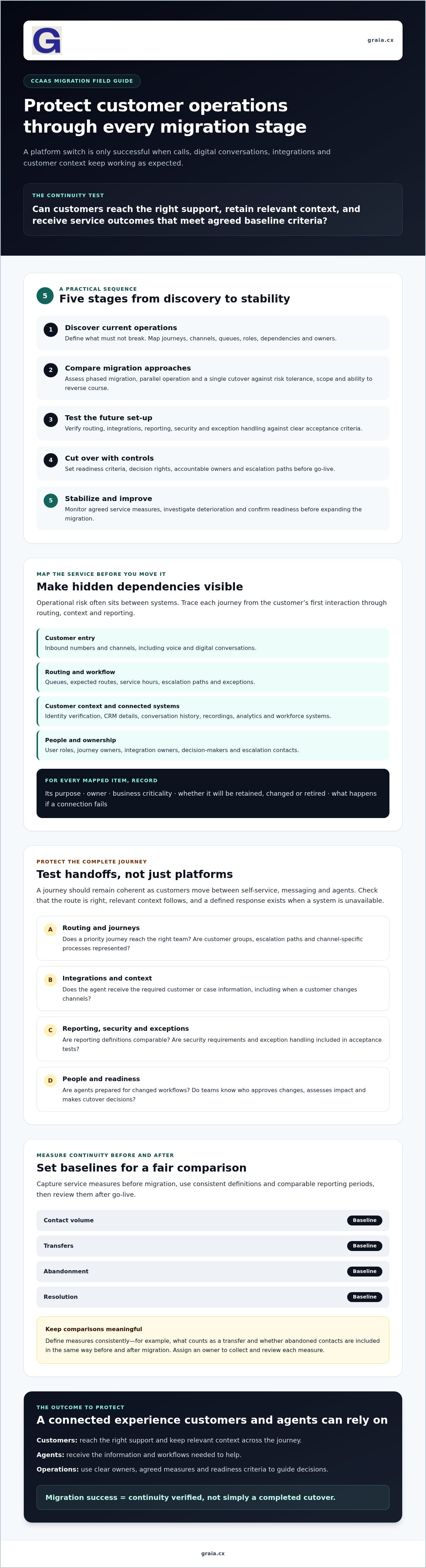
This checklist follows five stages: discover current operations, compare migration approaches, test the future set-up, cut over with controls, then stabilize against agreed service measures. Start by defining what must not break, and how your team will verify it.
Which migration failures create the greatest operational risk?
Risk often sits between systems, not within one platform. A phone number may feed a queue, the queue may rely on CRM data, and reports may draw from a separate analytics or workforce tool. If one dependency is undocumented or rebuilt incorrectly, calls can route without customer context, digital channels can behave differently from voice, or reports can lose consistency.
Incomplete requirements leave gaps. An escalation path may exist only for one channel, or a customer group may have a distinct service process that wasn’t captured. Unclear decision rights make recovery harder. Name an accountable owner for each journey and integration, and agree who can approve changes, assess impact and make cutover decisions. Issues move faster when responsibility is explicit and the right people know how to escalate them.
How do you define continuity before selecting a platform?
Document critical journeys before comparing providers. Record the customer groups served, channels used, service hours, escalation paths and the context agents need when an interaction transfers. Include exceptions, such as authentication failures or a customer moving from chat to a call. For each journey, note the expected route, information an agent should receive and what should happen if a system is unavailable. These details establish what the future environment must preserve.
Capture baseline measures for contact volume, transfers, abandonment and resolution, segmented where useful by channel or journey. Use consistent definitions and comparable reporting periods so post-migration results can be assessed fairly. For example, define what counts as a transfer and whether abandoned contacts are included in the same way before and after migration. Agree owners for collecting and reviewing each measure.
Define success in writing: “The migration is successful when customers can reach the right support, retain relevant context across the journey, and receive service outcomes that meet agreed baseline criteria.” This gives technical teams, operations and vendors a shared standard for decisions. It also makes avoiding common ccaas migration pitfalls a practical exercise in protecting service, rather than simply completing a platform switch.
Map CCaaS requirements, integrations, and data before migration
Once continuity goals are clear, turn them into a working map of the current environment. Record every queue, inbound number, channel, workflow and user role, including exceptions that may live only in team knowledge. For each item, note its purpose, owner, business criticality and whether it will be retained, changed or retired. This creates a discovery baseline for requirements and helps prevent an old process from disappearing simply because it wasn’t visible in the project plan.
Then trace the connections behind each customer journey. A voice interaction might pass from telephony to routing, identity verification and CRM, while recordings feed analytics and workforce systems. Document the systems involved, the data exchanged, the responsible integration owner and what happens if a connection fails. Mark where an agent needs conversation history or case details, especially when a customer moves between channels. The smooth CCaaS migration guidance from No Jitter can provide an additional planning reference, but your dependency map should reflect your actual environment.
How should teams document integrations and customer journeys?
Map each journey from entry point through routing, authentication, resolution and follow-up. For example, note whether an unsuccessful self-service interaction passes its captured details to the agent, or whether the customer must start again. Record failure behaviour too: does the journey queue, route to an alternative team or require manual intervention? Assign named owners from operations and the relevant system teams, then have them confirm the map before design decisions are made.
To explore how conversational automation and agent assistance might fit into a future-state design, consult this agentic CCaaS platform reference. Treat it as architecture context, not confirmation that a particular integration or deployment configuration will suit your environment. Use your own requirements and test results to confirm fit.
What should a CCaaS data and security review include?
List the fields and records in scope, where each originates, who owns it and how the migrated version will be checked. Agree access permissions and retention needs with the teams responsible for data, security, recordings and operations. Test representative records for completeness and accuracy, including customer identifiers and interaction history, rather than relying only on a successful transfer message. Check that a record can be found and used in the target workflow, not just that it exists in the destination system.
- Identity: confirm authentication flows, roles and access permissions.
- Protection and audit: review encryption, auditability and recording controls against verified organisational policies.
- Privacy and obligations: ask legal and security teams to identify applicable requirements; don’t assume a platform or migration design is compliant without their review.
This evidence-led discovery is central to avoiding common ccaas migration pitfalls: it gives teams a basis for comparing options, defining tests and assigning responsibility. For more future-state architecture perspectives, browse GraiaCX’s CCaaS and customer experience resources.
Compare CCaaS migration approaches against risk, fit, and control
With the current environment mapped, choose a transition model that fits the scale of change and your ability to manage disruption. There’s no universally safest option. A phased move can limit the impact of issues, while a single cutover may be simpler to coordinate but concentrates risk on one event. Compare approaches by scope, reversibility and the safeguards your teams can actually provide.
| Approach | Best-fit conditions | Principal risks | Required safeguards |
|---|---|---|---|
| Phased migration | Journeys, channels or teams can move in distinct waves. | Temporary differences between old and new environments; dependencies may cross wave boundaries. | Wave-specific owners, entry and exit criteria, end-to-end testing and a rollback plan. |
| Parallel operation | Teams need to validate the new environment against existing operations before switching fully. | Added operational complexity, duplicated processes and possible confusion over which system is authoritative. | Define what runs in each environment, how results will be compared, who resolves discrepancies and when parallel running ends. |
| Single cutover | The scope is well understood, dependencies are controlled and a coordinated switch is practical. | Issues can affect a broad set of journeys at once, with less opportunity to learn from an earlier wave. | Rehearsed cutover steps, decision authority, tested recovery procedures and explicit go or no-go criteria. |
When is a phased or parallel CCaaS migration more suitable?
A phased transition can isolate a channel, team or customer journey, making it easier to identify where a defect originates before expanding scope. It works best when the selected wave has clear boundaries and doesn’t rely on untested links to journeys still on the existing platform. For example, if customers can move between voice and messaging during resolution, test that connection across systems before migrating either channel on its own. Parallel operation can provide a comparison window, but it takes people and process to manage both environments. Set entry, exit and rollback criteria for every wave, including who can pause or reverse the change.
Which vendor questions reveal migration risk early?
Ask vendors to document responsibilities, not just describe a preferred plan. Who leads discovery? Who changes integrations, validates data, prepares training and makes cutover decisions? What support and escalation arrangements apply during and after launch, and how are incidents, change requests and unresolved issues handled? Put ownership and hand-offs in writing.
Request evidence against your actual systems and workflows, such as a demonstrated integration path or an agreed test scenario. Confirm compatibility, assumptions, dependencies and exclusions rather than relying on general capability statements. Ask what your team must configure or supply, and how changes to the plan will be assessed. This is central to avoiding common ccaas migration pitfalls: a credible plan makes risk, accountability and recovery visible before commitment. For wider transformation context, explore this legacy contact-centre modernization guide.
Use a go-live checklist to test, train, cut over, and recover
Readiness needs evidence, not optimism. Before launch, turn the requirements and migration approach into a sequence of test gates, training tasks and decision points. The checklist below gives each team a clear action, while measurable acceptance criteria help prevent pressure to go live from overriding unresolved customer-impacting issues.
- 1. Plan test coverage. Select priority customer journeys, channels, user roles and known exceptions. Include expected contact patterns and peak scenarios relevant to your operation.
- 2. Run end-to-end tests. Verify routing, channel parity, CRM and other integrations, reporting, identity and security controls, recordings where applicable, and exception handling. Simulate an integration failure to confirm the journey has a safe, understood outcome.
- 3. Set acceptance gates. Agree measurable thresholds for critical journeys and service measures before testing begins. Record results, defects, owners and retest outcomes; obtain sign-off from operations, IT, security and business owners.
- 4. Prepare people and procedures. Train agents and supervisors by role using realistic scenarios, including transfers and unavailable systems. Provide updated knowledge, escalation contacts, supervisor dashboards and clear instructions for reporting issues.
- 5. Rehearse recovery, then cut over. Walk through fallback and rollback procedures, decision authority and customer communications. Define the change window, go or no-go owner, incident roles and escalation routes before switching live traffic.
- 6. Stabilize deliberately. Monitor service measures and log issues by severity, customer impact, accountable owner and resolution status. Keep a clear route for escalating incidents until agreed stability criteria are met.
What should teams validate before go-live?
Test complete journeys, not just isolated features. Confirm that a customer can enter through each relevant channel, reach the intended route, authenticate where needed, receive consistent service and retain the context required for resolution. Check reporting against expected results, and verify that permissions and security controls behave as designed. Set a threshold for each critical test, including what constitutes a blocking defect. If a priority journey fails, pause and resolve it or use the agreed fallback rather than accepting an undocumented risk. Keep evidence of test results and sign-off together so the go-live decision is traceable.
How can teams make cutover and early support more controlled?
Brief agents and supervisors on what changes, what remains familiar and where to get help. During the change window, use one issue log and a named incident lead so problems aren’t lost across channels. Record the affected journey, customer impact, severity and owner for each issue. Review impact and progress at agreed intervals, then communicate clearly with affected teams and customers where appropriate. This discipline makes avoiding common ccaas migration pitfalls a shared operational practice, not just a technical task.
Agent workflows deserve attention in testing too. Explore AI agent assist guidance to consider how agent assistance may fit into your future-state design, then explore GraiaCX’s contact-centre resources for related perspectives.
Stabilize the new CCaaS environment and plan the next improvements
Go-live is a milestone, not proof that migration is complete. Treat the weeks that follow as a monitored stabilization period: compare live performance with the agreed baseline, resolve defects and assess how the new environment feels to customers and agents. Don’t expand the migration or add new capabilities until the essential journeys are working reliably and owners understand any remaining risks.
Which measures show whether migration is working?
Review service levels, transfers, resolution and abandonment alongside channel-specific failures, such as messages that don’t reach the right queue or customer context that fails to appear for an agent. Pair operational data with agent feedback and customer-impact reviews. A metric can look steady while an individual journey deteriorates, so investigate changes by channel, customer group and journey where your reporting allows. Check data quality too: inconsistent event definitions can make apparent improvements or declines misleading.
Measurement principle: “Compare like-for-like periods, use consistent definitions, and explain material changes before acting on the results.” Assign an owner to each measure and defect, record the evidence behind the assessment, and agree what requires investigation or blocks further rollout.
How can organisations extend capability without repeating migration mistakes?
Build an improvement backlog from observed issues and opportunities, then prioritise each item by customer or business impact, technical readiness and accountable ownership. For example, a repeated transfer problem may need attention before adding automation. A proposed enhancement should have a defined scope, integration assessment, test plan and success measure. That discipline keeps avoiding common ccaas migration pitfalls relevant beyond cutover.
Assess conversational automation, agent assistance and translation as distinct capabilities, not automatic benefits of moving to CCaaS. Define where each could support the customer journey, what context must pass to an agent, and how the change will be tested. GraiaCX offers conversational agents, agent assistance and live call translation, and integrates with Genesys, NICE CX and Avaya. Organisations should confirm current integration scope, compatibility and deployment configuration against their target architecture.
Once the environment is stable, explore GraiaCX’s customer experience resources for perspectives on agentic capabilities and future-state design. Keep the same governance used for migration: clear ownership, verified dependencies and evidence that the change improves the intended experience.
Make continuity the measure of migration success
A dependable CCaaS migration is defined by the experience it preserves, not simply the platform it launches. Map systems and customer journeys before choosing an approach, make vendor responsibilities explicit, and require tested acceptance criteria before cutover. After go-live, compare service measures with baselines and resolve meaningful issues before expanding scope.
That’s the practical value of avoiding common ccaas migration pitfalls: teams can move forward with clearer ownership, better evidence and a shared focus on customers and agents. Future capabilities should follow the same discipline. GraiaCX integrates with Genesys, NICE CX and Avaya, but organisations should verify fit and compatibility with their own environment. Its conversational agents can also escalate interactions to human agents with context.
For further perspectives on customer experience and CCaaS, explore GraiaCX’s practical customer experience and CCaaS resources. Use them to identify questions for your own design review, then assess each capability against your requirements and test plan.
Frequently Asked Questions
What are the most common CCaaS migration pitfalls?
The most common pitfalls are overlooking dependencies, under-defining requirements and treating migration as a platform switch rather than an operational change. A routing update, for example, may affect CRM context, reporting or an escalation journey. Unclear ownership can also slow decisions when something fails. Avoiding common ccaas migration pitfalls means mapping systems and customer journeys, assigning accountable owners, testing end to end and preparing agents for changed workflows.
How long does a CCaaS migration take?
There’s no reliable fixed duration: the timeline depends on the scope, number of channels, integration complexity, data requirements and chosen migration approach. A migration involving distinct teams or customer journeys may use several planned waves, while a tightly controlled scope may suit a single cutover. Estimate the schedule only after discovery, vendor responsibilities and testing needs are clear. Include time for training, issue resolution and post-launch stabilisation, not just technical configuration.
How can a business avoid downtime during a CCaaS migration?
You can reduce disruption risk, but shouldn’t assume it can be eliminated. Map critical journeys and dependencies, test routing and integrations, and rehearse fallback or rollback procedures before changing live traffic. Set a defined change window, name the go or no-go decision-maker, and agree how teams will escalate incidents. A phased transition or parallel operation may help validate service before wider cutover, provided ownership and exit criteria are clear.
Should a contact centre migrate all channels at once or in phases?
Choose the approach that best fits your dependencies, operational capacity and ability to recover. Phased migration can isolate a channel, team or journey, making issues easier to contain, but cross-channel links must be tested across each wave. A single cutover can be simpler to coordinate when scope is well understood, though it concentrates change. Define entry, exit and rollback criteria before deciding, and don’t split journeys in ways that lose customer context.
What should a CCaaS migration checklist include?
A useful checklist covers current queues, numbers, channels, workflows and roles; system dependencies and data ownership; migration scope and vendor responsibilities; and test cases with measurable acceptance criteria. It should also include role-specific agent and supervisor training, cutover authority, incident escalation, fallback procedures and customer communications. After launch, track service measures against baselines, assign owners to defects and confirm stability before expanding scope or introducing additional capabilities.
How do you test integrations before a CCaaS go-live?
Test each integration as part of a complete customer journey, not as an isolated connection. Check that the right records and fields pass between systems, that access permissions work as intended, and that agents receive the context they need. Include expected and failure scenarios, such as unavailable services or incomplete data, and verify the defined fallback. Record test results, defect owners and retests, then obtain sign-off from the responsible business and technical teams.
Can a business keep its existing CRM during a CCaaS migration?
Yes, if the target CCaaS environment can connect with the existing CRM in a way that supports your workflows and data needs. Confirm compatibility for your specific configuration, what information passes between systems, which system owns each record and how access is controlled. Test representative customer journeys, including agents viewing and updating case context. A CCaaS migration doesn’t automatically require replacing the CRM, but the integration must be validated before cutover.